

 If you’ve ever run the same app in multiple environments, you know the pain of duplicated configuration. Agent swarms have the same problem: the moment you try multiple orchestrators (LangGraph, Strands, OpenAI Swarm), your agent definitions start living in different formats. Prompts drift. Model settings drift. A “small behavior tweak” turns into archaeology across repos.
AI behavior isn’t code. Prompts aren’t functions. They change too often, and too experimentally, to be hard-wired into orchestrator code. LaunchDarkly AI Configs lets you treat agent definitions like shared configuration instead. Define them once, store them centrally, and let any orchestrator fetch them. Update a prompt or model setting in the LaunchDarkly UI, and the new version rolls out without a redeploy.
If you’ve ever run the same app in multiple environments, you know the pain of duplicated configuration. Agent swarms have the same problem: the moment you try multiple orchestrators (LangGraph, Strands, OpenAI Swarm), your agent definitions start living in different formats. Prompts drift. Model settings drift. A “small behavior tweak” turns into archaeology across repos.
AI behavior isn’t code. Prompts aren’t functions. They change too often, and too experimentally, to be hard-wired into orchestrator code. LaunchDarkly AI Configs lets you treat agent definitions like shared configuration instead. Define them once, store them centrally, and let any orchestrator fetch them. Update a prompt or model setting in the LaunchDarkly UI, and the new version rolls out without a redeploy.
Ready to build framework-agnostic AI swarms? Start your 14-day free trial of LaunchDarkly to follow along with this tutorial. No credit card required.Start free trial →
The problem: Research gap analysis across multiple papers
When analyzing academic literature, researchers face a daunting task: reading dozens of papers to identify patterns, spot contradictions, and find unexplored opportunities. A single LLM call can summarize papers, but it produces a monolithic analysis you can’t trace, refine, or trust for critical decisions. The challenge compounds when you need to:- Identify methodological patterns across 12+ papers without missing subtle connections
- Detect contradictory findings that might invalidate assumptions
- Discover research gaps that represent genuine opportunities, not just oversight
| ---
| --- |
| Approach Analyzer
| Clusters methodological themes across papers
| “Papers 1, 4, 7 use reinforcement learning; Papers 2, 5 use symbolic methods” |
| Contradiction Detector
| Finds conflicting claims between papers
| “Paper 3 claims X improves performance; Paper 8 shows X degrades it” |
| Gap Synthesizer
| Identifies unexplored research directions
| “No papers combine approach A with dataset B; potential opportunity” |
We’ll implement this swarm across three different orchestrators (LangGraph, Strands, and OpenAI Swarm), demonstrating how LaunchDarkly AI Configs enable:
- Framework-agnostic agent definitions: Define agents once in LaunchDarkly, use them everywhere
- Per-agent observability: Track tokens, latency, and costs for each agent individually - catch silent failures when agents skip execution
- Dynamic swarm composition: Add/remove agents from the swarm or switch models without touching code
Why use a swarm?
Research gap analysis requires different skills: clustering methodological patterns, detecting contradictions, and synthesizing opportunities. With a swarm, each agent handles one aspect and produces artifacts the next agent builds on. You can track tokens, latency, and cost per agent. You can catch silent failures when an agent skips execution. And when something goes wrong, you know exactly where.Technical requirements
Before implementing the swarm, ensure you have:- LaunchDarkly account with AI Configs enabled (see quickstart guide)
- API keys for Anthropic Claude or OpenAI GPT-4 (check supported models)
- Python 3.11+ for running orchestrators
- Basic understanding of agent systems (review LangGraph agents tutorial if needed)
The architecture: how Launch
Darkly powers framework-agnostic swarms The swarm architecture has three layers: dynamic agent configuration, per-agent tracking, and custom metrics for cost attribution. Here’s how they work together.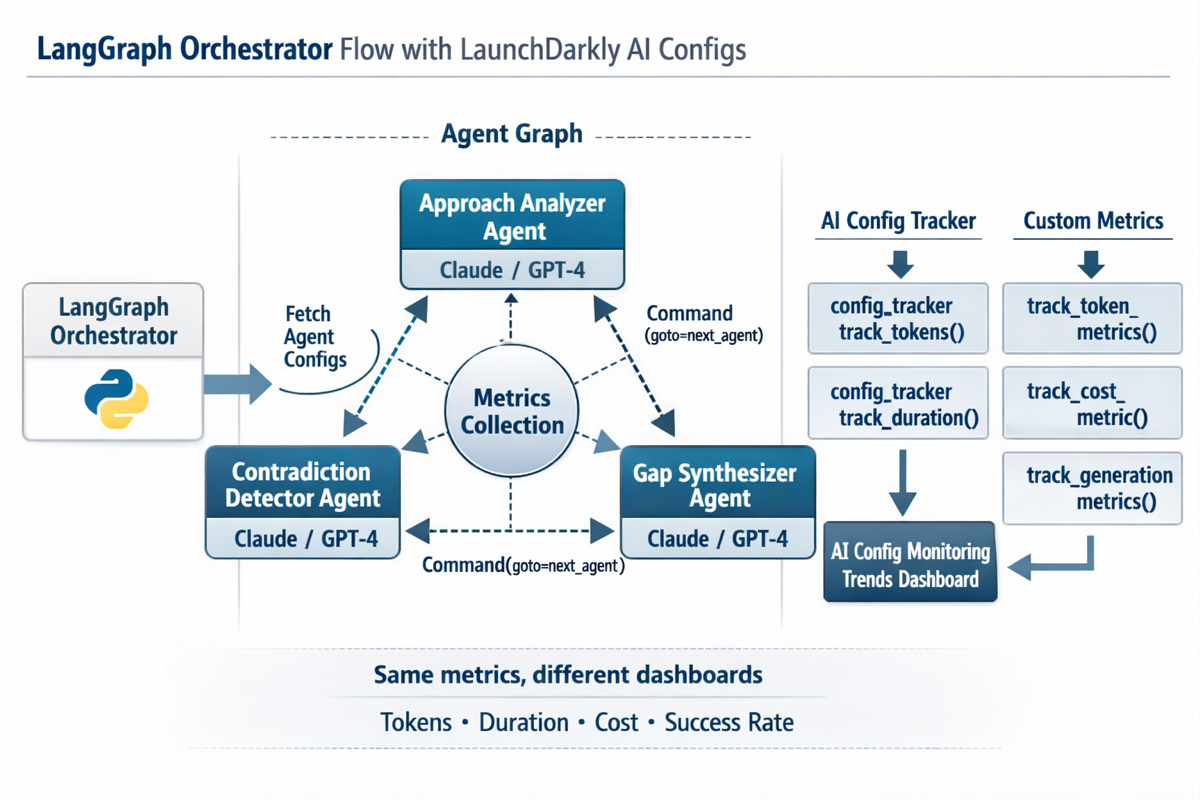
LangGraph swarm architecture showing LaunchDarkly configuration fetch, agent interactions with Command-based handoffs, and dual metrics tracking to AI Config Trends
- Configuration Fetch: The orchestrator queries LaunchDarkly’s API to dynamically discover all agent configurations, avoiding hardcoded agent definitions
- Agent Graph: Three specialized agents (Approach Analyzer, Contradiction Detector, Gap Synthesizer) connected through explicit handoff mechanisms
- Metrics Collection: Each agent execution captures tokens, duration, and cost metrics through both the AI Config tracker and custom metrics API
- Dual Dashboard Views: The same metrics appear in the AI Config Trends dashboard (for individual agent monitoring)
Three layers of framework-agnostic swarms
**- AI Config for Dynamic Agent Configuration**
- Agent key, display name, and model selection
- System instructions and tool definitions
- Per-Agent Tracking with AI SDK**
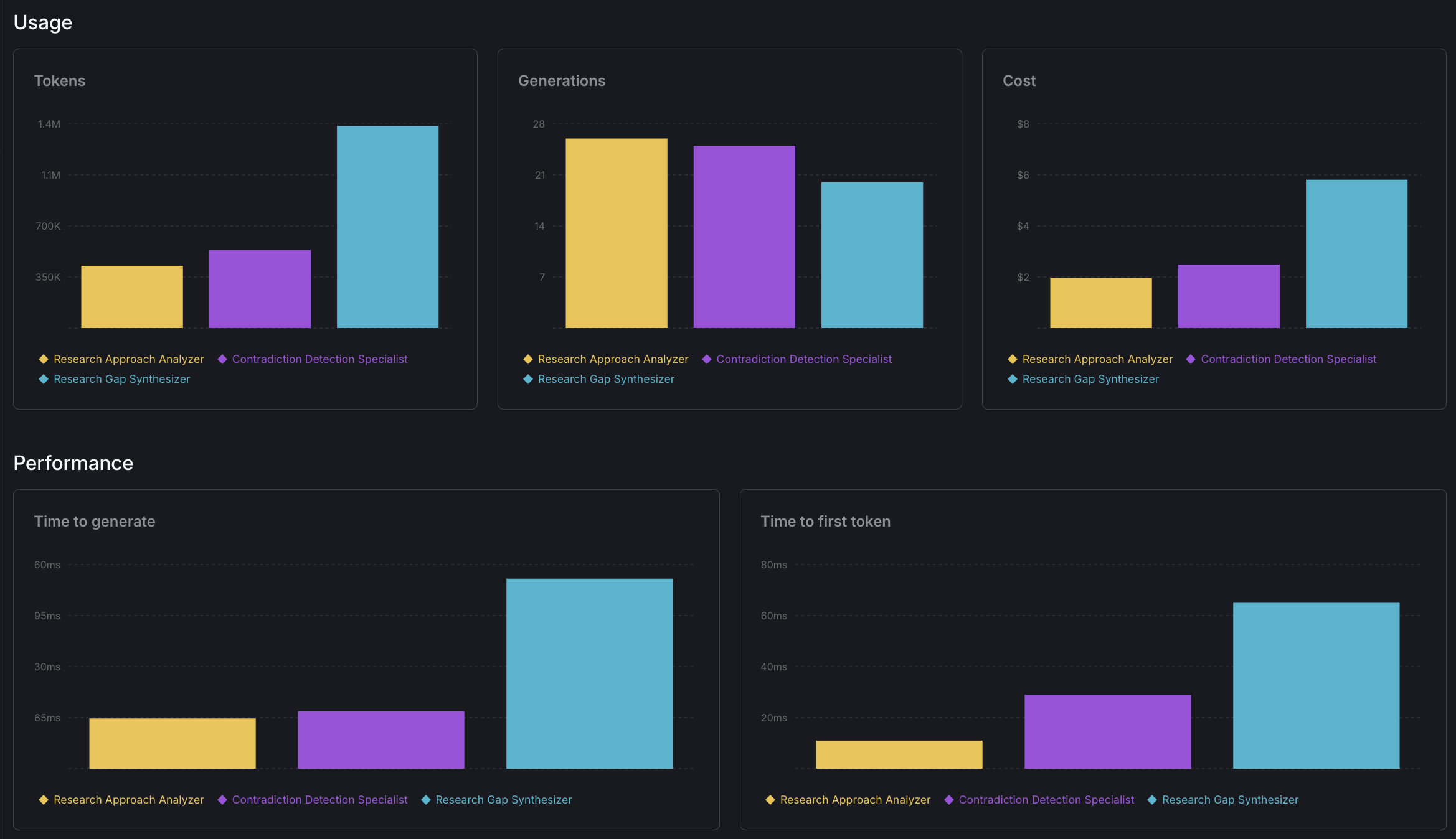
AI Config monitoring dashboard showing per-agent token usage, duration, and success rates across multiple runs
- Custom Metrics for Cost Attribution**
Step 1: Download research papers
First, you need papers to analyze. Thescripts/download_papers.py script queries ArXiv with narrow, category-specific searches to ensure focused results.
cat:cs.CL, cat:cs.MA) to limit scope. Boolean AND operators ensure papers match all criteria. 2-5 year windows prevent overwhelming the analysis.
For even narrower custom queries, combine categories with specific techniques like cat:cs.CL AND chain-of-thought AND mathematical AND reasoning for CoT math only, cat:cs.MA AND emergent AND (referential OR compositional) for specific emergence types, or cat:cs.SE AND few-shot AND (Python OR JavaScript) AND test generation for language-specific code generation.
The script saves papers to data/gap_analysis_papers.json with this structure:
Step 2: Set up your multi-orchestrator project
Environment setup
For help getting your SDK and API keys, see the API access tokens guide and SDK key management.Install dependencies
Step 3: Bootstrap agent configs with the manifest
The orchestration repo includes a complete bootstrap system that automatically creates all agent configurations, tools, and variations in LaunchDarkly. This is much faster and more reliable than manual setup.Understanding the bootstrap system
The bootstrap process uses a YAML manifest to define:- Tools - Functions agents can call (fetch_paper_section, handoff_to_agent, etc.)
- Agent Configs - Three specialized agents with their roles and instructions
- Variations - Multiple model options (Anthropic Claude vs OpenAI GPT)
- Targeting Rules - Which orchestrators get which models
Run the bootstrap script
What gets created
The bootstrap script creates the three agents described earlier (Approach Analyzer, Contradiction Detector, Gap Synthesizer), each with swarm-aware instructions and handoff tools.Verify in Launch
Darkly dashboard After bootstrap completes:- Go to your LaunchDarkly AI Configs dashboard at
https://app.launchdarkly.com/<your-project-key>/<your-environment-key>/ai-configs - You’ll see all three agent configs created
- Each config has:
- Two variations (Claude and OpenAI models)
- Proper tools configured
- Detailed swarm-aware instructions
- Targeting rules for orchestrator-specific routing
How variations and targeting work
Each agent has two variations in the manifest:- Context includes orchestrator attribute:
context = create_context(execution_id, orchestrator="openai_swarm") - LaunchDarkly evaluates targeting rules: If orchestrator is “openai_swarm” or “openai-swarm”, use OpenAI variation
- Otherwise use default: Claude variation for all other orchestrators
- Use OpenAI models when running OpenAI Swarm (native compatibility)
- Use Claude for other orchestrators
- A/B test models by adjusting targeting rules
Customize agent behavior
After bootstrap, you can adjust agents in the LaunchDarkly UI without code changes. Switch between Claude, GPT-4, or other supported providers. Refine instructions for better handoffs. Control which agents are included in the swarm through targeting rules. Test different prompts or models side-by-side with experiments. Your three agents are now configured in LaunchDarkly. Next, we’ll implement tracking so you can monitor tokens, latency, and cost for each agent individually.Step 4: Implement per-agent tracking
The orchestration repository demonstrates per-agent tracking across all three frameworks. First, you need to fetch agent configurations from LaunchDarkly:Fetching agent configurations dynamically
Pattern 1: Native framework metrics (Strands)
Strands providesaccumulated_usage on each node result after execution:
Pattern 2: Message-based tracking (Lang
Graph) LangGraph attachesusage_metadata to messages, requiring post-execution iteration:
Pattern 3: Interception-based tracking (Open
AI Swarm) OpenAI Swarm doesn’t aggregate per-agent metrics, requiring interception of completion calls:Critical: Provider token field names differ
Each provider uses different field names: Anthropic usesinput_tokens/output_tokens, OpenAI uses prompt_tokens/completion_tokens, and some frameworks use camelCase (inputTokens). The implementations use fallback chains to handle all formats.
You can now capture tokens, latency, and cost for each agent. Next, we’ll run the swarm across LangGraph, Strands, and OpenAI Swarm to see how they perform with the same agent definitions.
Step 5: Run multiple orchestrators and track results
The repository includes scripts to run all three orchestrators and analyze their performance:-
Configure env: Create
.envwith SDK keys -
Install deps:
pip install -r requirements.txt -
Download papers:
python scripts/download_papers.py -
Bootstrap agents:
python scripts/launchdarkly/bootstrap.py - Configure targeting: Set default variation for each agent in LaunchDarkly UI
-
Test run:
python orchestrators/strands/run_gap_analysis.py
Comparing orchestrator approaches to swarms
All three frameworks support multi-agent workflows, they just disagree on who decides what happens next.Key differences
| Aspect | Strands | LangGraph
| ---
| ---
| --- |
| Routing
| Framework-managed
| Graph-based
| Function return |
| Handoff API
| Tool call (automatic)
| Command object
| Return Agent object |
| Boilerplate
| Low
| Medium
| Medium |
| Control
| Low (black box)
| High (explicit graph)
| High (manual impl) |
| Debugging
| Hard (why didn’t agent run?)
| Easy (graph trace)
| Hard (silent failures) |
| Per-Agent Metrics
| Built-in
| Wrapper required
| Interception required |
View full implementations: Strands
| LangGraph
| OpenAI Swarm
The LaunchDarkly advantage: By defining agents externally, you can implement swarms across all three frameworks and compare their approaches with the same agent definitions.
Performance comparison (9 runs: 3 datasets × 3 orchestrators)
| Metric | OpenAI Swarm | Strands
| ---
| ---
| --- |
| Avg Time
| 2.9 min
| 5.7 min
| 8.0 min |
| Tokens
| 67K
| 99K
| 89K |
| Speed
| 385 tok/s
| 287 tok/s
| 186 tok/s |
| Report Size
| 13KB
| 32KB
| 67KB |
| Variance
| ±1.05 min
| ±1.38 min
| ±0.21 min |
Key insight (based on limited sample): Fastest ≠ best. OpenAI Swarm was 3x faster but produced reports 80% smaller than LangGraph. LangGraph had the lowest variance and most comprehensive outputs despite slower execution.
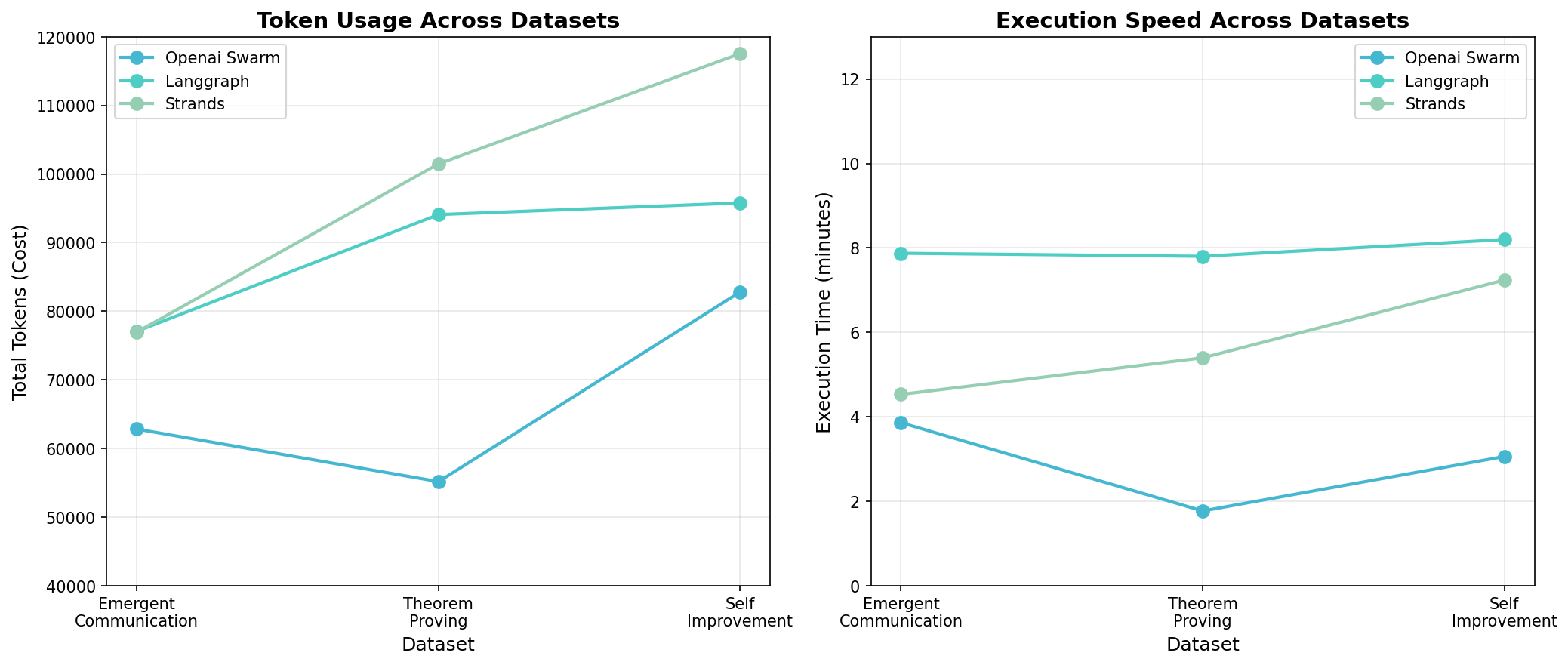
Performance comparison graphs showing execution time, token usage, and processing speed across all three orchestrators
Example reports: See the outputs
- LangGraph (60-70KB): Emergent
- Strands (30-35KB): Emergent
- OpenAI Swarm (10-15KB): Emergent