

 Your deployment shouldn’t fail because an AI config is misconfigured. And you shouldn’t wait until production rollout to discover your new prompt performs worse than the old one.
This CI/CD pipeline is implemented via GitHub Actions to catch config issues before they break your deployment and test prompt changes against your golden dataset before you start a guarded release.
With LaunchDarkly AI Configs, you get:
Your deployment shouldn’t fail because an AI config is misconfigured. And you shouldn’t wait until production rollout to discover your new prompt performs worse than the old one.
This CI/CD pipeline is implemented via GitHub Actions to catch config issues before they break your deployment and test prompt changes against your golden dataset before you start a guarded release.
With LaunchDarkly AI Configs, you get:
- Instant rollback via UI (no redeploy needed)
- Real-time config updates (change models, prompts, thresholds without code changes)
- Progressive rollout with targeting rules and percentage-based deployment
What This Pipeline Does
**- Validate AI Configs exist in LaunchDarkly**
- Test AI response quality against your golden dataset**
- Sync config defaults**
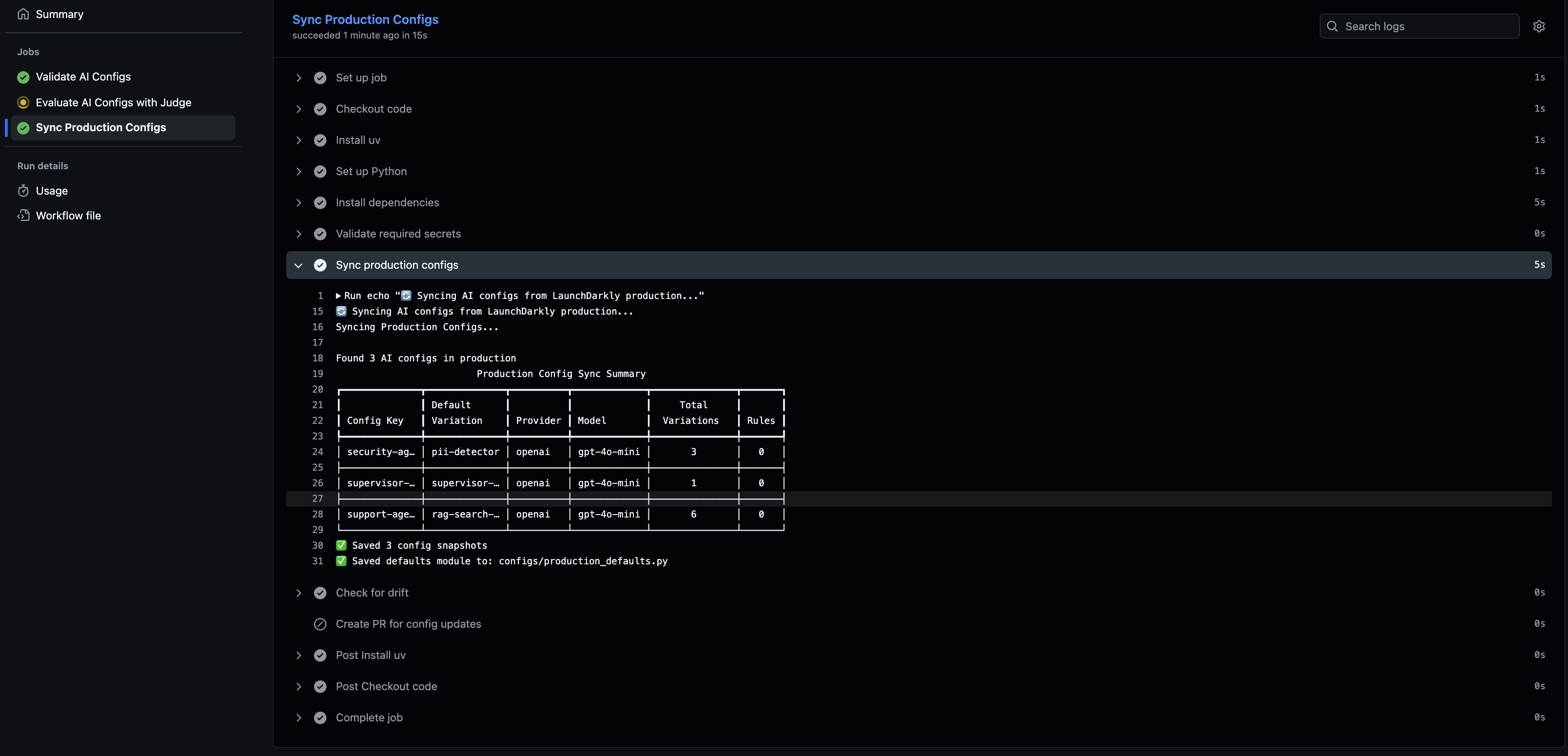
Automated sync job creating a PR when production configs drift from code defaults
- Deploy safely with LaunchDarkly’s guardrails**
How the Pipeline Works
Stage 1: Validation
The pipeline starts by verifying that your AI Configs actually exist in LaunchDarkly and are configured correctly. This catches basic setup issues early, before they reach your test environment or production. Validation scans your codebase for AI Config references (likeai_configs.* or ai_client.agent(key="security-agent")), then checks LaunchDarkly to confirm:
- The config key exists in your project
- It’s enabled (not disabled or archived)
- Required fields are present (
model,provider,instructions) - The configuration is well-formed
Stage 2: Quality Testing
The pipeline tests all AI Config variations across different user contexts (premium users, free-tier, enterprise, etc.) using an LLM-as-judge. This produces quality scores, latency metrics, and variation comparisons to see which config performs best for which user segment. The testing stage evaluates responses against your quality thresholds: accuracy scores, error rates, and latency limits. The pipeline blocks your PR if quality falls below thresholds. Once tests pass, the pipeline moves to syncing defaults and preparing for deployment.Stage 3: Config Sync and Drift Detection
An important part of this pipeline is keeping your code’s default AI Config values in sync with what’s actually running in LaunchDarkly production. This serves two purposes:- Runtime fallback when LaunchDarkly is unavailable
- Drift detection when production configs change
configs/production_defaults.py) that you commit to git. This becomes your source of truth for default values. Then, a nightly sync job checks for drift by comparing your code’s defaults against LaunchDarkly production. When someone changes an AI Config in production, the sync job detects the difference and creates a PR to update your code.
Why this matters: Your application imports these defaults as fallback behavior when LaunchDarkly is unavailable. Keeping them in sync with production means your fallback behavior matches production, not stale values from weeks ago. The drift detection also keeps your team aware of production changes.
Stage 4: Safe Deployment
After tests pass and the PR merges, LaunchDarkly’s built-in safety controls manage the deployment through four phases: deploy at 0% rollout, dark launch with internal users, guarded rollout with guardrails, and instant rollback if needed. Deploy at 0% rollout Your code goes to production, but the new AI Config serves no traffic initially. Setting the rollout percentage to 0% in LaunchDarkly lets you verify deployment succeeded before exposing it to users. Dark launch with internal users LaunchDarkly targeting rules enable testing with real production traffic, starting with internal users and beta testers. For example, targeting rules likeuser.email contains "@yourcompany.com" or user.segment = "beta_testers" serve the new config only to specific groups. This catches issues that only appear with actual user interactions.
Guarded rollout with release guardrail metrics
Traffic increases gradually (0% - 1% - 10% - 50% - 100%) while release guardrail metrics monitor quality at each stage. Configure metrics for error rate, latency, and satisfaction in LaunchDarkly, and they’ll automatically track each rollout stage. If quality degrades, LaunchDarkly alerts you or pauses the rollout.
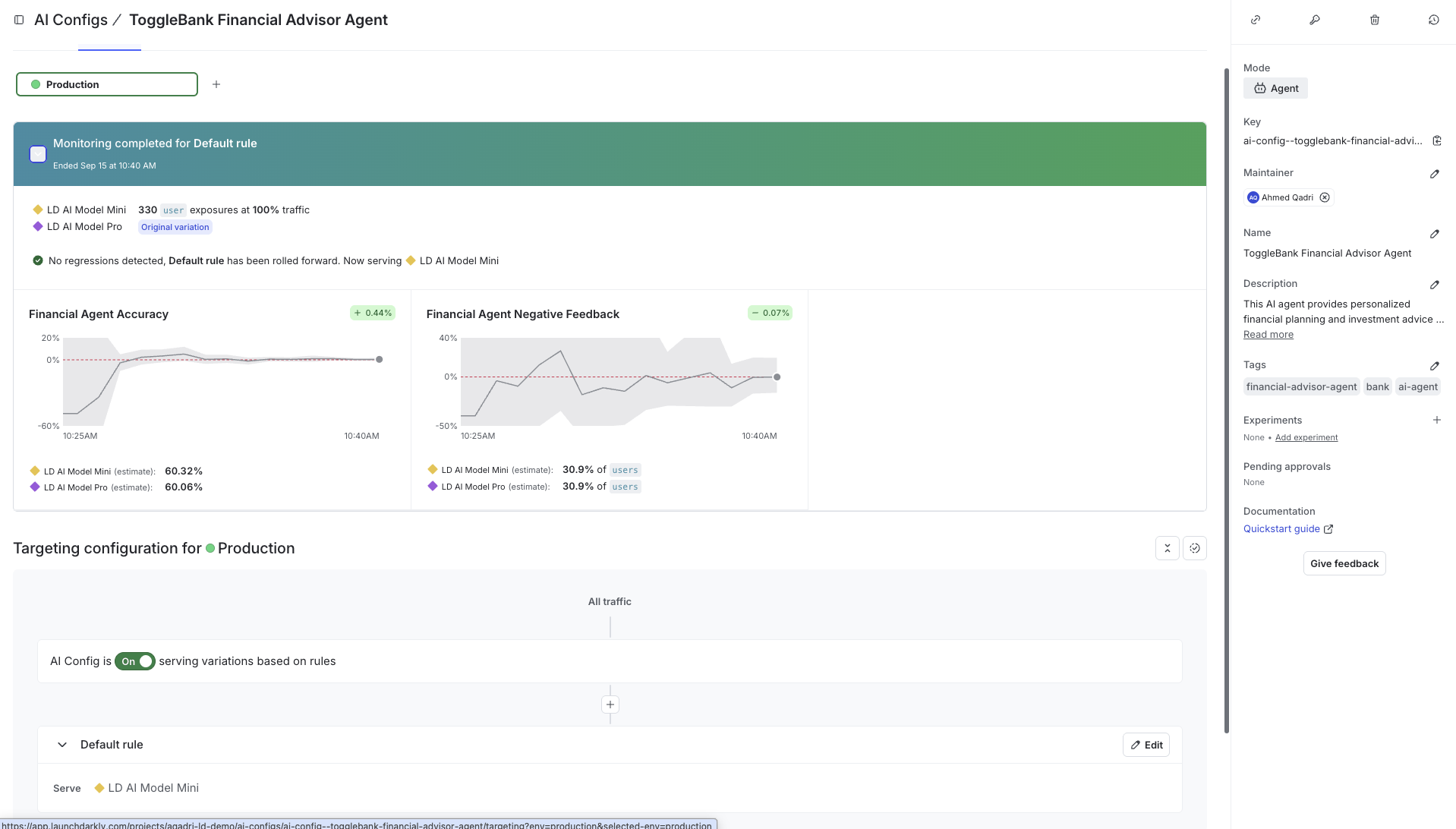
Guarded release with guardrail metrics monitoring quality during rollout
Integration with Git
Hub Actions This entire pipeline runs automatically in your GitHub repository via GitHub Actions. When you open a PR, GitHub Actions executes the validation and testing stages. The results appear directly in your PR checks.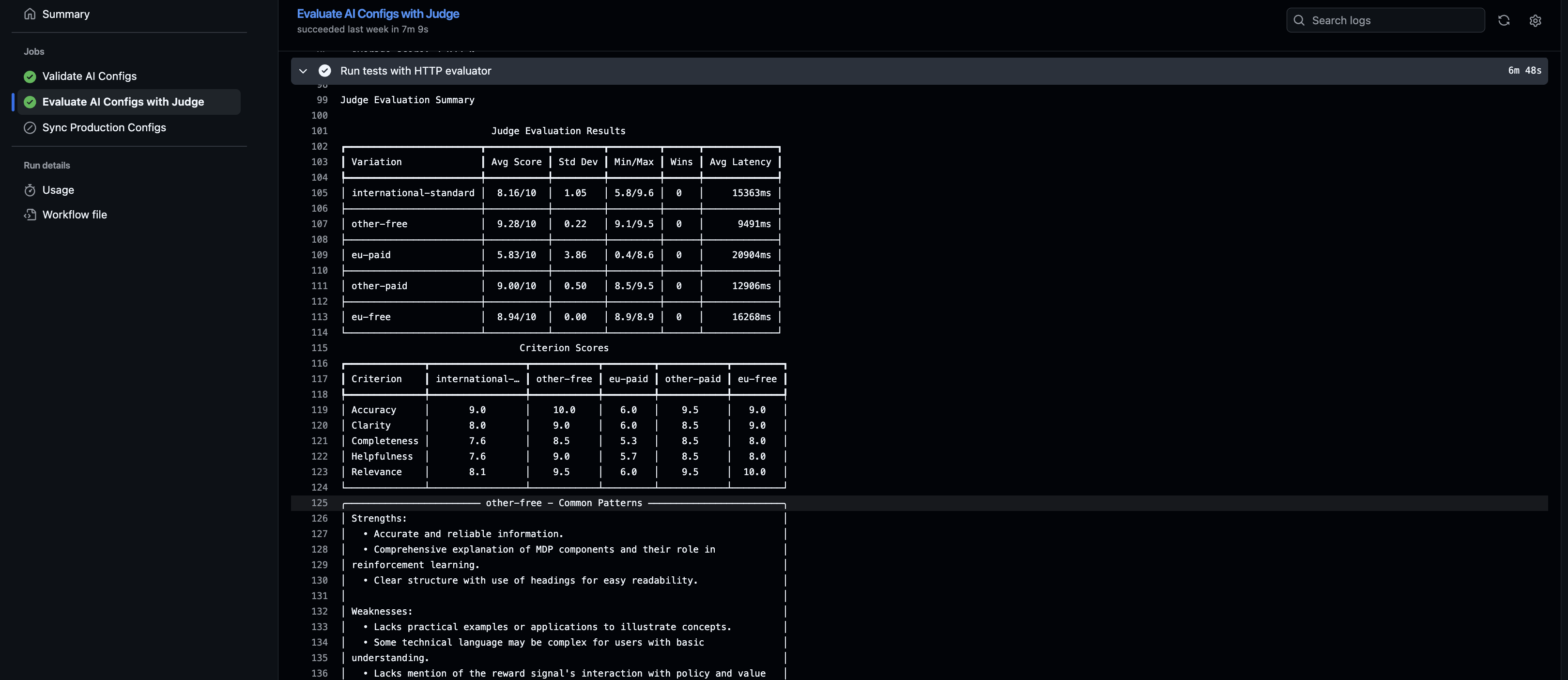
GitHub Actions workflow showing validation and testing steps with pass/fail status
- Validation results (which configs were checked)
- Test results (quality scores, latency, variation comparison)
- Pass/fail status for each quality gate
LD_API_KEY, LD_SDK_KEY, etc.) to connect to LaunchDarkly and execute the checks.
What You Get
This pipeline gives you the confidence to ship AI changes fast without sacrificing quality. Before this CI/CD pipeline:- Manual review of AI outputs doesn’t scale.
- Quality regressions slip into production.
- No systematic way to test across user segments and variations.
- Config changes go straight to prod without validation.
- Automated quality gates catch broken configs before merge.
- LLM-as-judge tests all variations systematically (requires test data covering all config variations).
- Validation in PR checks ensures configs exist and are well-formed.
- Drift detection keeps your code defaults in sync with production.
Additional Details
For detailed implementation guidance, see the ld-aic-cicd repository documentation covering:- Choosing Evaluators: Direct evaluator (unit testing for single configs) vs HTTP evaluator (integration testing for multi-agent systems). Custom evaluators for specialized AI architectures
- Test Data Format: Creating golden datasets with evaluation criteria, context attributes, reference responses, and performance constraints
- Drift Detection: Syncing production configs to code defaults, nightly drift detection workflows, and handling config changes
- Function Calling: Tool support across OpenAI, Anthropic, and Gemini providers with schema validation
- Troubleshooting: Common issues with configs, latency, judge variability, and rate limits