

 Every December, engineering teams unwrap the same unwanted gift: their annual observability bill. And every year, it’s bigger than the last.
You know the pattern. Services multiply. Traffic grows. Someone discovers OpenTelemetry and suddenly every microservice is emitting 50 spans per request instead of
Every December, engineering teams unwrap the same unwanted gift: their annual observability bill. And every year, it’s bigger than the last.
You know the pattern. Services multiply. Traffic grows. Someone discovers OpenTelemetry and suddenly every microservice is emitting 50 spans per request instead of
- Then January rolls around and your observability platform sends an invoice that’s 30% higher than last quarter.
Why “collect everything” no longer works
The old playbook was simple: instrument everything, store it all, figure out what you need later. Storage was cheap enough. Queries were fast enough. No need to overthink it. Then, three things happened:- OpenTelemetry went mainstream. Teams migrated from vendor agents to OTel and began adding spans for everything. This added more visibility, but with 10x the data.
- AI observability tools arrived. Platforms started using LLMs to analyze traces and suggest root causes. Powerful, but also expensive to run against terabytes of unfiltered trace data.
- CFOs started asking questions. “Our_traffic grew 15% but observability costs grew 40%. Explain.”
Cardinality will eat your budget
Cardinality is the observability villain. It sneaks in quietly, one innocent-looking label at a time, and before you know it, it’s stolen your entire cloud budget. What is cardinality? It’s just the number of unique time series your metrics generate, but it’s also the main driver of observability costs that nobody sees coming.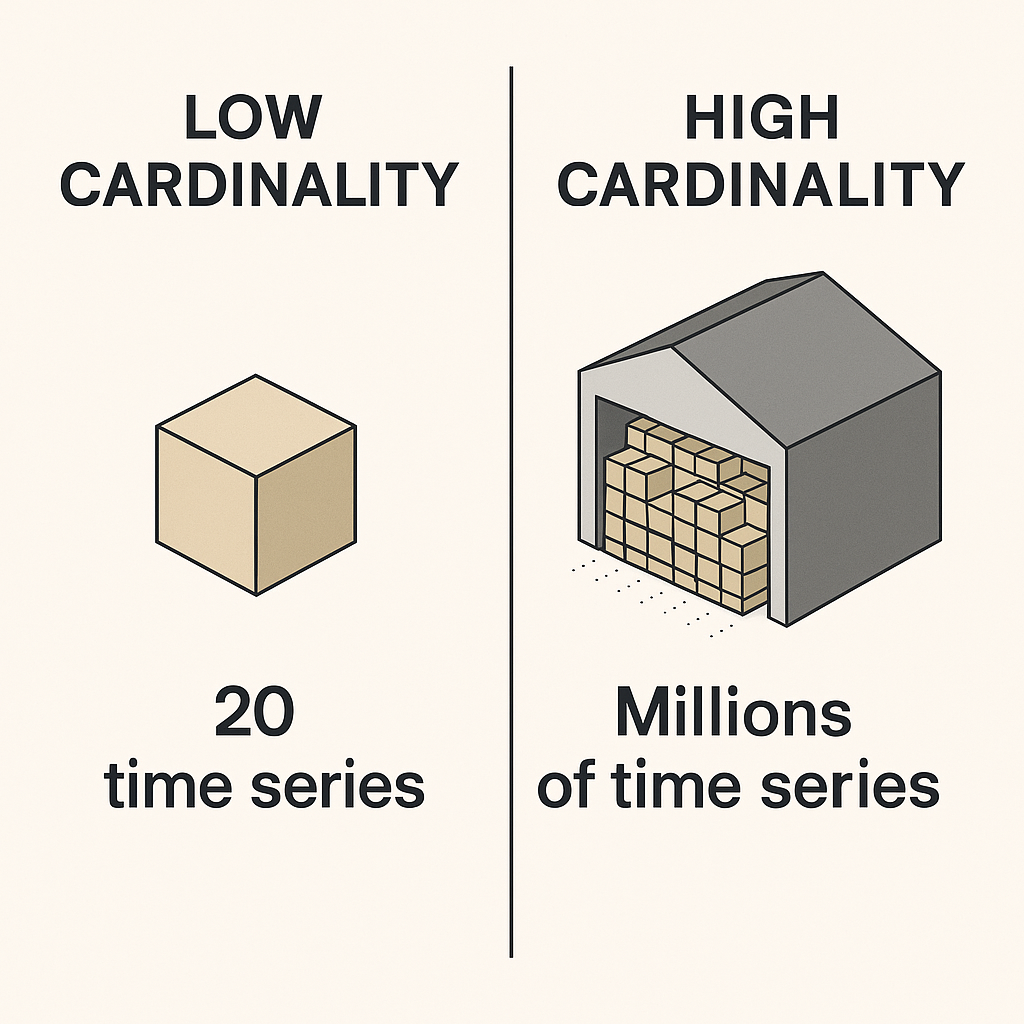
Low cardinality vs high cardinality with time series data.
http_requests_total tracked by method and status_code. Maybe 20 unique combinations. Fairly manageable.
High cardinality: Same counter, but now you’ve added user_id, request_id, and session_token as labels. By simply adding these labels, you’ve just created millions of unique time series. Each one needs storage, indexing, and query compute. This will compound your bill faster than you can say deck the halls, except you wouldn’t be able to deck the halls, you’d be paying off your usage bill.
Stopping the Green character: set cardinality budgets
Most teams don’t set limits on how many time series a service can create even though they should., but you can. Start by auditing what you’re currently generating. Look for metrics with >100K unique time series, or labels that include UUIDs, request IDs, or email addresses. These are your problem children. Then set budgets. Give each service a limit, like 50K time series max. Assign team quotas so the checkout team knows they get 200K total across all their services. Create attribute allowlists that define exactly which labels are allowed in production. Yes, this feels restrictive at first. Your developers will complain. They’ll argue that they need that user_id label for debugging. And sometimes they’re right. But forcing that conversation up front means they have to justify the cost, not just add labels reflexively. Finally, enforce budgets through linters that flag high-cardinality attributes in code review, CI checks that fail if estimates get too high, and dashboards that alert when cardinality spikes. This isn’t about being restrictive. It’s about being intentional. If you’re adding a label, you should know why and what it’ll cost. Cardinality budgets solve the metrics problem, but what about traces? That’s where sampling comes in.Sampling: without the guilt
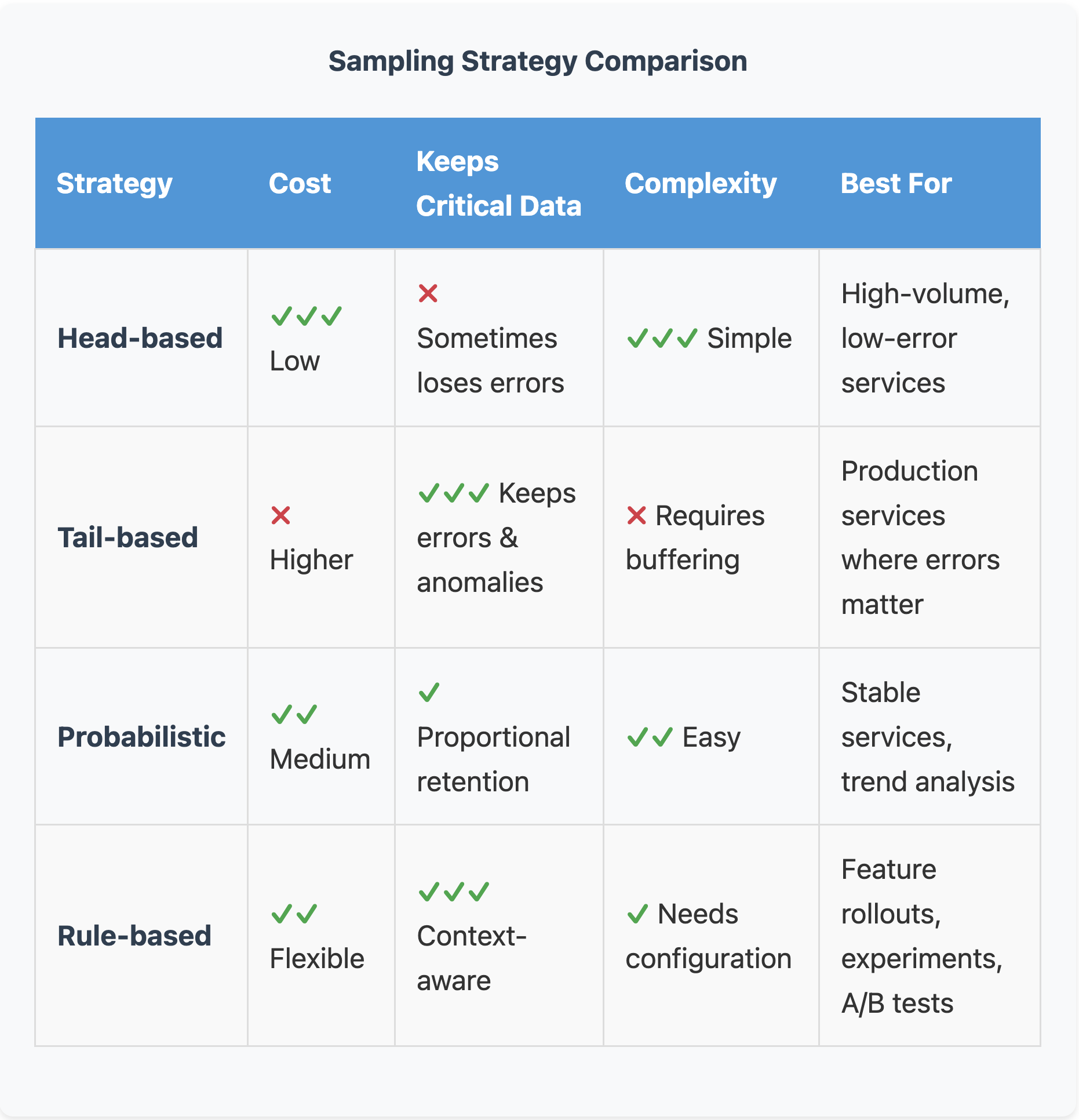
The different sampling strategies for evaluating traces.
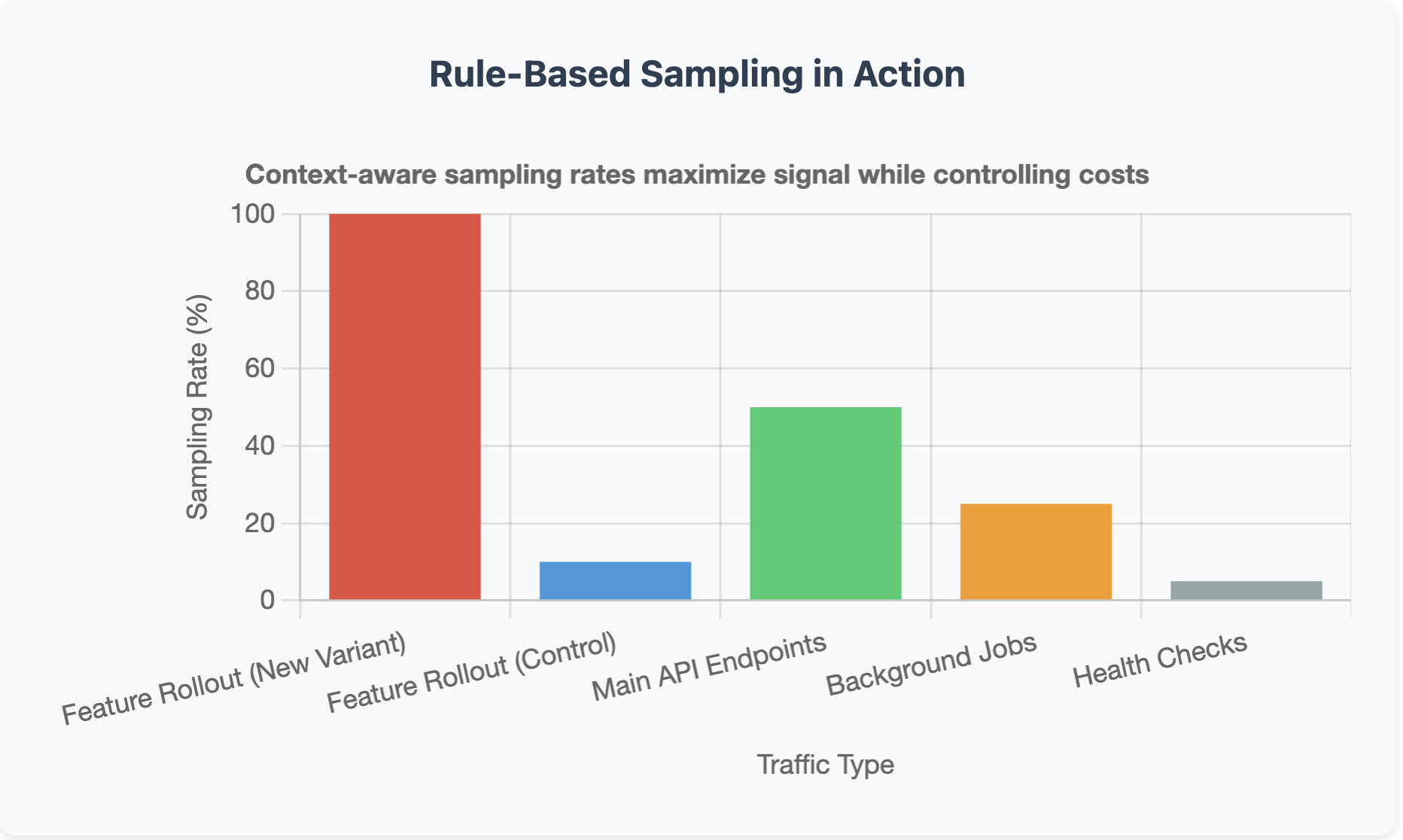
Rule-based sampling in action.
Downsample vs. Discard: know when to do which
Not all data reduction is the same, and mixing up downsampling with discarding is how teams accidentally delete data they actually need. Downsample when you need historical context but not full precision. SLO burn rates don’t need second-by-second granularity so you can downsample to 1-minute intervals and still catch every trend. An additional practice is to keep high-res data for a week, then downsample to hourly for long-term retention. Discard when the data is redundant or has served its purpose. For instance, debug spans from a canary that passed three days ago can be deleted. Or if you captured an error in both a trace and a log, you can pick one source of truth and drop the duplicate. The rule of thumb here is If you’ll never query it, don’t store it. If you might need it for trends in six months, downsample it. If you need it immediately when something breaks, keep it at full resolution with an aggressive retention policy.What this actually looks like

The impact of cost-efficient observability on overall budget.

Where to start for implementing cost-efficient observability.