

 A content-management system (CMS) is software used to create, manage, and host content.
It is crucial to use a CMS for any frequently updating content on your site, as it allows for:
A content-management system (CMS) is software used to create, manage, and host content.
It is crucial to use a CMS for any frequently updating content on your site, as it allows for:
- Easy content creation and editing
- Centralized content management
- Collaboration and workflow management
Why Git
Hub is the best solution for usSpeedy Build Times 💨
At the time of writing, we have 48 blog posts. At build time, post content is fetched from the CMS and each post page is statically generated on the server (See Static Site Generation). This means that we need to make 48 separate API calls to Hygraph to retrieve post content. However, due to API rate limits, we had to introduce a delay for each request. While this worked fine initially, our build time started to suffer as the number of posts increased. With GitHub, all of our posts are written in markdown files and stored in the repository itself. The server is now able to read the file system and instantly fetch post content without having to make a single API call.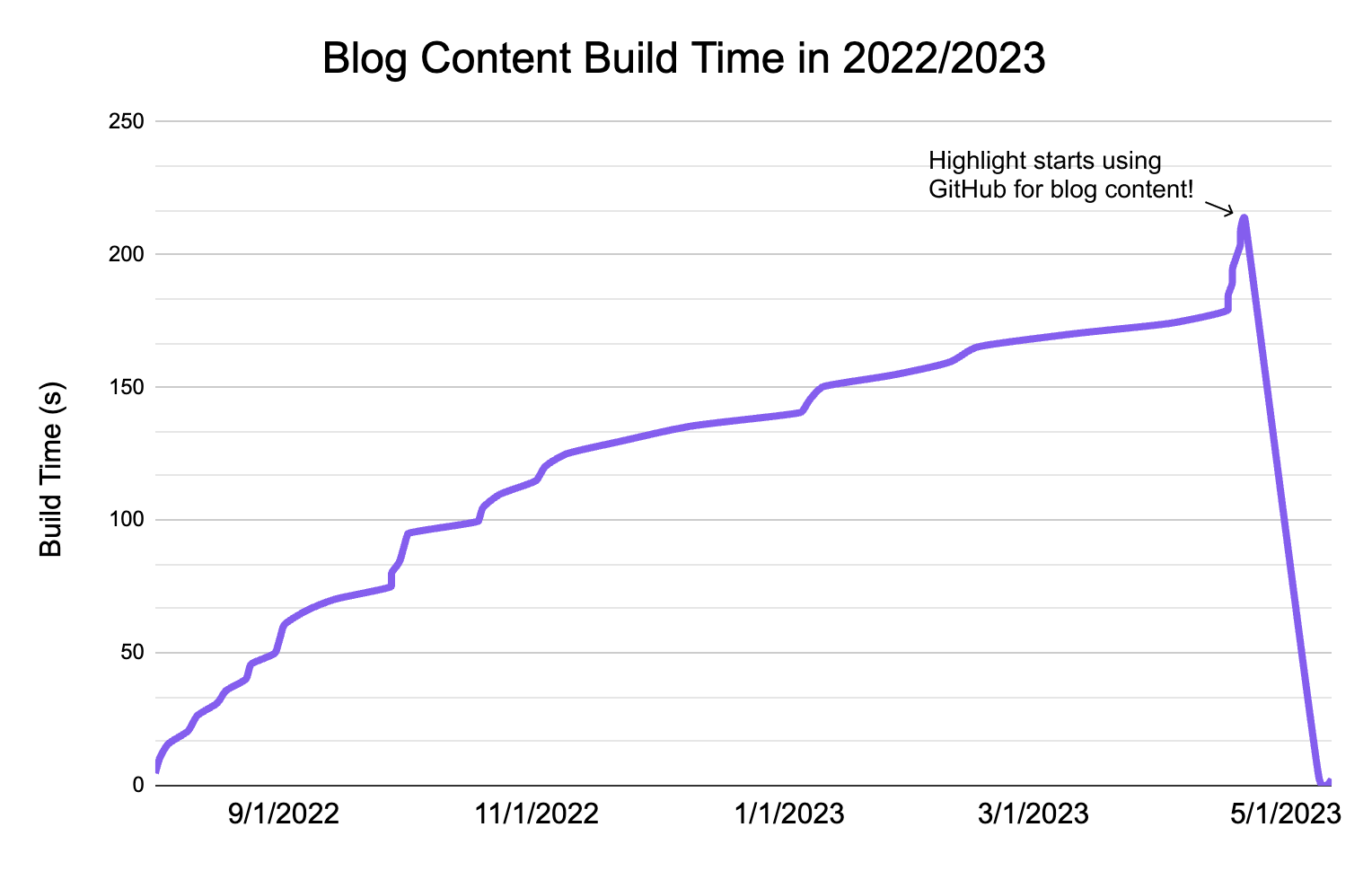
Chart showing blog build time decreasing over time after switching from Hygraph to GitHub.
Improved Developer Experience 💡
For our technical content writers, GitHub couldn’t be better! With the limited team members allowed by Hygraph, not everyone was able to review blog posts in Hygraph before they get published. Now, our engineers can make PRs and let everyone see the hosted blog post formatted exactly how its supposed to be. Additionally, we get access to GitHub features, including Issues, Actions, and Projects. This ensures better organization and also provides a centralized platform for collaboration and feedback.How we did it
The original workflow involved:- Fetching the raw markdown content from Hygraph with a GraphQL API call
- Rendering the content in the proper styling with Hygraph’s Rich Text Renderer
next-mdx-remote.
gray-matter. This data is parsed at build time and the relevant information is rendered accordingly.