

Overview
This topic explains how to use flag targeting rules to serve flag variations to different contexts based on their attributes.About targeting rules
Targeting rules are the mechanism for expressing precedence and conditions across multiple context kinds. Individual targeting does not support combined logic across context kinds. Targeting rules, including the default rule, are all listed on a feature flag’s Targeting tab. You can also use the quick add buttons at the top of the Targeting tab to start different kinds of rollouts or a new experiment. Each targeting rule includes a description, one or more conditions, and a rollout. Each condition has three parts:- Context kind and attribute information, which defines the scope of the condition’s impact.
- For segment rules, this is always “context,” because segment rules check whether a context is part of a segment.
- For mobile rules, this is always the application or device context kind, and then an attribute that you select.
- For custom rules, this is the context kind and attribute that you select, such as “user” and “email address.” To learn more, read Attributes.
- An operator, which sets differentiating characteristics of the attribute, such as limiting the condition to emails that end with certain extensions. If a condition specifies multiple values for the operator to track, the operator iterates over the array. To learn more, read Operators.
- A value, which identifies the attribute by a value you specify, such as
.eduorv1. For segment rules, these are the segments that you select.
Rollouts
The rollout describes what variation of the flag to serve when the end user matches the targeting rule. You can set this to any of the variations of the flag, or to a percentage rollout. If you want to roll out the selected variation gradually, you can add a progressive rollout or guarded rollout to the targeting rule. To learn more, read Releasing features with LaunchDarkly. Here is an image of a targeting rule: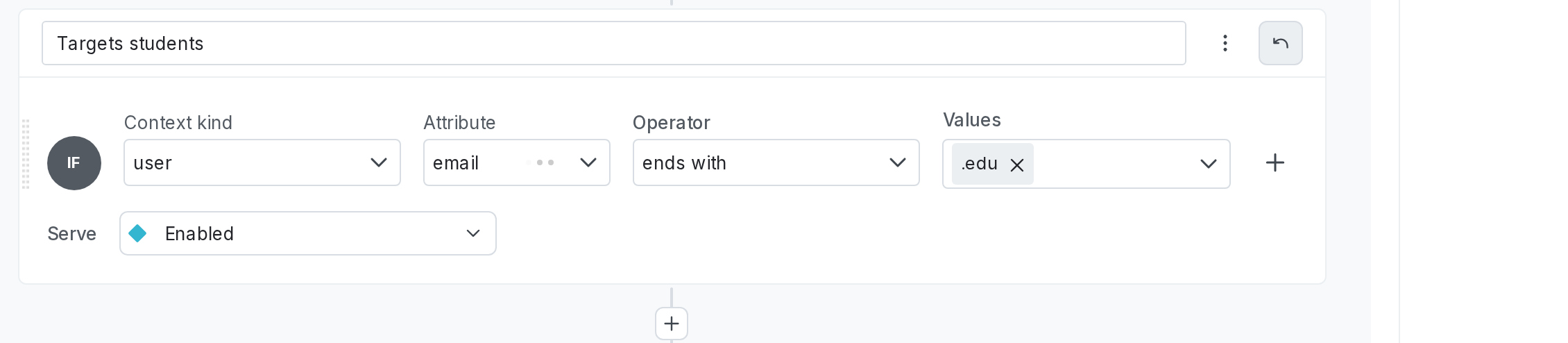
A targeting rule that serves "Available" to all user contexts that contain an "email" attribute with a value that ends in ".edu".
There is no specific limit on the number of targeting rules you can have on a flag. As a general rule, the SDK initialization time scales with the combination of the total number of flags in the project, the size of the flag variations, and the number and complexity of targeting rules across all flags in the environment. To discuss specifics for your account, start a Support ticket.
Attributes
LaunchDarkly allows you to create your own attributes. For instance, you might want to target contexts based on plan, group, role, or location. Here is an example of a context with custom attribute values, though each SDK sends context data to LaunchDarkly in a slightly different format:
The "Attribute" menu, showing attributes for a user context.
/ as a delimiter to refer to specific object fields. For example, if you have an “address” attribute that includes “city,” “state,” and several other fields, then you can use /address/city in your targeting.
From here, you can also select whether to include or exclude all contexts of a particular context kind based on whether they are part of a segment. To learn more, read Segments.
Operators
LaunchDarkly supports the following operators: | Operator | Attribute type | Meaning
| ---
| ---
| --- |
| is one of (=), is not one of (!=)
| string, number, boolean, date
| Exact match
|
in |
| ends with, does not end with
| string
| String suffix match
| endsWith |
| starts with, does not start with
| string
| String prefix match
| startsWith |
| matches regex, does not match regex
| string
| Regular expression match
| matches |
| contains, does not contain
| string
| Substring match
| contains |
| greater than (>), less than (<), greater than or equal to (>=), less than or equal to (<=)
| number
| Numeric comparisons
| greaterThanlessThangreaterThanOrEquallessThanOrEqual |
| before, after
| date
| Date comparisons. Dates must be formatted in UNIX milliseconds or a string in RFC-3339 format. To learn more, read Representations of date/time values .
| beforeafter |
| semantic version is one of (=), is not one of (!=), greater than (>), less than (<), greater than or equal to (>=), less than or equal to (<=)
| string
| Compares values as semantic versions in the format MAJOR.MINOR.PATCH. LaunchDarkly accepts versions without a PATCH, such as 2.0.
| semVerEqualsemVerGreaterThansemVerLessThanFor “greater than or equal to,” use
semVerLessThan and set negate to trueFor “less than or equal to,” use
semVerGreaterThan and set negate to true |
| is in, is not in ( segments only )
| segment name
| Exact match. If you list more than one segment, LaunchDarkly considers the condition met if the context is in/is not in at least one of the segments.
| segmentMatch |
Semantic versions follow the format MAJOR.MINOR.PATCH, such as 1.2.3. The PATCH number is optional, so 2.0 and 2.0.1 are both valid. For some operators, LaunchDarkly stores comparisons internally as the inverse. For example, >= is stored as not <, and <= is stored as not >. To learn more, read Semantic versions.
Regular expression compatibility across SDKs
LaunchDarkly supports regular expressions for the matches regex and does not match regex operators. Because regular expression syntax varies between programming languages, regex behavior can differ depending on where your flag is evaluated.- Server-side SDKs: Regular expressions are evaluated using the regex engine of the SDK language. For example, the Java SDK uses
java.util.regex, and the Go SDK uses Go’sregexppackage. - Client-side SDKs: Regular expressions are evaluated by LaunchDarkly’s backend:
- If the expression conforms to Perl syntax, LaunchDarkly evaluates it with a Rust-based regex engine.
- If it does not conform to Perl syntax, LaunchDarkly evaluates it with a Go-based regex engine.
., *, [ ], ^, and $. If your implementation relies on more advanced syntax, test your expressions with the specific SDKs and environments you use before deploying them.