
Documentation Index

Fetch the complete documentation index at: https://launchdarkly-preview.mintlify.app/llms.txt

Use this file to discover all available pages before exploring further.

portrait of Vadim Korolik.

by Vadim Korolik

LaunchDarkly is an [open source](https://github.com/highlight/highlight) monitoring platform. If you’re interested in learning more, get started at [LaunchDarkly](https://launchdarkly.com).

OpenTelemetry is an important specification that defines how we send telemetry data to observability backends like LaunchDarkly, Grafana, and others. OpenTelemetry is great because it is vendor agnostic, and can be used with several observability backends. If you’re new to OpenTelemetry, you can learn more about it here. Today, we’ll go through a complete guide to using OpenTelemetry in Python, including the high-level concepts as well as how to send traces and logs to your OpenTelemetry backend of choice.

Step One: Signals

In OpenTelemetry, a signal is a type of telemetry data that is collected and sent to an observability backend. There are three primary types of signals in OpenTelemetry: traces, metrics, and logs.
  • Traces: Traces represent the end-to-end journey of a request as it travels through various services and components in a distributed system. They are composed of spans, which are individual units of work within the trace. Traces help you understand the flow of requests and identify performance bottlenecks or errors in your system.
  • Metrics: Metrics are numerical measurements that provide insights into the performance and health of your system. They can include data such as request counts, error rates, and latency. Metrics are typically aggregated over time and used to monitor trends and set up alerts.
  • Logs: Logs are timestamped records of events that occur within your application. They provide detailed information that is helpful for monitoring, debugging and troubleshooting the application’s behavior. Logs can include various levels of severity, such as info, warning, and error.
In addition to traces, metrics and logs, there are other constructs that can inherit from a signal. For example, an error can be represented using traces as the underlying data type, providing context about where and why the error occurred. Similarly, sessions can be constructed using several signals, such as traces, metrics, and logs, to provide a holistic view of a user’s interaction with the system. In the context of OpenTelemetry, signals are generated by instrumenting your systems (whether its a container, application, or service).

Components of Instrumentation

Beyond signals, when working with OpenTelemetry instrumented in your application code, there are several key components that ultimately make up the OpenTelemetry API. These components are designed to be flexible and can be used for all signals. After these signals leave your application, they then can hit an OpenTelemetry collector (or multiple). In LaunchDarkly, we host a cluster of collectors that can be used to send data to, but you can also choose to host your own. Let’s go through each of them. You can refer to the diagram below for a visual representation of how these components interact:
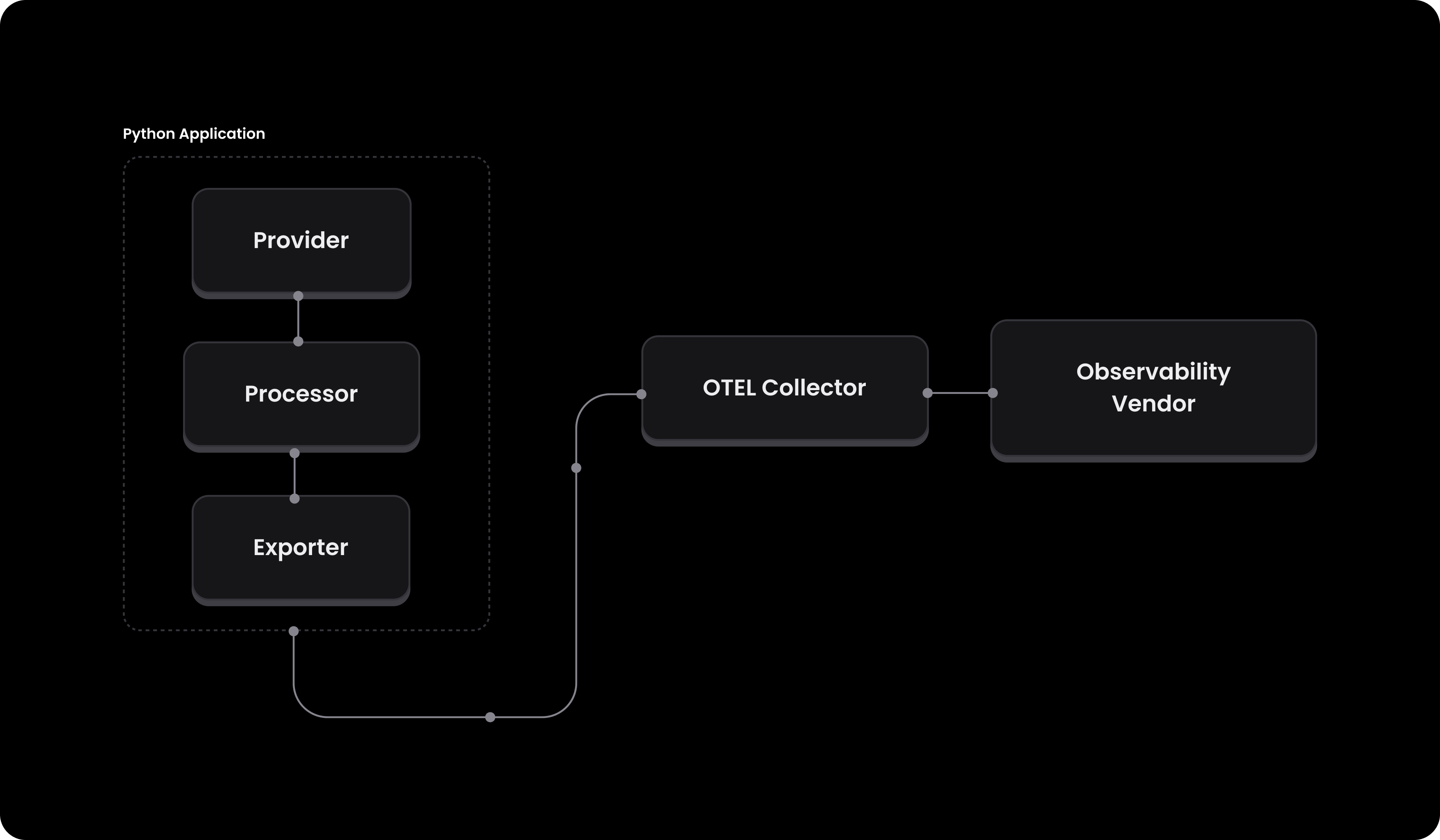
Diagram of the OpenTelemetry pipeline showing how providers, processors, and exporters interact to send telemetry data from an application to a collector.

Provider

A provider is the API entry point that holds the configuration for telemetry data. In the context of tracing, this would be a TracerProvider, and for logging, it would be a LoggerProvider. The provider is responsible for setting up the environment and ensuring that all necessary configurations are in place. This can include configuring a vendor specific api key, or something as simple as setting the service name and environment. For example, a TracerProvider could set up the resource attributes like service name and environment, and set the LaunchDarkly project key so that the traces are associated with your LaunchDarkly project. Here’s a quick example of what this looks like in code:
from opentelemetry import trace
from opentelemetry.sdk.trace import TracerProvider
from opentelemetry.sdk.resources import Resource

provider = TracerProvider(resource=Resource.create(
    {
        "service.name": "my-service",
        "highlight.project_id": "<YOUR_PROJECT_ID>",
        "environment": "production",
    }
))

trace.set_tracer_provider(provider)
tracer = trace.get_tracer("my-service")

Processor

A processor defines any pre-processing that should be done on the created signals, such as batching, sampling, filtering or even enriching data. This is important because you may have specific needs on the machine that you’re sending data from that require customization. As a very simple example, a BatchSpanProcessor collects spans in batches and sends them to the exporter, which is more efficient than sending each span individually. Here’s an example of how you might configure a BatchSpanProcessor:
from opentelemetry.sdk.trace import TracerProvider
from opentelemetry.sdk.trace.export import BatchSpanProcessor
from opentelemetry.exporter.otlp.proto.grpc.trace_exporter import OTLPSpanExporter

processor = BatchSpanProcessor(
    exporter=OTLPSpanExporter(endpoint="https://otel.highlight.io:4317"),
    max_queue_size=1000,
    max_export_batch_size=100,
    schedule_delay_millis=1000,
)

As you can see, we’ve configured the processor to use a BatchSpanProcessor with an OTLPSpanExporter that sends the spans to the LaunchDarkly collector (more about this later). We’ve also configured the processor to batch the spans and send them to the exporter every second with a queue size of 1000.

Exporter

Finally, an exporter sends the telemetry data to the backend. This is where you configure the endpoint and any other necessary settings related to the backend you’re sending data to. For example, an OTLPSpanExporter would configure the endpoint and any necessary headers, while an ConsoleSpanExporter would simply print the spans to the console. Here’s an example of how you might configure an OTLPSpanExporter:
from opentelemetry.exporter.otlp.proto.grpc.trace_exporter import OTLPSpanExporter

exporter = OTLPSpanExporter(endpoint="https://otel.highlight.io:4317", insecure=True, headers={ "foo": "bar" })
As you can see, we’ve configured the exporter to use the LaunchDarkly collector, and set the foo header to bar.

Instrumenting your application

Logging

Now that we’re familiar with the high-level concepts, let’s see how we can instrument our application to send logs to an OpenTelemetry backend. In this example, we’ll assume that we’re sending data to LaunchDarkly, but the same principles would apply to any other backend that supports OpenTelemetry. First, lets install the necessary packages:
pip install opentelemetry-api opentelemetry-sdk opentelemetry-exporter-otlp
Next, we’ll need to set up the provider, processor, and exporter.
service_name = "my-service"
environment = "production"
otel_endpoint = "https://otel.highlight.io:4317"

# Set up the logger provider with the resource
logger_provider = LoggerProvider(resource=Resource.create(
    {
        "service.name": service_name,
        "highlight.project_id": "<YOUR_PROJECT_ID>",
        "environment": environment,
    }
))
set_logger_provider(logger_provider)

# Configure the OTLP log exporter
exporter = OTLPLogExporter(endpoint=otel_endpoint, insecure=True)
logger_provider.add_log_record_processor(BatchLogRecordProcessor(exporter))

# Set up the logger
logger = logging.getLogger(service_name)
logger.setLevel(logging.DEBUG)

# Add the OpenTelemetry logging handler
handler = LoggingHandler(level=logging.DEBUG, logger_provider=logger_provider)
logger.addHandler(handler)

Tracing

Similar to logging, we can instrument our application to send traces to an OpenTelemetry backend. Lets start with installing the necessary packages:
pip install opentelemetry-api opentelemetry-sdk opentelemetry-exporter-otlp
Next, we’ll need to set up the provider, processor, and exporter.
import logging
from opentelemetry import trace
from opentelemetry._logs import set_logger_provider
from opentelemetry.exporter.otlp.proto.grpc._log_exporter import OTLPLogExporter
from opentelemetry.sdk._logs import LoggerProvider, LoggingHandler
from opentelemetry.sdk._logs.export import BatchLogRecordProcessor
from opentelemetry.sdk.resources import Resource
from opentelemetry.sdk.trace import TracerProvider
from opentelemetry.sdk.trace.export import BatchSpanProcessor
from opentelemetry.sdk.trace.export import ConsoleSpanExporter
from opentelemetry.exporter.otlp.proto.grpc.trace_exporter import OTLPSpanExporter
import sys

# Define the service name and environment
service_name = "my-service"
environment = "production"
otel_endpoint = "https://otel.highlight.io:4317"

# Create a resource with service name and highlight project ID
provider = TracerProvider(resource=Resource.create(
    {
        "service.name": service_name,
        "highlight.project_id": "<YOUR_PROJECT_ID>",
        "environment": environment,
    }
))
processor = BatchSpanProcessor(OTLPSpanExporter(endpoint=otel_endpoint, insecure=True))
provider.add_span_processor(processor)
trace.set_tracer_provider(provider)
tracer = trace.get_tracer(service_name)

At this point, once you’ve instrumented your application to send logs and traces to an OpenTelemetry backend, you can start using the tracer and logger objects to start sending data to your backend, like so:
    with tracer.start_as_current_span("example-span") as span:
	        logger.info('hello, world!')
	        span.set_attributes(
	            {
	                "category": "special",
	                "rows_affected": 123
	            }
	        )
	        logger.warning('whoa there', {'key': 'value'})`,

Metrics

Lastly, we can instrument our application to send metrics. In this example, we’ll send a simple count metric, but you can also send other types of metrics like histograms, gauges, and more (see the OpenTelemetry docs for more information). First, we need to install the necessary OpenTelemetry packages for metrics:
pip install opentelemetry-api opentelemetry-sdk opentelemetry-exporter-otlp
Next, we’ll need to set up the provider, processor, and exporter.
from opentelemetry import metrics
from opentelemetry.sdk.metrics import MeterProvider, set_meter_provider
from opentelemetry.sdk.metrics.export import ConsoleMetricsExporter
from opentelemetry.sdk.resources import Resource

# Set up the meter provider with the resource
meter_provider = MeterProvider(resource=Resource.create(
    {
        "service.name": service_name,
        "highlight.project_id": "<YOUR_PROJECT_ID>",
        "environment": environment,
    }
))
set_meter_provider(meter_provider)
meter = metrics.get_meter("my-service")
counter = meter.create_counter("my-counter")
And lastly, we can use the meter to create a counter and add a simple value to it:
counter.add(1)
Note that this is a simple example, and you can also create other types of metrics like histograms, gauges, and more. There’s also the option to use Observable Metric Objects, which allow for more complex metrics collection (like collecting CPU usage, memory usage, etc). Take a look at the OpenTelemetry docs for more information.

Auto-instrumentation & Middleware

Last but not least, in addition to manual instrumentation, OpenTelemetry also supports auto-instrumentation for popular libraries and frameworks. This allows you to automatically collect telemetry data without having to modify your application code. For example, in Python, you could use the OpenTelemetry Distro SDK or the Zero Code Python setup to automatically instrument your application. The downside of these options, however, is that it requires that you change the way your application is run (and may affect your deployment strategy). As a good alternative, you could use middleware to automatically instrument your application. Middleware is a layer of code that sits between your application and the OpenTelemetry backend, and can be used to automatically collect telemetry data. For example, in a Python FastAPI application, you could write a simple middleware to wrap your application and automatically create traces for each request, like so:
from fastapi import Request, FastAPI

app = FastAPI()

@app.middleware("http")
async def trace_middleware(request, call_next):
    with tracer.start_as_current_span(f"{request.method} {request.url.path}"):
        response = await call_next(request)
        return response

@app.get("/")
def read_root():
    return {"message": "Hello, World!"}
The great thing about middleware is that it doesn’t require that you change the way your application is run, and every time you write signals within each of your endpoints, you’ll automatically have traces and logs associated with that request.

Putting it all together

Let’s take the various pieces of the OpenTelemetry configuration and put them into a single file that can easily be imported by our application. Create the file o11y.py with the following contents:
import logging
import os
from dotenv import load_dotenv
from typing import Optional

from opentelemetry import metrics, trace
from opentelemetry.sdk.metrics.export import AggregationTemporality
from opentelemetry.sdk.metrics import Counter, Histogram, UpDownCounter
from opentelemetry._logs import set_logger_provider
from opentelemetry.exporter.otlp.proto.grpc._log_exporter import OTLPLogExporter
from opentelemetry.exporter.otlp.proto.grpc.metric_exporter import OTLPMetricExporter
from opentelemetry.exporter.otlp.proto.grpc.trace_exporter import OTLPSpanExporter
from opentelemetry.sdk._logs import LoggerProvider, LoggingHandler
from opentelemetry.sdk._logs.export import BatchLogRecordProcessor, ConsoleLogExporter
from opentelemetry.sdk.metrics import MeterProvider
from opentelemetry.sdk.metrics.export import ConsoleMetricExporter, PeriodicExportingMetricReader
from opentelemetry.sdk.resources import Resource
from opentelemetry.sdk.trace import TracerProvider
from opentelemetry.sdk.trace.export import BatchSpanProcessor, ConsoleSpanExporter

EXPORTER_OTLP_ENDPOINT = os.getenv("OTEL_ENDPOINT","https://otel.highlight.io:4317")

# read from .env
load_dotenv()

print("OTEL Endpoint is: ", EXPORTER_OTLP_ENDPOINT)
HIGHLIGHT_PROJECT_ID = os.getenv("HIGHLIGHT_PROJECT_ID", "EMPTY")
print("HIGHLIGHT_PROJECT_ID is: ", HIGHLIGHT_PROJECT_ID)

import sys

def create_logger(service_name: str, environment: Optional[str] = "production", local_debug: bool = False) -> logging.Logger:
    if environment is None:
        environment = "production"
    commit = os.getenv("RENDER_GIT_COMMIT", "unknown")
    resource = Resource.create(
        {
            "service.name": service_name,
            "highlight.project_id": HIGHLIGHT_PROJECT_ID,
            "environment": environment,
            "commit": commit
        }
    )

    logger_provider = LoggerProvider(resource=resource)
    set_logger_provider(logger_provider)

    exporter = OTLPLogExporter(endpoint=EXPORTER_OTLP_ENDPOINT, insecure=True) if not local_debug else ConsoleLogExporter()

    logger_provider.add_log_record_processor(BatchLogRecordProcessor(exporter))

    logger = logging.getLogger(service_name)
    logger.setLevel(logging.DEBUG)

    handler = LoggingHandler(level=logging.DEBUG, logger_provider=logger_provider)
    logger.addHandler(handler)

    # Add console handler for stdout
    console_handler = logging.StreamHandler(sys.stdout)
    console_handler.setLevel(logging.DEBUG)
    if commit:
        formatter = logging.Formatter('commit: ' + commit + ' - %(asctime)s - %(name)s - %(levelname)s - %(message)s')
    else:
        formatter = logging.Formatter('%(asctime)s - %(name)s - %(levelname)s - %(message)s')
    console_handler.setFormatter(formatter)
    logger.addHandler(console_handler)

    return logger

def create_tracer(
        service_name: str, 
        environment: Optional[str] = "production", 
        local_debug: bool = False
        ) -> trace.Tracer:
    if environment is None:
        environment = "production"
    commit = os.getenv("RENDER_GIT_COMMIT", "unknown")
    provider = TracerProvider(resource=Resource.create(
        {
            "service.name": service_name,
            "highlight.project_id": HIGHLIGHT_PROJECT_ID,
            "environment": environment,
            "commit": commit
        }
    ))
    processor = BatchSpanProcessor(OTLPSpanExporter(endpoint=EXPORTER_OTLP_ENDPOINT, insecure=True)) if not local_debug else BatchSpanProcessor(ConsoleSpanExporter())
    provider.add_span_processor(processor)
    trace.set_tracer_provider(provider)
    tracer = trace.get_tracer(service_name)

    return tracer

def get_meter(service_name: str, environment: Optional[str] = "production", local_debug: bool = False) -> metrics.Meter:
    if environment is None:
        environment = "production"
    commit = os.getenv("RENDER_GIT_COMMIT", "unknown")


    preferred_temporality: dict[type, AggregationTemporality] = {
            Counter: AggregationTemporality.DELTA,
            UpDownCounter: AggregationTemporality.DELTA,
            Histogram: AggregationTemporality.DELTA,
    }

    readers = [PeriodicExportingMetricReader(exporter=OTLPMetricExporter(endpoint=EXPORTER_OTLP_ENDPOINT, insecure=True, preferred_temporality=preferred_temporality))]
    if local_debug:
        readers.append(PeriodicExportingMetricReader(exporter=ConsoleMetricExporter(
            preferred_temporality=preferred_temporality
        ), export_interval_millis=1000))

    provider = MeterProvider(resource=Resource.create(
        {
            "service.name": service_name,
            "highlight.project_id": HIGHLIGHT_PROJECT_ID,
            "environment": environment,
            "commit": commit
        }
    ), metric_readers=readers)
    metrics.set_meter_provider(provider)
    meter = metrics.get_meter(service_name)
    return meter
Now, let’s use the setup from our Flask app. In our app entrypoint main.py, we just need to set up the OpenTelemetry resources:
import os
from o11y import create_logger, create_tracer, get_meter

# Initialize observability tools
service_name = "flask-backend"
logger = create_logger(service_name, os.getenv("ENVIRONMENT"))
tracer = create_tracer(service_name, os.getenv("ENVIRONMENT"))
meter = get_meter(service_name, os.getenv("ENVIRONMENT"))

histogram = meter.create_histogram("request_duration_histogram")
gauge = meter.create_gauge("request_duration_gauge")
counter = meter.create_counter("request_count")

logger.info("Starting the application")
See the complete example in our Python Flask OTel github repository.

Conclusion

In this guide, we’ve gone through everything you need to use OpenTelemetry in Python, including the high-level concepts as well as how to send traces and logs to your OpenTelemetry backend of choice. If you have any questions, please feel free to reach out to us on Twitter or Discord.