LaunchDarkly’s React Native SDK v10 uses @react-native-async-storage/async-storage for bootstrapping. If you are not using Expo, you must explicitly add it as a dependency.
import { AutoEnvAttributes, LDProvider, ReactNativeLDClient,} from '@launchdarkly/react-native-client-sdk';const ldClient = new ReactNativeLDClient('YOUR_MOBILE_KEY', AutoEnvAttributes.Enabled, { debug: true, applicationInfo: { id: 'ld-rn-test-app', version: '0.0.1', },});// A "context" is a data object representing users, devices, organizations, and other entities.const context = { kind: 'user', key: 'EXAMPLE_CONTEXT_KEY' };const App = () => { useEffect(() => { ldClient.identify(context); }, []); return ( <LDProvider client={ldClient}> <YourComponent /> </LDProvider> );};export default App;
Finding your SDK credentials
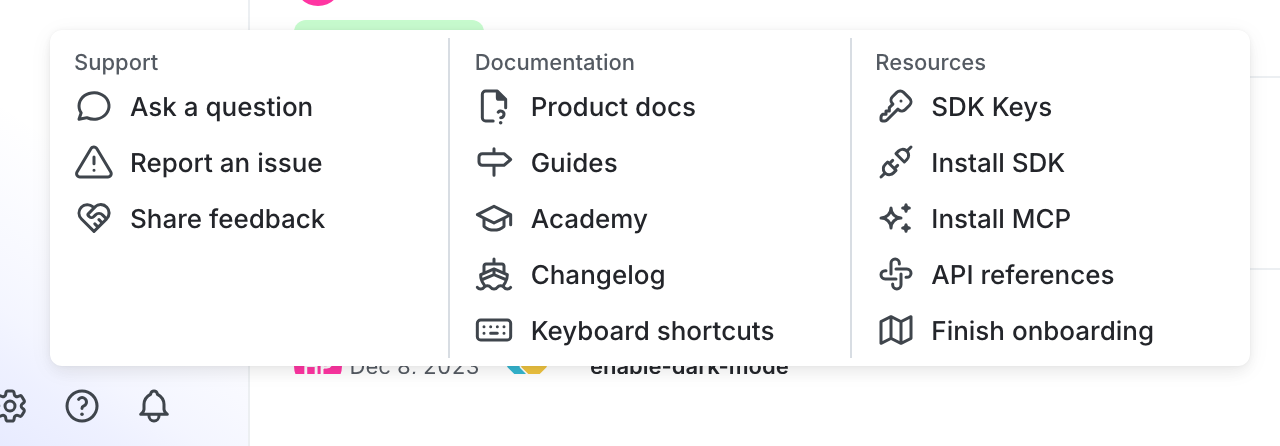
You can find your server-side SDK key, client-side ID, and mobile key in the “Resources” section of the help menu. Click the help icon at the bottom left corner of the LaunchDarkly UI, then choose SDK keys: