

Overview
This topic explains what progressive rollouts are and why you might use them to release new features incrementally. To learn how to create a progressive rollout, read Creating and managing progressive rollouts.What happens when a progressive or guarded rollout starts or stops
Progressive rollouts and guarded rollouts use randomized traffic allocation to determine which contexts receive a new variation. Before you create a rollout, it’s important to understand how context targeting behaves when stopping and restarting the rollout. If you stop a progressive rollout or guarded rollout and later create a new one on the same flag and variation, LaunchDarkly may serve the variation to a different set of contexts than in the original rollout. This happens because each new progressive or guarded rollout independently assigns contexts to receive the variation, based on the selected randomization unit. When you stop a progressive rollout, you must choose a specific variation to serve to all traffic for that targeting rule. After you save, LaunchDarkly updates the rule to serve the selected variation to every context that matches the rule. This behavior is different from percentage rollouts, which retain the same set of contexts when you stop and restart them. The same contexts continue to receive the variation, provided the flag configuration and context kind remain unchanged.How sample size affects bucketing
Progressive rollouts use randomized traffic allocation and context bucketing. Bucketing means LaunchDarkly sorts contexts into consistent groups based on a chosen randomization unit, such as “user,” “device,” or “account.” The accuracy of this allocation depends on the number of contexts included in the rollout:- When a rollout includes a larger number of contexts, LaunchDarkly assigns the variation to a percentage that closely matches what you specify. For example, if a rollout includes 10,000 contexts, a 10% step assigns the variation to about 1,000 contexts.
- When a rollout includes a smaller number of contexts, LaunchDarkly may not assign the variation to the percentage you specify. For example, if a rollout includes 20 contexts, a 10% step may assign the variation to zero, one, or two contexts. Smaller sample sizes may cause some contexts to start receiving the new variation earlier or later than you expect because each rollout step allocates based on probability rather than absolute counts.
Progressive rollouts do not include metric monitoring or relative difference charts. Metrics and charts are only available for guarded rollouts.
About progressive rollouts
Progressive rollouts are an option on a flag’s targeting rule in a given environment. A progressive rollout serves a given flag variation to a specified percentage of contexts, and gradually increases that percentage over a specified time. Use progressive rollouts if you want to randomly allocate traffic by context kind, and automatically increase the amount of traffic to a specific flag variation over time. For example, if you are changing the color scheme on your landing page from a “blue” variation to a “yellow” variation, you might use progressive rollouts to gradually increase the percentage of customers receiving “yellow” from 5% up to 100% in a series of steps over 24 hours: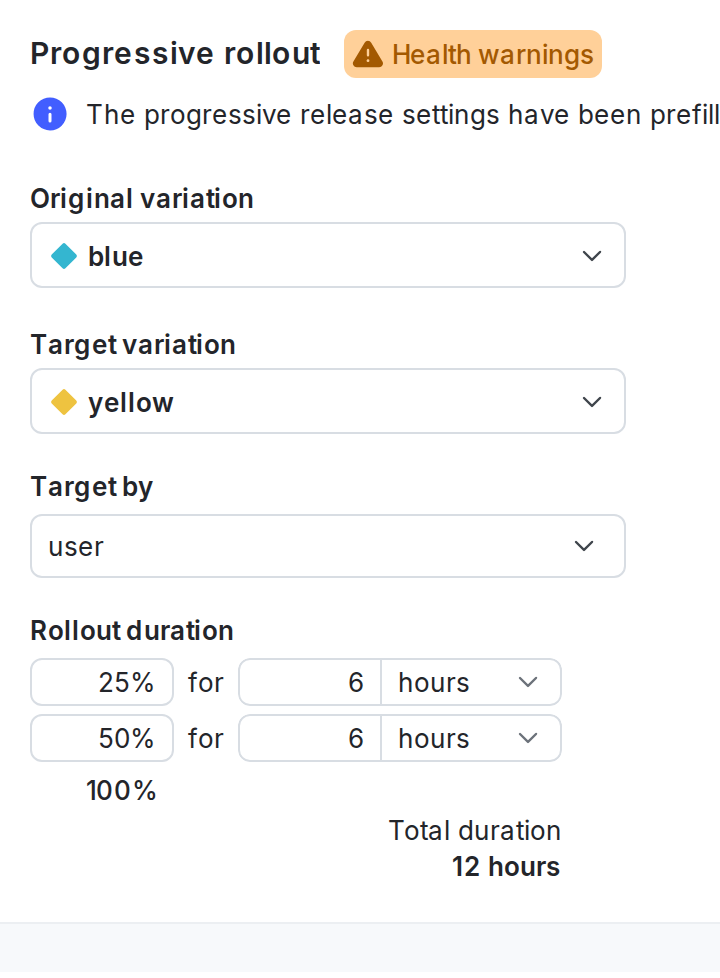
A progressive rollout configuration on a default rule.