

Overview
This topic explains how to deprecate flags you no longer need.About deprecating flags
When a flag is still being served to customers, but it is only being served in older or deprecated versions of your application, it may be time to deprecate it. Deprecating a flag hides it from the live Flags list without archiving or deleting it. You can restore a deprecated flag if you need it, or find it to reference or update its configuration later. Deprecating flags can simplify your Flags list, especially in situations where you have a long tail of customers using older versions of your applications. You can only deprecate flags that you use with client-side SDKs. Deprecated flags are still evaluated, just like live flags. If you are completely done with a flag, you should archive it instead. To learn more, read Archiving flags.Deprecate flags
To deprecate a flag:- Navigate to the Flags list and open the flag you wish to deprecate.
- Click the three-dot overflow menu in the right sidebar.
- Select Deprecate. The “Deprecate flag” dialog appears.
- The dialog shows you how the flag has been evaluated recently.
All flags exist in every environment for a project, but often only a few environments matter for your organization’s production processes. Deprecating a flag will remove it from the live Flags list for every environment in the project.
- Click Deprecate.
View and restore flags
By default, the Flags list shows live flags only. To view deprecated flags, click Filters from the Flags list and select “Deprecated” under “Lifecycle”: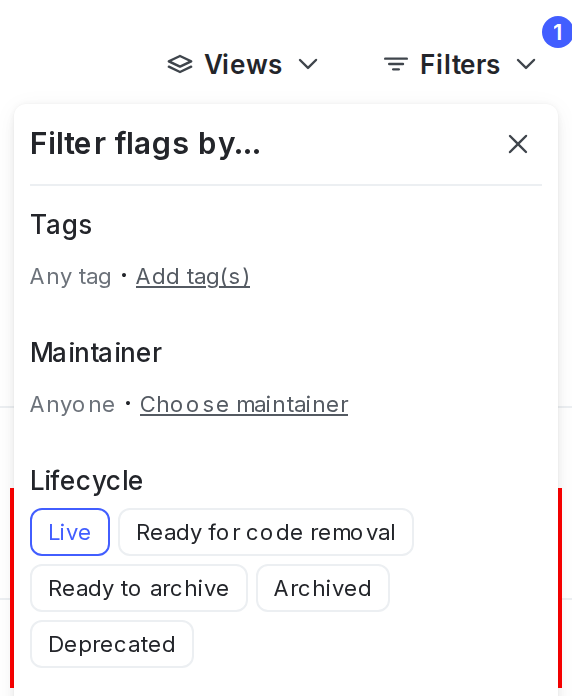
The Flags list Filters, with the lifecycle options shown.
- Navigate to the Flags list.
- Click Filters. In the “Lifecycle” section, click “Deprecated.” The deprecated flag list appears.
- Click a flag name to open the flag you wish to restore.
- Click the three-dot overflow menu in the right sidebar.
- Select Restore. The “Restore flag” dialog appears.
- The dialog shows you how the flag has been evaluated recently.
- Click Restore. The flag appears in the live Flags list.