

Overview
This topic explains what the Contexts list is, how it is populated, and how to use it. The Contexts list shows you contexts that have encountered feature flags in your application, with two exceptions:- The list does not display anonymous contexts.
- In high-volume environments, the list includes a significant sample of the contexts, but is not comprehensive. To learn more, read Manage stored contexts, below.
About the Contexts list
The Contexts list populates automatically when different contexts encounter a feature flag and are evaluated by a LaunchDarkly SDK. The data in the list is populated from the data you send in variation calls, as well as data from identify calls. To learn more about contexts and attributes, read Context attributes.
Try it in your SDK: Evaluating flags
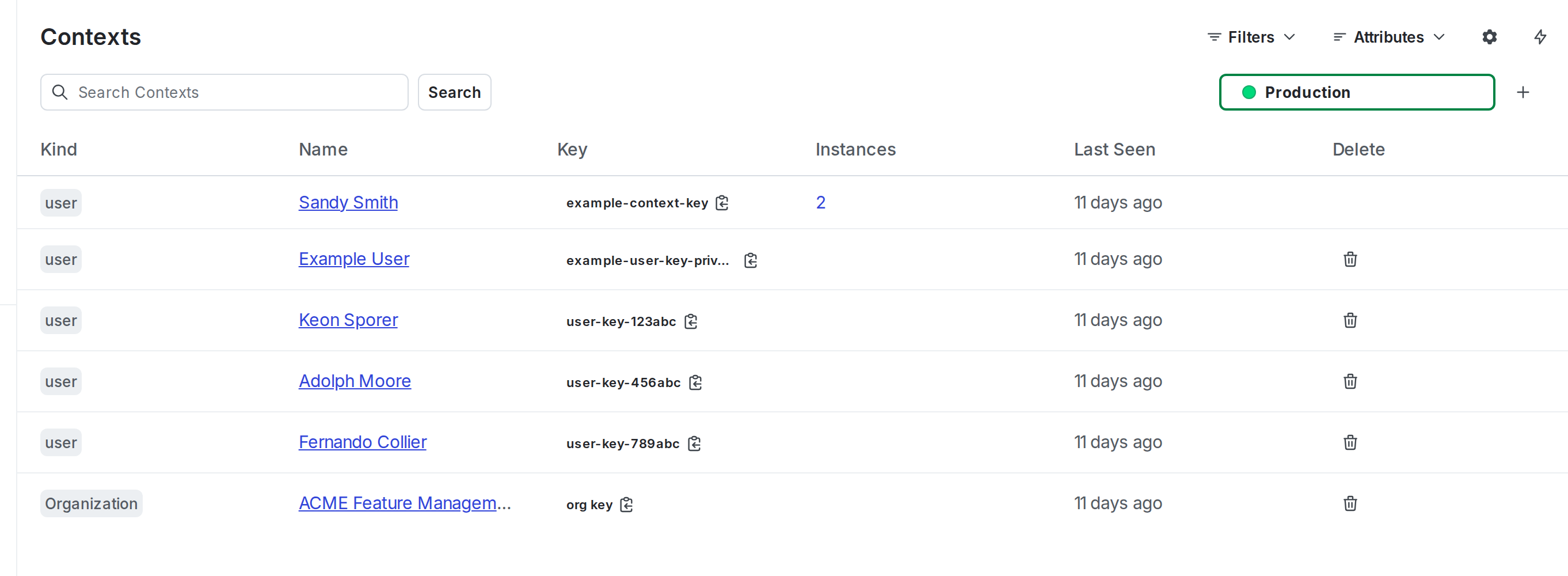
The "Contexts" list.
Your application may evaluate a feature flag for a multi-context, that is, one that contains multiple context kinds. For example, your application may send a multi-context that contains the “user,” “organization,” and “device” context kinds, all in one evaluation call in the LaunchDarkly SDK. When this happens, all three individual contexts appear separately in your Contexts list. You can use the context kind filters to search for them separately.
Create contexts
You cannot create contexts from the Contexts list in the LaunchDarkly user interface (UI). The list only includes contexts that have already been evaluated by a LaunchDarkly SDK.Configure your SDK: Context configuration
Sort the Contexts list
You can sort the Contexts list to identify the oldest or most recent contexts evaluated in your LaunchDarkly account. By default, the most recently active contexts appear first. Click the toggle arrow on the “Last seen” column to sort the list by least recently active contexts. If a context is re-evaluated, and its attributes change within five minutes of the previous evaluation, and the context key stays the same, the list deduplicates the context and does not reflect the latest evaluation. This does not affect variation calls, which always use the attribute values passed to them.You can also use the REST API: Get contexts, Get context instances
Customize the Contexts list
You can customize which attributes appear on the Contexts list. To start, click the Attributes button: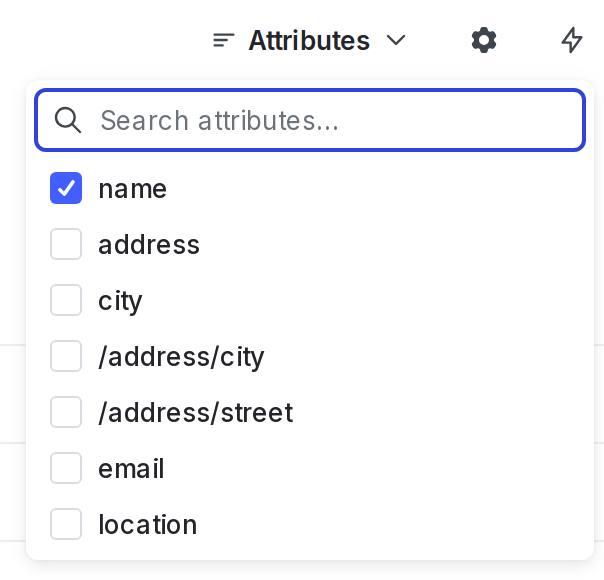
The "Attributes" menu on the "Contexts" list.
Modify feature flags for a context instance
Click a context to manage the feature flags that apply to it, view the context instances that have encountered your flags, view the segments that the context is in, and view a full list of context attributes. To learn more, read The context details page.Manage stored contexts
The Contexts list shows only cached context information. A context will appear on the list for 30 days after an SDK sends anidentify event or evaluates a feature flag for that context. Each time an SDK sends a new event for the context, the 30-day period starts over.
After 30 days with no new identify or flag evaluation events, contexts age out of the system and their information no longer appears on the list. After a context ages out of the system, it will reappear on the list if an SDK sends an identify or flag evaluation event for it again.
If you want to keep contexts on the list for longer than 30 days between flags sending identify or flag evaluation events, you can manually call identify for all of the contexts that you wish to retain.
In high-volume environments, events may be sampled. This means the Contexts list includes a significant sample of the contexts that have encountered feature flags in your application, but is not comprehensive.
Try it in your SDK: Identifying and changing contexts
Remove a context instance
You can delete individual context instances from the Contexts list by clicking the overflow menu and choosing “Delete instance.” Deleting a context instance deletes all versions of that instance. The overflow menu only appears if there is exactly one context instance, due to the risks of deleting multiple instances at once. You can also delete context instances from the context details page. To learn how, read Delete context instances. To learn more about context instances, read Context instances.You can also use the REST API: Delete context instances