

Overview
This topic describes metrics that LaunchDarkly autogenerates from AI Config events. An AI Config is a resource that you create in LaunchDarkly and then use to customize, test, and roll out new large language models (LLMs) within your generative AI applications. As soon as you start using AI Configs in your application, your AI SDKs begin sending events to LaunchDarkly and you can track how your AI model generation is performing. AI SDK events are prefixed with$ld:ai and LaunchDarkly automatically generates metrics from these events.
Some events generate multiple metrics that measure different aspects of the same event. For example, the $ld:ai:feedback:user:positive event generates a metric that measures the average number of positive feedback events per user, and a metric that measures the percentage of users that generated positive feedback.
The following expandable sections explain the metrics that LaunchDarkly autogenerates from AI SDK events:
Positive AI feedback count `$ld:ai:feedback:user:positive`
Positive AI feedback count `$ld:ai:feedback:user:positive`
Metric kind: Custom conversion countSuggested analysis unit: UserDefinition:
- Measurement method: Count
- Unit aggregation method: Sum
- Analysis method: Average
- Success criterion: higher is better
- Units without events: Include units and set the value to
0
Positive AI feedback rate `$ld:ai:feedback:user:positive`
Positive AI feedback rate `$ld:ai:feedback:user:positive`
Metric kind: Custom conversion binarySuggested analysis unit: RequestDefinition:
- Measurement method: Occurrence
- Unit aggregation method: Average
- Analysis method: Average
- Success criterion: higher is better
- Units without events: Include units and set the value to
0
Negative AI feedback count `$ld:ai:feedback:user:negative`
Negative AI feedback count `$ld:ai:feedback:user:negative`
Metric kind: Custom conversion countSuggested analysis unit: UserDefinition:
- Measurement method: Count
- Unit aggregation method: Sum
- Analysis method: Average
- Success criterion: lower is better
- Units without events: Include units and set the value to
0
Negative AI feedback rate `$ld:ai:feedback:user:negative`
Negative AI feedback rate `$ld:ai:feedback:user:negative`
Metric kind: Custom conversion binarySuggested analysis unit: UserDefinition:
- Measurement method: Occurrence
- Unit aggregation method: Average
- Analysis method: Average
- Success criterion: lower is better
- Units without events: Include units and set the value to
0
Average input tokens per AI completion `$ld:ai:tokens:input`
Average input tokens per AI completion `$ld:ai:tokens:input`
Metric kind: Custom numericSuggested analysis unit: RequestDefinition:
- Measurement method: Value/size
- Unit aggregation method: Average
- Analysis method: Average
- Success criterion: higher is better
- Units without events: Exclude units that generate no events
Average output tokens per AI completion `$ld:ai:tokens:output`
Average output tokens per AI completion `$ld:ai:tokens:output`
Metric kind: Custom numericSuggested analysis unit: RequestDefinition:
- Measurement method: Value/size
- Unit aggregation method: Average
- Analysis method: Average
- Success criterion: lower is better
- Units without events: Exclude units that generate no events
Average total tokens per AI completion `$ld:ai:tokens:total`
Average total tokens per AI completion `$ld:ai:tokens:total`
Metric kind: Custom numericSuggested analysis unit: RequestDefinition:
- Measurement method: Value/size
- Unit aggregation method: Average
- Analysis method: Average
- Success criterion: lower is better
- Units without events: Exclude units that generate no events
Average AI completion time `$ld:ai:duration:total`
Average AI completion time `$ld:ai:duration:total`
Metric kind: Custom numericSuggested analysis unit: RequestDefinition:
- Measurement method: Value/size
- Unit aggregation method: Average
- Analysis method: Average
- Success criterion: lower is better
- Units without events: Exclude units that generate no events
AI completion success count `$ld:ai:generation:success`
AI completion success count `$ld:ai:generation:success`
Metric kind: Custom conversion countSuggested analysis unit: UserDefinition:
- Measurement method: Count
- Unit aggregation method: Sum
- Analysis method: Average
- Success criterion: higher is better
- Units without events: Include units and set the value to
0
AI completion error count `$ld:ai:generation:error`
AI completion error count `$ld:ai:generation:error`
Metric kind: Custom conversion countSuggested analysis unit: UserDefinition:
- Measurement method: Count
- Unit aggregation method: Sum
- Analysis method: Average
- Success criterion: lower is better
- Units without events: Include units and set the value to
0
Average time to first token for AI requests `$ld:ai:tokens:ttf`
Average time to first token for AI requests `$ld:ai:tokens:ttf`
Metric kind: Custom NumericSuggested analysis unit: UserDefinition:
- Measurement method: Value/size
- Unit aggregation method: Average
- Analysis method: Average
- Success criterion: lower is better
- Units without events: Exclude units that generate no events
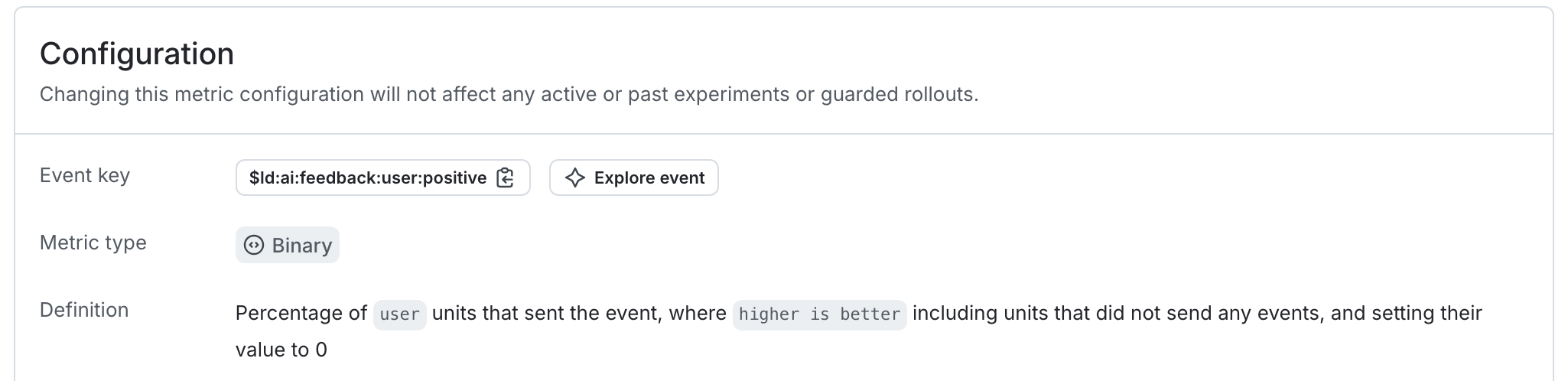
An autogenerated metric.