

Overview
This topic explains how to create and use agent-based AI Configs to support structured, multi-step AI workflows with shared configuration and performance monitoring. Agent-based AI Configs define workflow behavior through a single instructions field that describes how the model should operate across multiple coordinated steps. This structure is useful for tasks that require multi-step execution. The instructions define the goal of the task and how the model should proceed. You can combine multiple agent-based AI Configs into workflows where each agent performs a specific role. For example, one agent may analyze a request, another may validate input, and another may retrieve information. Your application coordinates these interactions while LaunchDarkly manages configuration for each agent. Agent-based AI Configs use a configuration model similar to other AI Configs, including variations, targeting, approvals, and monitoring. However, LaunchDarkly evaluates agent-based AI Configs differently to provide instructions, model details, provider information, attached tools, and a tracker instance for recording metrics. Agent mode is optimized for structured, multi-step workflows. Completion mode and agent mode differ in how behavior is defined, but both can integrate with external tools depending on your SDK and model provider implementation. As a result, using agent-based AI Configs helps you manage workflow behavior safely and update logic without redeploying code. It also lets you observe performance across environments. You can attach judges to completion-mode AI Config variations in the LaunchDarkly UI. For agent-based variations, invoke a judge programmatically using the AI SDK. To learn more, read Online evaluations in AI Configs.Capabilities and use cases
Agent-based AI Configs support structured workflows that involve multiple coordinated steps. Teams use them to define structured behavior and manage complex workflows through configuration rather than application code. Tools are reusable, versioned resources defined at the project level and can be attached to AI Config variations as needed. You can use agent-based AI Configs to:- Guide models through multi-step tasks using structured instructions.
- Coordinate multi-step workflows that may interact with external systems.
- Reuse shared tools across multiple agents and variations.
- Monitor workflow performance and compare variations.
- Update workflow behavior safely using targeting rules, approvals, and guarded rollouts.
Create and configure an agent
To create an agent-based AI Config:- In the left navigation, select AI Configs, then click Create AI Config.
- In the “Create AI Config” dialog, click Agent-based.
- Enter a name for the AI Config.
- (Optional) Click Edit key to update the AI Config key. You use the key to reference the AI Config in your code.
- (Optional) Select a maintainer.
- Click Create. LaunchDarkly creates the AI Config and displays the configuration panel.
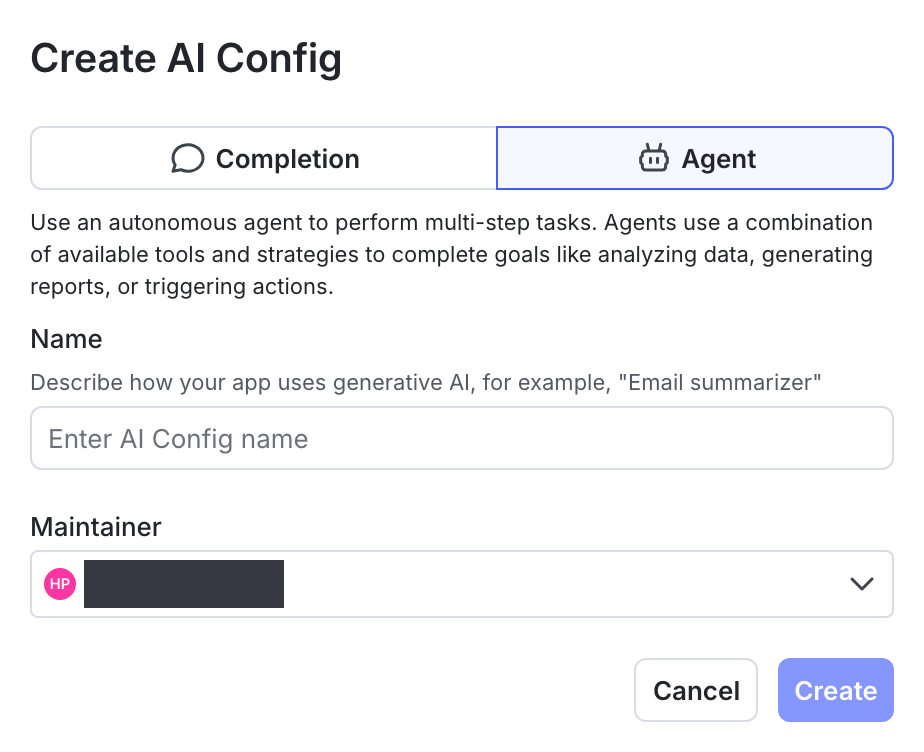
The "Create AI Config" dialog.
Retrieve and use agent-based AI Configs in your application
Use the LaunchDarkly Node.js (server-side) AI SDK or Python AI SDK to retrieve agent-based AI Configs for a context. Agent-based AI Configs are retrieved using the agent-specific SDK methods, such as.agentConfig() or .agentConfigs(). These methods return the evaluated agent, including its instructions, model configuration, provider information, attached tools, and a tracker instance for recording metrics.
This allows you to compose multi-agent workflows where each agent has a distinct role and can be evaluated independently.
These examples assume that you have already initialized the AI client and created a context. To learn how to do this, read Quickstart for AI Configs.
Agent configuration structure
Agent-based AI Configs share the same overall configuration model as completion-mode AI Configs, but have a different variation structure. Each AI Config includes amode property that is set at creation time and determines which fields are required and how targeting, evaluation, and metrics are handled.
In agent-based AI Configs, each variation requires a description and an instructions field. These fields define how the model should behave when evaluated. Agent-based variations do not use message roles or message history. Workflow behavior is defined through the instructions field and any configuration associated with the variation.
Because agent-based AI Configs use an instructions-based structure rather than message-based prompts, the Monitoring tab may display metrics differently for agent-based workflows.
Monitor agent performance
The Monitoring tab displays metrics for each variation of an agent-based AI Config. Metrics include:- Generations
- Time to generate
- Time to first token
- Token usage
- Costs
- Error rate
- Satisfaction, when instrumented