

Overview
LaunchDarkly complies with some of the strictest privacy and security standards available today, including the European Union’s General Data Protection Regulation (GDPR) and the California Consumer Privacy Act (CCPA). It is SOC 2 Type II, ISO 27001, and ISO 27701 compliant, as well as FedRAMP Moderate Authority to Operate (ATO) rated. LaunchDarkly handles customer and end-user data in compliance with these standards. Depending on your organization’s security and privacy requirements, you may need to further restrict what end-user data you send to LaunchDarkly. This guide helps you understand what end-user data LaunchDarkly can access, how you can restrict or eliminate that access, and what features we provide to help you minimize access. If you’re an existing or potential customer of LaunchDarkly with questions about how we handle sensitive or third-party data, this guide is for you.About end-user data
End-user data is information about your customers that your product sends to LaunchDarkly as part of a context. This is different from information about your account members, who are part of your LaunchDarkly account. End user data can include personally identifiable information (PII), including names, email addresses, or other unique identifiers, depending on how you define your context kinds. This data can be business-critical information and can present significant risk if exposed to unauthorized parties. To learn more about contexts, read Contexts. If you are using one of LaunchDarkly’s mobile SDKs, end user data can optionally include environment attributes from the device that is running your app, including the application name and version, the operating system name and version, and the device model and manufacturer information.How Launch
Darkly receives end-user dataYou configure the LaunchDarkly SDK to collect and transmit attributes from contexts to LaunchDarkly for the purpose of flag targeting. When you evaluate a feature flag in your SDK, you must provide a context, which is a generalized way of referring to the people, services, machines, or other resources that encounter feature flags in your product. The context includes the context kind and the values of any attributes for particular end users visiting your application. To learn more about the built-in attributes LaunchDarkly suggests you collect, read Built-in attributes. When you configure a mobile SDK, you must explicitly instruct the SDK whether or not to collect environment attributes data from the device. If you enable this collection, the data is included in the context. To learn more, read Automatic environment attributes. LaunchDarkly SDKs do not store or have access to end-user data outside of what you provide in the contexts. For example, LaunchDarkly SDKs do not store cookies.How Launch
Darkly handles end-user dataThis section discusses how LaunchDarkly receives, stores, and transmits end-user data.Consider data requirements
Every company has different types of data they collect and use for various purposes. Consider whether data is advantageous for your business to collect, and if any data exposes you to unwanted risk. For data that presents a risk, understand your requirements for handling that data. If you are collecting data, examine the methods you use to store it, and how long you want to keep it. When you pass data through LaunchDarkly, consider whether the end users affected are protected by regional laws that restrict which data you can transmit or we can receive. You may wish to default to a more restrictive set of data transmitted and stored than is required by your home country in order to comply with relevant international laws. LaunchDarkly is a multi-tenant platform. This means that, with some exceptions, LaunchDarkly stores data in the same place and uses the same application to respond to customer requests. Exceptions to this include certain large customers and customers who are members of the United States federal government. Multi-tenant software has a broader security footprint because more people access the same database than they would in a single-tenant instance. You may want to restrict which data you send to LaunchDarkly because of this, although multi-tenant software architecture is very common and extremely low-risk. When you pass data to LaunchDarkly, it is never available to anyone to whom you have not granted permission, regardless of where it is stored. Depending on the requirements of your organization, you may want to limit or completely restrict the data you send to LaunchDarkly.How the Launch
Darkly SDK you use affects context dataLaunchDarkly SDKs have different constraints that affect context data. Specifically, client-side SDKs differ from server-side SDKs in the following ways:- Each flag that you want client-side or mobile SDKs to evaluate must be explicitly available to them. To do this, select the toggles in the “Advanced controls” section of the flag’s right sidebar. LaunchDarkly accounts created after October 21, 2025 have this box checked by default. To learn more, read Client-side ID.
- By default, client-side SDKs aren’t authenticated. Because of this, one end user could use another end user’s account to evaluate flags not meant for them. To authenticate context data, you can enable the SDK’s secure mode, which requires you to pass a server-generated hash in each evaluation context. To learn more, read Secure mode.
- Client-side SDKs send context data in the URL as a
GETquery parameter. If you are concerned about that data being stored in logs or by intermediary proxies, you can use theuseReportsetting to use the HTTPREPORTverb. This sends the evaluation context in the request body, rather than in the header. To learn more, read Use REPORT in the JavaScript SDK.
How end-user data can be accessed within Launch
DarklyThis section discusses how members of your LaunchDarkly team may be able to access end-user data, depending on how your team is configured. You can configure LaunchDarkly features to increase the security of your LaunchDarkly project. Some of these features are optional, but as a best practice we recommend using as many of these features as are available on your plan.Account member access
Every account member with a LaunchDarkly Viewer project role in your LaunchDarkly project can view context and flag information, including targeting data. Account members with LaunchDarkly Project Admin, Maintainer, or Developer project roles, or with a base role of Writer, Admin, or Owner, can configure flag settings, including targeting flags by PII like end user email addresses. Consider if your organization needs to restrict which account members can control access to this data. The exceptions to this are if an account member is assigned:- the LaunchDarkly Member organization role, and no project role, or
- the No access base role, or
- another role with the
viewProjectaction set todeny.TheviewProjectaction controls a role holder’s access to an entire project by preventing or granting them viewing rights to the project. Viewing rights are required for any other permissions in a project to take effect, so restricting viewing rights effectively removes all access to the project. To learn more, read Roles.
Multi-factor authentication
Multi-factor authentication (MFA) requires you to use a second verification step in addition to your password to log in to a service, app, or website. You or an Administrator can enable MFA for your LaunchDarkly account. To learn more, read Multi-factor authentication.Single sign-on
Single sign-on (SSO) allows your team to authenticate with LaunchDarkly using the same identity provider (IdP) you use for your other internal and external services. LaunchDarkly supports both SAML and SCIM-based SSO.To learn more, read Single sign-on.How to minimize end-user data sent to Launch
DarklyLaunchDarkly does not have guardrails that prevent you from sending PII.Further hardening the privacy of your LaunchDarkly projects may require some LaunchDarkly features to stop working or cause performance degradation.
Use REPORT in the Java
Script SDKYou can configure the JavaScript SDK to use the REPORT HTTP verb instead of GET. In this model, the REPORT verb forces evaluation contexts to be sent as request bodies instead of as path parameters. Path parameters are frequently logged and easy for proxies to observe, but request bodies are typically not logged or stored. In addition, LaunchDarkly uses end-to-end encryption and all communication occurs over HTTPS. Unless a malicious third party breaks transport layer security (TLS) encryption, a man-in-the-middle attack is impossible. Using the REPORT HTTP verb requires an additional option when configuring the JavaScript SDK.Here is an example where theuseReport parameter is enabled:
Evaluate flags against a Relay Proxy
The LaunchDarkly Relay Proxy provides mobile and client-side evaluation endpoints. You can initialize a client-side SDK directly against the Relay Proxy instead of connecting to LaunchDarkly. The benefit of this approach is that the Relay Proxy runs within your own infrastructure, so no private data ever needs to leave the network. Additionally, the SDK functions in the same way that it would function in a standard environment, so you can still take advantage of LaunchDarkly’s streaming API and real-time updates to flag changes. To learn more, read The Relay Proxy.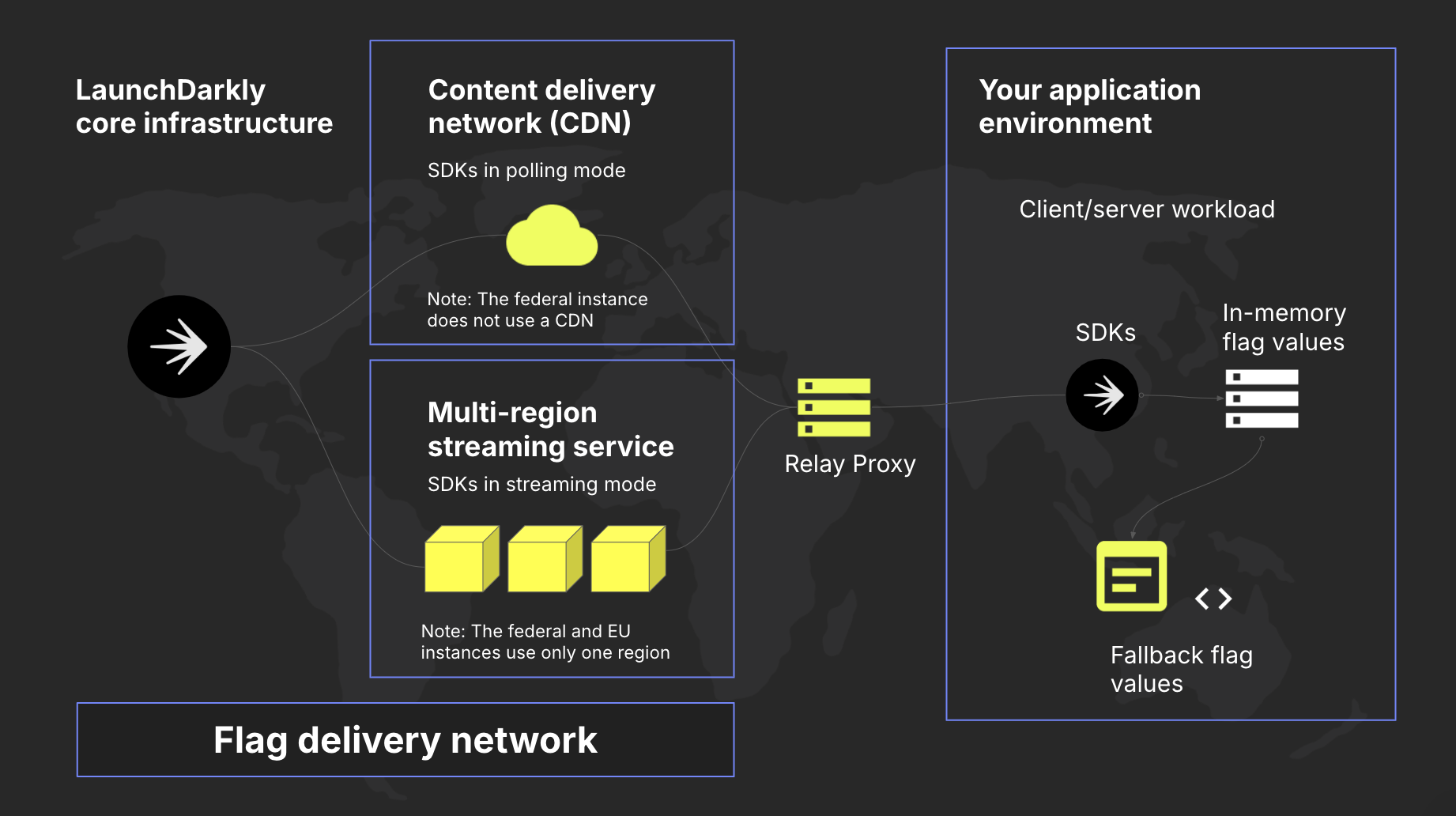
A diagram showing a Relay Proxy's position in LaunchDarkly's network architecture.
Bootstrap flag values against a server-side SDKSimilar to using a Relay Proxy, you can get the initial payload for evaluation contexts from one of your own servers instead of reaching out to Launch
Darkly. This technique is referred to as bootstrapping. In this model, the evaluation context values are acquired from a server-side SDK instance while the JavaScript SDK initializes.
Configure your SDK: Bootstrapping
Use private attributes
You can use LaunchDarkly’s private attribute settings to restrict the context data your service sends to LaunchDarkly while still using that data for flag targeting. You can make all attributes private, choose specific attributes to make private, or make attributes private for specific context kinds. To learn more, read Using private context attributes.Use anonymous contexts
Anonymous contexts do not register as context instances in your Contexts list, and so the usual data LaunchDarkly collects isn’t available for an anonymous context instance. You can use anonymous contexts to hide personally identifiable information (PII), but we recommend using private attributes instead. To specify that a context should not be indexed, setanonymous to true.To learn more, read Anonymous contexts.
Disable environment attributes on a mobile device
When you configure a mobile SDK, you must explicitly instruct the SDK whether or not to collect environment attributes from the device, such as the application name and version, the operating system name and version, and the device model and manufacturer information. If you disable this collection, the data is not collected, is not included in the evaluation context, and will not appear on the Contexts list. To learn more, read Automatic environment attributes.Remove PII from Launch
DarklyIn the event that you accidentally send PII to LaunchDarkly, you should take the following steps to remove the information from LaunchDarkly:- Revert the change or action you took that sent the data to LaunchDarkly.
- Find any context instances with exposed PII using the search context instances API endpoint.
- Delete the affected context instances from the Contexts list in one of two ways:
- using the user interface (UI), or
- using the API with the delete context instances endpoint. If you want to delete all context instances out of an environment, you can find them using the search context instances API endpoint.