

Code references are only available to customers on select plans. To learn more, read about our pricing. To upgrade your plan, contact Sales.
Overview
This topic explains how to use theld-find-code-refs utility with Bitbucket code references to create code references in LaunchDarkly.
You can use the ld-find-code-refs utility with Bitbucket Pipelines to automatically populate code references in LaunchDarkly. To do this, you must create a Pipes configuration using LaunchDarkly’s code reference pipe.
Prerequisites
To set up Bitbucket Pipes, you must have the following prerequisite:- A Bitbucket Pipelines configuration file. To create one, navigate to the Pipelines section of your Bitbucket repository.
- An API access token with write permissions for the
code-reference-repositoryresource, either through a base role, a LaunchDarkly-provided project role, or another role that you have created. To learn more, read API access tokens and Code reference actions.
Set up the Pipes configuration
To set up the Bitbucket Pipes configuration:- Create a new Pipeline configuration in your Bitbucket repository.
- Configure the Pipeline to run on
pushusing thedefaultconfiguration. Include the following variables:
LD_ACCESS_TOKEN: This secured variable should be your API access token.LD_PROJ_KEY: This should be your LaunchDarkly project key. To learn how to find your project key, read Project keys.
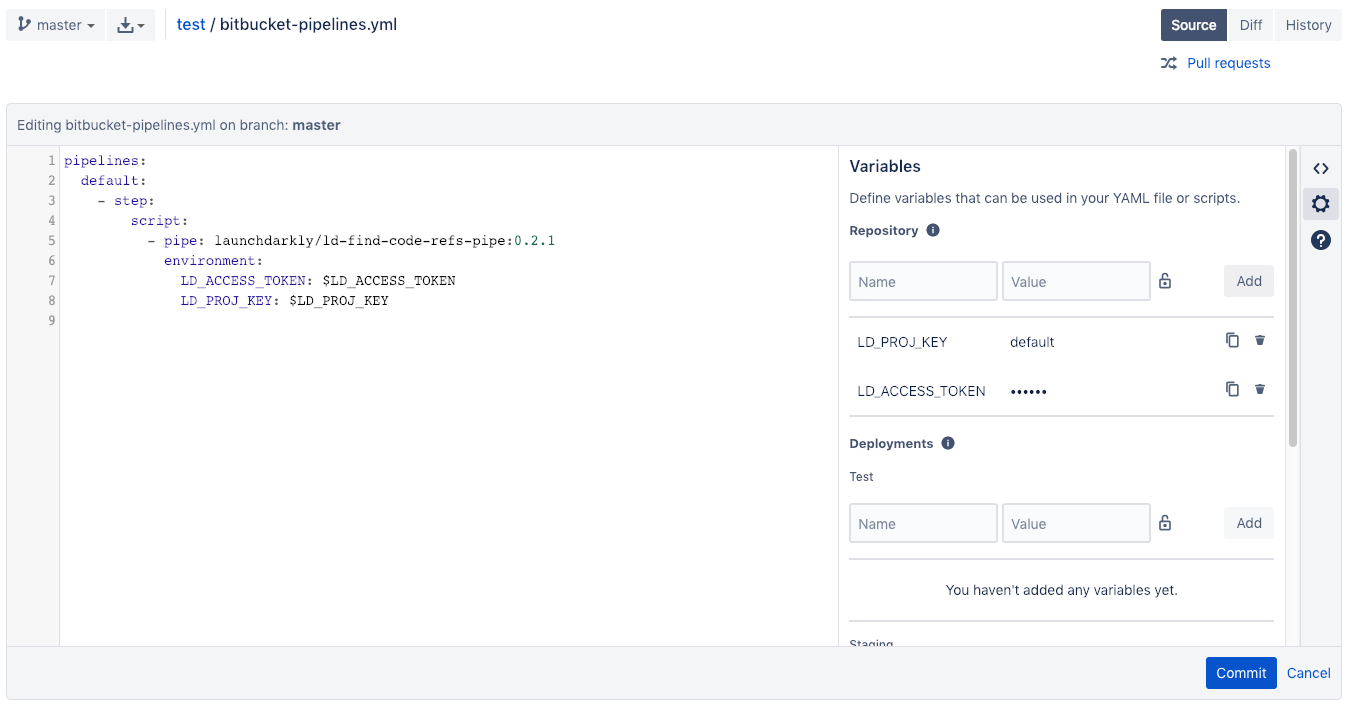
An example Pipeline configuration.
LD_PROJ_KEY and LD_ACCESS_TOKEN environment variables as repository variables:
- Confirm that the pipeline is working by creating a new pull request with the workflow file and visiting the Pipelines page on your repository’s webpage. If your pipeline fails, there may be a problem with your configuration. To investigate, check the pipeline’s logs to view any error messages.