

Overview
This guide provides best practice advice for using LaunchDarkly in serverless and short-lived environments. While most uses of serverless architecture require no extra configuration, some apps may benefit from additional configuration to ensure consistent high performance. If your app is very sensitive to start up run times, you may want to use LaunchDarkly with the Relay Proxy hosted on a long-lived server to reduce initialization latency. To learn more, read Reducing initialization latency in short-lived and serverless environments. If you do not need to use the Relay Proxy, an alternative option is described here. This guide assumes that you have already chosen to use serverless functions in your application architecture.Concepts
To use this guide effectively, you should understand the following concepts:Serverless
Serverless computing is a cloud computing model where a cloud provider runs the server and dynamically manages the allocation of machine resources.Function-as-a-Service (Faa
S)FaaS services are serverless computing services that allow customers to develop, run, and manage small units of functionality. These units can be developed and deployed independently, and then connected later to form a single app. This model contrasts with the more traditional software development model, in which functions are compiled together into a single monolithic unit before deployment.Launch
Darkly in a serverless infrastructureFaaS platforms let developers code in the languages they know while reducing the effort required to create and manage production infrastructure. If you’re considering using LaunchDarkly in a serverless or containerized app, the LaunchDarkly SDK in its default configuration has no significant performance impact in a serverless environment. However, if your app is sensitive to initialization performance, consider configuring the LaunchDarkly SDK to use a persistent local flag store. A local flag store can increase initialization speed.How the SDKs balance performance
Each LaunchDarkly SDK is designed to have minimal impact on application performance. In its default configuration, its impact occurs almost entirely in the app’s initialization phase. Here’s how the SDK interacts with your app:- While the app starts, the SDK connects to LaunchDarkly and downloads the project’s flags to an in-memory store. This network connection is held open while the app runs so that flag updates are received immediately.
- After the app initializes, the in-memory flag store is used for flag evaluation functions such as variation calls. These functions run instantly, with no need to wait for network input/output (I/O).
Both of the examples below use AWS Lambda, but you can use this approach for other FaaS platforms as well.
Option 1: Use the SDK as normal
For smaller workloads, you can use the LaunchDarkly SDK as you normally would. Here is a code sample that shows how to evaluate a feature flag with the NodeJS runtime in AWS Lambda:{ stream: false } in the configuration options.
We strongly recommend using streaming mode, but the specifics depend on the use case for your Lambda:
- If your Lambda is invoked multiple times per minute or more, streaming mode is preferable because invocations are likely to reuse an existing streaming connection.
- If your Lambda’s invocation volume often spikes to higher than usual levels, it is sensitive to execution context initialization time, and you are not using provisioned concurrency to minimize cold starts, consider using polling mode to receive flag updates. Polling mode may provide better initialization performance in this use case.
- If your Lambda is invoked infrequently, you can use either streaming or polling mode to receive flag updates. To learn more, read
streamin the Node.js (server-side) SDK API documentation.
Option 2: Use a persistent feature store
If your app often has high levels of concurrency or sensitivity to cold starts, you may need to reduce the initialization time that LaunchDarkly takes. You can do this by setting up a persistent feature store to serve flag values locally. In this configuration, the LaunchDarkly SDK no longer downloads the project’s entire flag set for later evaluation. Instead, it connects to the configured feature store at initialization time, then queries the feature store for each flag evaluation call. To learn more, read Persistent data stores. The example below is a five-step process to configure a feature store:- Use a cloud-local storage service to act as a flag store.
- Use a dedicated AWS Lambda function to update the flag store when a flag configuration changes.
- Use an AWS API Gateway endpoint to give the Lambda function a consistent HTTPS URL.
- Create a LaunchDarkly webhook to send flag changes to the API Gateway URL.
- Configure the LaunchDarkly SDK to read flags from the persistent flag store.
RedisFeatureStore method. The AWS Lambda function built on the NodeJS runtime could look like this:
Initializing the LaunchDarkly SDK inside the handler is not best practice, and should be done only if strictly necessary.
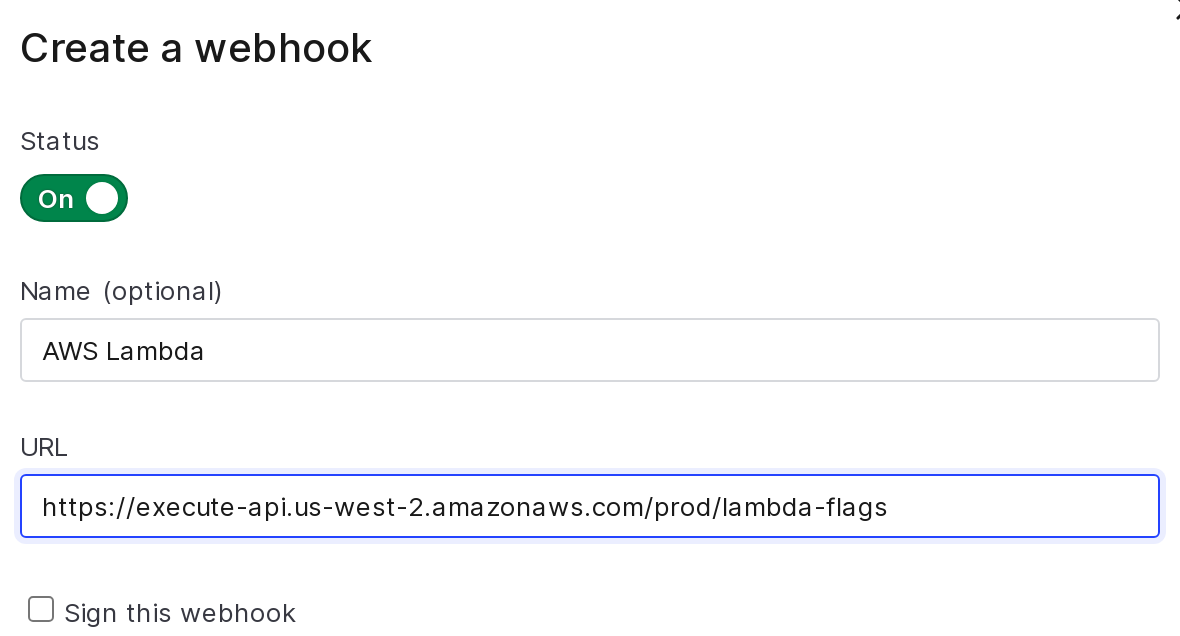
Creation of a LaunchDarkly webhook which sends flag updates to a Lambda function.

Configure your SDK: Using daemon mode
Send analytics events to the Contexts list
The Contexts list is populated with data from analytics events. You must call close in your SDK before shutting down to ensure the SDK sends analytics events and your Contexts list displays context data.Try it in your SDK: Shutting down