

Overview
This topic explains how to sendcustom events using the track feature in each SDK. The track feature is available in server-side, client-side, and most edge SDKs.
Tracking events
The track feature lets you record actions your customers take in your application as events. Events are specific to one LaunchDarkly environment and use an event key. You can use custom events to create LaunchDarkly metrics for use in experiments and guarded rollouts. To learn more, read Metrics. This is an example of a custom conversion binary metric with an event key ofconversions-to-paid-accounts:
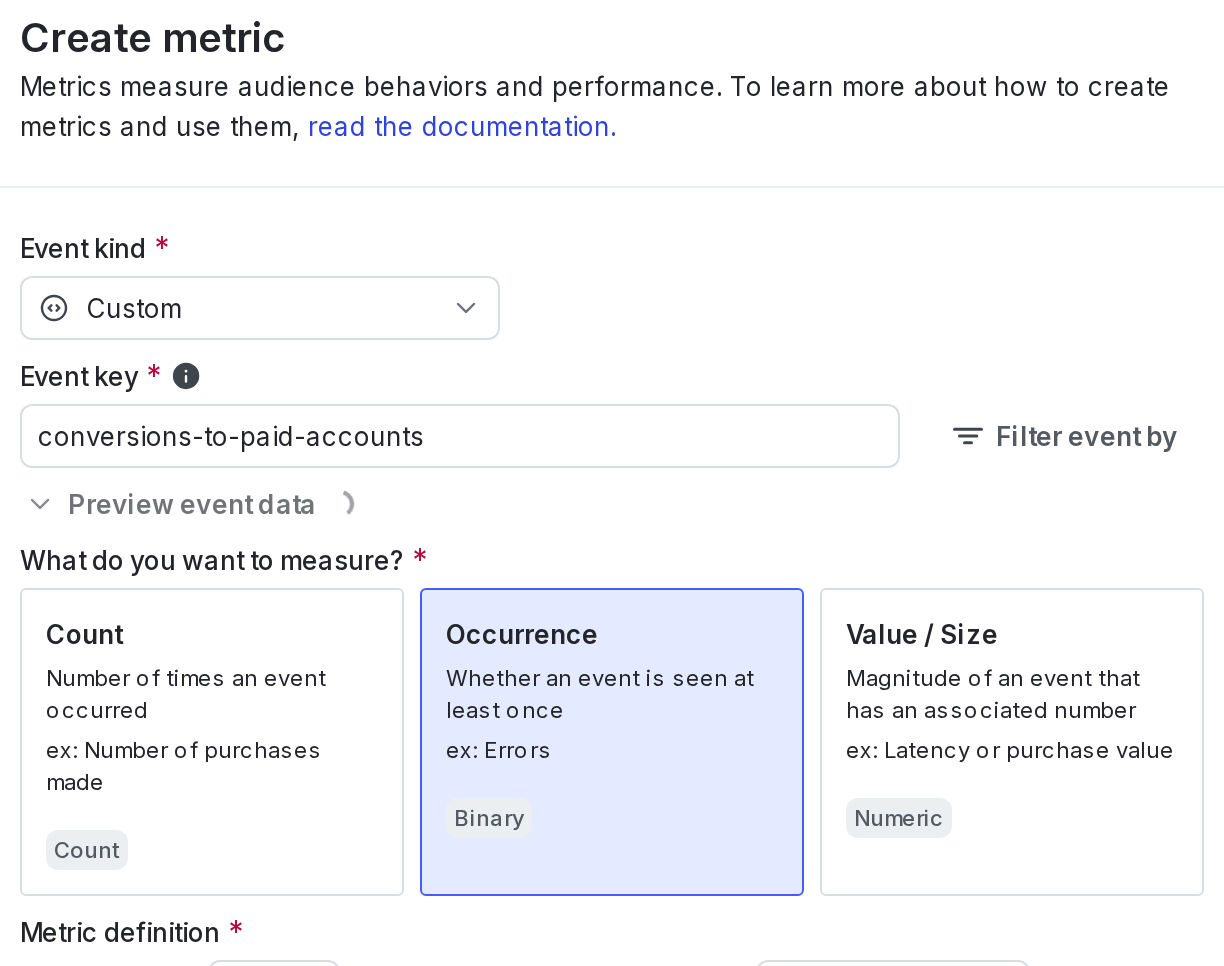
A custom conversion binary metric.
variation() produces analytics events which you can observe on your LaunchDarkly Live events page. The initial context you specify in the client constructor, as well as any context you specify with identify(), produces an analytics event which is how LaunchDarkly receives your context data. To learn more, read Live events. In a few client-side SDKs, evaluating flags with allFlags() also produces analytics events. To learn more, read About the all flags feature.
To learn more about the different kinds of events SDKs send to LaunchDarkly, read Analytics events. To learn how to view a list of all of the metric events your SDKs are sending to LaunchDarkly, read Viewing incoming events.
Details about each SDK’s configuration are available in the SDK-specific sections below.
Client-side SDKs
This feature is available in the following client-side SDKs:- .NET (client-side)
- Android
- C++ (client-side)
- Electron
- Flutter
- iOS
- JavaScript
- Node.js (client-side)
- React Native
- Roku
.NET (client-side)
Expand .NET (client-side) code sample
Expand .NET (client-side) code sample
Track method lets you record custom events end users take in your application using an event key.Here’s how:Track, using the LdValue class to represent any value that can be encoded in JSON. To learn how, read LdClient.Track.Android
Expand Android code sample
Expand Android code sample
track method lets you record custom events end users take in your application using an event key. You can also attach custom JSON data to your event by passing an extra JsonElement parameter to track.Here’s how:track.You can also attach custom data to your event by calling trackData or trackMetric.C++ (client-side)
Expand C++ (client-side) code sample
Expand C++ (client-side) code sample
Track method lets you record custom events end users take in your application using an event key.Here’s how:Track.Electron
Expand Electron code sample
Expand Electron code sample
track function lets you record custom events in your application with LaunchDarkly using an event key.Here’s how:Flutter
Expand Flutter code sample
Expand Flutter code sample
track method lets you record custom events end users take in your application using an event key. You can also attach custom data to your event by passing an extra LDValue parameter or num parameter to track.Here’s how:track.iOS
Expand iOS code sample
Expand iOS code sample
track method lets you record custom events end users take in your application using an event key.In the iOS SDK, track is a custom event added to the LDClient event store. A client app can set a tracking event to allow client customized data analysis. After an app has called track, the app cannot remove the event from the event store. LDClient periodically transmits events to LaunchDarkly based on the frequency set in LDConfig.eventFlushInterval. The LDClient must be started and online.After the SDK’s event store is full, the SDK discards new events until the event store is cleared when it reports events to LaunchDarkly. Configure the size of the event store using LDConfig.eventCapacity. The first parameter, key, is the key for the event. The SDK does nothing with the key, which can be any string the client app sends. The second parameter, data, is the data for the event. The data parameter is optional. The SDK does nothing with the data, which can be any valid JSON item as an LDValue instance.Optionally, you can add a metricValue parameter of type Double to track in Swift or as a required parameter to the overloaded track method in Objective-C.JavaScript
Expand JavaScript code sample
Expand JavaScript code sample
track method lets you record custom events end users take in your application using an event key.To call track:- With Data Export, the second argument gives additional information without saving the data to the LaunchDarkly context. To learn more about Data export, read Data Export.
- If you define clicked or tapped conversion or page viewed conversion metrics in LaunchDarkly, the SDK sends them automatically after you have initialized the client. You do not have to do anything else with the client to send click or page view events. The SDK will generate
page viewevents correctly regardless of how the URL is changed, such as by the HTML5 history API or by changing the URL hash fragment. To learn more about metrics, read Metrics.
track.If you are using the LaunchDarkly observability SDKs, calling track() also automatically indexes your sessions so that you can search for sessions where the end user has completed an action.click and page view events correctly.sendEvents configuration to false.Version 3.x of the JavaScript SDK respects the Do Not Track events header. If an end user has Do Not Track enabled in their browser, v3.x of the SDK does not send analytics events for flag evaluations or metrics to events endpoints (events.launchdarkly.com for commercial, events.launchdarkly.us for federal, or events.eu.launchdarkly.com for EU).In addition, ad blocking software may block analytics events from being sent. This does not impact feature flag evaluations. To learn more about the events SDKs send to LaunchDarkly, read Analytics events.Node.js (client-side)
Expand Node.js (client-side) code sample
Expand Node.js (client-side) code sample
track method lets you record custom events end users take in your application using an event key.Here’s an example:track.React Native
Expand React Native code sample
Expand React Native code sample
track method lets you record custom events end users take in your application using an event key. You can also attach custom JSON data to your event by passing an extra parameter to track.metricValue parameter to the track method if you are using the latest version of Experimentation.Here’s how:track.Roku
Expand Roku code sample
Expand Roku code sample
track method lets you record custom events end users take in your application using an event key.Here’s how:Server-side SDKs
This feature is available in the following server-side SDKs:- .NET (server-side)
- Apex
- C++ (server-side)
- Erlang
- Go
- Haskell
- Java
- Lua
- Node.js (server-side)
- PHP
- Python
- Ruby
- Rust
.NET (server-side)
Expand .NET (server-side) code sample
Expand .NET (server-side) code sample
Track method lets you record custom events end users take in your application using an event key.Here’s an example:Track. To do this, use the LdValue type, which can contain any kind of data supported by JSON. You can also pass another parameter for a custom metric value.Apex
Expand Apex code sample
Expand Apex code sample
track method lets you record actions your users take in your you do application. You can also attach custom JSON data to your event by passing an LDValue parameter to track, or a custom metric value by passing a Double parameter.Here’s how:C++ (server-side)
Expand C++ (server-side) code sample
Expand C++ (server-side) code sample
Track method lets you record custom events end users take in your application using an event key. Optionally, you can include additional data associated with the event.Here’s how:Track() in Client.Erlang
Expand Erlang code sample
Expand Erlang code sample
track method lets you record custom events end users take in your application using an event key.Here’s how:track.You can also attach a JSON object containing arbitrary data to your event, or a custom metric value. To learn how, read track_metric.Go
Expand Go code sample
Expand Go code sample
Track method lets you record custom events end users take in your application using an event key.In this example, we use TrackEvent to send an event with the key example-event-key.Here’s how:TrackData, which takes an extra parameter. Or, if you are using experimentation, you can specify a numeric metric with TrackMetric.Haskell
Expand Haskell code sample
Expand Haskell code sample
track method lets you record custom events end users take in your application using an event key.Here’s how:track.Java
Expand Java code sample
Expand Java code sample
track method lets you record custom events end users take in your application using an event key.Here’s how:track, trackData. You can set the data to any value that can be represented in JSON. To learn more, read LDValue.If you are using Experimentation, you can specify a numeric metric with trackMetric.Lua
Expand Lua code sample
Expand Lua code sample
track method lets you record custom events end users take in your application using an event key. Optionally, you can include additional data associated with the event.Here’s how:track.Node.js (server-side)
Expand Node.js (server-side) code sample
Expand Node.js (server-side) code sample
track method lets you record custom events end users take in your application using an event key.Here’s how:PHP
Expand PHP code sample
Expand PHP code sample
track method lets you record custom events end users take in your application using an event key.Here’s how:track. To learn how, read track().Python
Expand Python code sample
Expand Python code sample
track method lets you record actions end users take on your site. This lets you record events that take place on your server.Here’s how:track.Ruby
Expand Ruby code sample
Expand Ruby code sample
track method lets you record custom events end users take in your application using an event key.Here’s how:track.Rust
Expand Rust code sample
Expand Rust code sample
track method lets you record custom events end users take in your application using an event key.In this example, we use track_event to send an event with the key example-event-key.Here’s how:track_data, which takes an extra parameter. Or, if you are using experimentation, you can specify a numeric metric with track_metric.Edge SDKs
All edge SDKs can be used with one of the LaunchDarkly client-side SDKs as follows:- The edge SDK gets all flags at the edge for a given context, and bootstraps them onto a cached payload
- The client-side SDK initializes the bootstrapped payload
- The client-side SDK evaluates the flags and sends events back to LaunchDarkly
Cloudflare
Expand Cloudflare code sample
Expand Cloudflare code sample
track method lets you record custom events end users take in your application using an event key.Here’s how:flush after sending any events:Fastly
Expand Fastly code sample
Expand Fastly code sample
track method lets you record custom events end users take in your application using an event key.Here’s how:track.When you are working with an edge SDK, you must also flush the events before your worker exits to ensure that they are sent back to LaunchDarkly. If you call flush inside the waitUntil method, then flushing events will not impact the handler’s response time. To learn more, read the Fastly Compute documentation on waitUntil.Here’s how:Vercel
Expand Vercel code sample
Expand Vercel code sample
track method lets you record custom events end users take in your application using an event key.Here’s how:flush inside the waitUntil method, then flushing events will not impact the handler’s response time. To learn more, read the Vercel documentation on waitUntil.Here’s how: