

Overview
This topic explains how to configure LaunchDarkly SDKs to send application metadata to LaunchDarkly. This feature is available for client-side and server-side SDKs.Customize application information
Some LaunchDarkly SDKs support configuration options for specifying application information, including application identifier and version. When you configure these options, the SDK automatically sends this application information to LaunchDarkly. In the LaunchDarkly user interface (UI), the application information appears in the following places:- Application information appears in the “From source” field on Context details pages. To learn more, read The context details page.
- Application information appears in the Applications page. From this page, you can also set additional properties, such as whether an application version is supported or unsupported. To learn more, read Applications and application versions.
- Application metadata also appears on the Usage pages. This information can help you identify which applications are consuming Service Connections.
ld_application context that the SDK then includes in each evaluation context. To learn more, read Automatic environment attributes.
After the SDK has evaluated at least one feature flag using an ld_application context, you can create mobile targeting rules based on application and application version information. To learn more, read Applications and application versions and Mobile targeting.
For the SDKs that support this feature, you can send some or all of the following metadata:
- Application identifier (string): A unique identifier representing the application where the LaunchDarkly SDK is running. For example,
authentication-service. - Application name (string): A human-friendly name for the application where the LaunchDarkly SDK is running. For example,
Authentication-Service. - Application version (string): A unique identifier representing the version of the application where the LaunchDarkly SDK is running. For example, you could set this to the semantic version of your application, such as
1.0.0. If you are using engineering insights, you must set the application version either to the full secure hash algorithm (SHA) of the GitHub commit for this deployment, such asa12bcde3f45ab6c789123456d78efabcde91234f, or to the tag associated with the GitHub commit for this deployment. Learn more about sending deployment information to engineering insights. - Application version name (string): A human-friendly name for the version of the application in which the LaunchDarkly SDK is running. For example,
v1.
-, periods ., and underscores _. Spaces are converted to hyphens.
You can set these values when you configure the SDK. All connections to LaunchDarkly from a client will send the same value to LaunchDarkly, whether the connection is through streaming, polling, or events. You cannot change the value after you configure the client.
Configure application metadata for engineering insights
Engineering insights is only available to customers on select plans. To learn more, read about our pricing. To upgrade your plan, contact Sales.
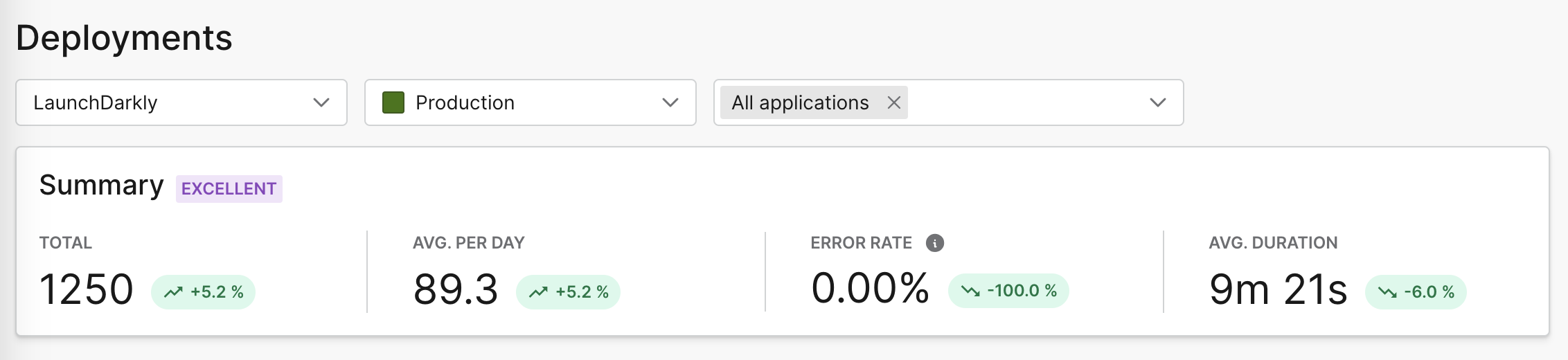
An example of deployment frequency summary in engineering insights.
Client-side SDKs
This feature is available in the following client-side SDKs:- .NET (client-side)
- Android
- C++ (client-side)
- Flutter
- iOS
- JavaScript
- Node.js (client-side)
- React Native
- React Web: The React Web SDK relies on the JavaScript SDK for this functionality.
- Roku
.NET (client-side)
Expand .NET (client-side) code sample
Expand .NET (client-side) code sample
This code sample shows you how to configure the application information:The application information is supported in .NET SDK v3.1.0 and later.If you configure the application information and have enabled automatic environment attribute collection, the values you set will override any values collected automatically. The application identifier, name, version, and version name you set explicitly will be included in the
ld_application context. To learn more, read Automatic environment attributes and application metadata configuration.To learn more about the configuration option, read ApplicationInfoBuilder.Android
Expand Android code sample
Expand Android code sample
This code sample shows you how to configure the application information:The application identifier and version are supported in Android SDK v4 and later. The application name and version name are supported in Android SDK v5 and later.If you configure the application information and have enabled automatic environment attribute collection, the values you set will override any values collected automatically. The application identifier, name, version, and version name you set explicitly will be included in the
ld_application context. To learn more, read Automatic environment attributes and application metadata configuration.To learn more about the configuration option, read ApplicationInfoBuilder.C++ (client-side)
Expand C++ (client-side) code sample
Expand C++ (client-side) code sample
This code sample shows you how to configure the application identifier and application version:To learn more, read
AppInfoBuilder.Flutter
Expand Flutter code sample
Expand Flutter code sample
This code sample shows you how to configure the application information:The application identifier and version are supported in Flutter SDK v2 and later. The application name and version name are supported in Flutter SDK v3 and later.If you configure the application information and have enabled automatic environment attribute collection, the values you set will override any values collected automatically. The application identifier, name, version, and version name you set explicitly will be included in the
ld_application context. To learn more, read Automatic environment attributes and application metadata configuration.To learn more, read LDConfig.iOS
Expand iOS code sample
Expand iOS code sample
This code sample shows you how to configure the application identifier and application version:The application identifier and version are supported in iOS SDK v8 and later. The application name and version name are supported in iOS SDK v9 and later.If you configure the application information and have enabled automatic environment attribute collection, the values you set will override any values collected automatically. The application identifier, name, version, and version name you set explicitly will be included in the
ld_application context. To learn more, read Automatic environment attributes and application metadata configuration.To learn more about the specific configuration options available in this SDK, read the SDK’s API docs.Java
ScriptExpand JavaScript code sample
Expand JavaScript code sample
This code sample shows you how to configure the application identifier and application version:To learn more about the specific configuration options available in this SDK, read the
LDOptions.Node.js (client-side)
Expand Node.js (client-side) code sample
Expand Node.js (client-side) code sample
This code sample shows you how to configure the application identifier and application version:To learn more, read
application.React Native
Expand React Native code sample
Expand React Native code sample
This code sample shows you how to configure the application information:The application identifier and version are supported in React Native SDK v7 and later. The application name and version name are supported in React Native SDK v8 and later.If you configure the application information and specify the application id, all application information will be added to the
ld_application context. Otherwise, the ld_application context will not be included. To learn more, read Automatic environment attributes and application metadata configuration.To learn more about the specific configuration options available in this SDK, read LDOptions.Roku
Expand Roku code sample
Expand Roku code sample
This code sample shows you how to configure the application identifier and application version:
Server-side SDKs
This feature is available for the following server-side SDKs:- .NET (server-side)
- C++ (server-side)
- Erlang
- Go
- Haskell
- Java
- Lua
- Node.js (server-side)
- PHP
- Python
- Ruby
- Rust
.NET (server-side)
Expand .NET (server-side) code sample
Expand .NET (server-side) code sample
This code sample shows you how to configure the application identifier and application version:For a complete list of configuration options, read the documentation for
ConfigurationBuilder.C++ (server-side)
Expand C++ (server-side) code sample
Expand C++ (server-side) code sample
This code sample shows you how to configure the application identifier and application version:To learn more, read
AppInfoBuilder.Erlang
Expand Erlang code sample
Expand Erlang code sample
This code sample shows you how to configure the application identifier and application version:For a complete list of configuration options, read the documentation for the
ldclient_config module.Go
Expand Go code sample
Expand Go code sample
The code in this sample configures the application identifier and application version:To learn more about the configuration options, read
Config.Haskell
Expand Haskell code sample
Expand Haskell code sample
This code sample shows you how to pass custom parameters to the client by creating a custom configuration object.The code in this sample configures the application identifier and application version:
Java
Expand Java code sample
Expand Java code sample
This code sample shows you how to configure the application identifier and application version:For a complete list of configuration options for the client, including proxy settings, timeouts, and streaming/polling options, read the Javadoc for
LDConfig.Builder.Lua
Expand Lua code sample
Expand Lua code sample
This code sample shows you how to configure the application identifier and application version:To learn more about the configuration options, read
clientInit.Node.js (server-side)
Expand Node.js (server-side) code sample
Expand Node.js (server-side) code sample
This code sample shows you how to configure the application identifier and application version:To learn more about the specific configuration options available in this SDK, read the SDK’s API docs.
PHP
Expand PHP code sample
Expand PHP code sample
This code sample shows you how to configure the application identifier and application version:To learn more, read
ApplicationInfo. For a complete list of configuration options, read the documentation for the LDClient constructor.Python
Expand Python code sample
Expand Python code sample
This code sample shows you how to configure the application identifier and application version:To learn more, read
application. For a complete list of configuration options, read the documentation for the ldclient.config module.Ruby
Expand Ruby code sample
Expand Ruby code sample
This code sample shows you how to configure the application identifier and application version:To learn more about the specific configuration options available in this SDK, read the SDK’s API docs.
Rust
Expand Rust code sample
Expand Rust code sample
This code sample shows you how to configure the application identifier and application version:The
Config type lets you specify a variety of options. To learn more about the specific configuration options available in this SDK, read the SDK’s API docs.