

Overview
This topic explains how to use the Relay Proxy. It also explains the Relay Proxy’s two modes and gives detail on how to perform flag evaluations with the Relay Proxy. To learn more about deploying and configuring the Relay Proxy, read Deploying the Relay Proxy.Configuring an SDK to use the Relay Proxy
After the Relay Proxy is up and running, you must set certain values in your SDK’s configuration to connect to the Relay Proxy. Precise steps to set the configuration values depend on your particular SDK. The values you may replace are:-
The base URI for the polling service. The default values vary by instance:
- Commercial:
https://app.launchdarkly.com,https://sdk.launchdarkly.com, orhttps://clientsdk.launchdarkly.com, depending on which SDK you use. - Federal:
https://app.launchdarkly.us,https://sdk.launchdarkly.us, orhttps://clientsdk.launchdarkly.us, depending on which SDK you use. - EU:
https://app.eu.launchdarkly.com,https://sdk.eu.launchdarkly.com, orhttps://clientsdk.eu.launchdarkly.com, depending on which SDK you use.
- Commercial:
-
The base URI for the streaming service. The default values vary by instance:
- Commercial:
https://stream.launchdarkly.comfor server-side SDKs andhttps://clientstream.launchdarkly.comfor client-side and mobile SDKs. - Federal:
https://stream.launchdarkly.usfor server-side SDKs andhttps://clientstream.launchdarkly.usfor client-side and mobile SDKs. - EU:
https://stream.eu.launchdarkly.comfor server-side SDKs andhttps://clientstream.eu.launchdarkly.comfor client-side and mobile SDKs.
- Commercial:
-
The base URI for the events service. The default values vary by instance:
- Commercial:
https://events.launchdarkly.comorhttps://mobile.launchdarkly.com, depending on which SDK you use. - Federal:
https://events.launchdarkly.us. - EU:
https://events.eu.launchdarkly.com.
- Commercial:

Configure your SDK: Relay Proxy configuration
Configuring SDKs to use different modes
After you set up the Relay Proxy, you can configure your SDKs to run in either proxy mode or daemon mode. Which mode you choose depends on the types of SDKs you are using:- Client-side and mobile SDKs can only use the Relay Proxy in proxy mode. This is because in daemon mode, the SDK connects directly to the Relay Proxy’s data store, which is not a supported behavior for client-side SDKs.
- Server-side SDKs can use it in either mode.
Expand Using proxy mode
Expand Using proxy mode
Using proxy mode
Proxy mode is the most common use case for connecting to the Relay Proxy. LaunchDarkly SDKs are configured to run in proxy mode by default. Client-side SDKs must use proxy mode. To learn more about configuring the Relay Proxy for client-side SDKs, read the Relay Proxy GitHub repository’s Client-side/mobile connections.In proxy mode, several Relay Proxy instances should exist in a high-availability configuration behind a load balancer. Relay Proxy nodes do not need to communicate with each other. There is no master node or cluster.You can scale the Relay Proxy horizontally by deploying more nodes behind the load balancer. Do not use a single node when your SDKs are in proxy mode.Here is a diagram showing how the Relay Proxy works in proxy mode: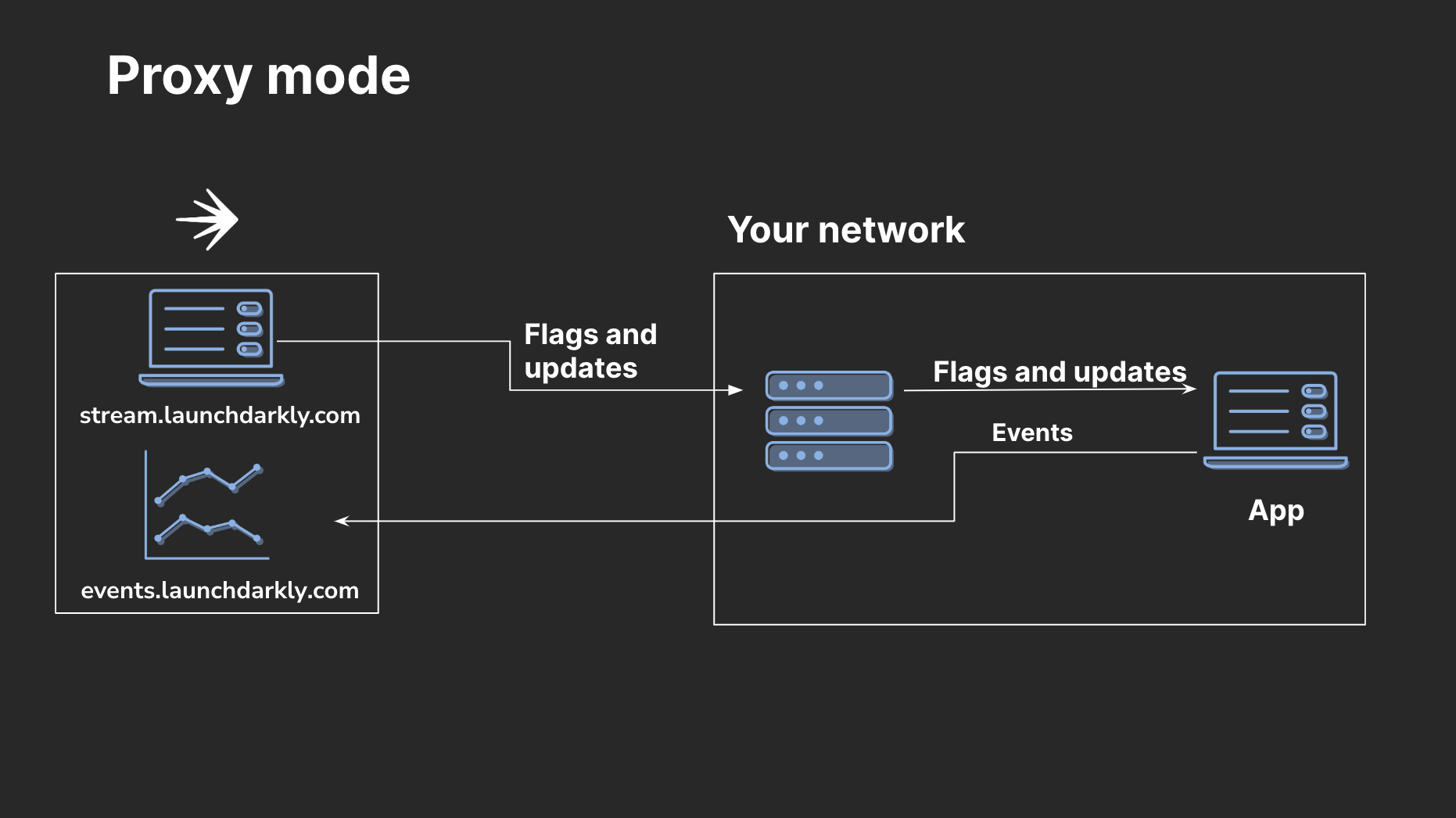
SDKs configured to use the Relay Proxy while in proxy mode.
Configure your SDK: Using proxy mode
Expand Using daemon mode
Expand Using daemon mode
Using daemon mode
Daemon mode requires that you configure server-side LaunchDarkly SDKs to communicate directly with the Relay Proxy’s persistent data store. We recommend this configuration when you’re using LaunchDarkly with PHP or in a serverless environment.There is no need to put a load balancer in front of the Relay Proxy when your SDKs are configured to run in daemon mode. You need only one instance of the Relay Proxy to keep the persistent store up to date. Multiple instances do not help the Relay Proxy to scale with the number of connected clients.The persistent store will contain the flag and segment rules for your configured environments. The amount of data is typically quite small. The data will be the same information returned by the streaming and polling endpoints. To learn more about using daemon mode, read the Relay Proxy GitHub repository’s Daemon mode.Here is a diagram showing how the Relay Proxy works in daemon mode: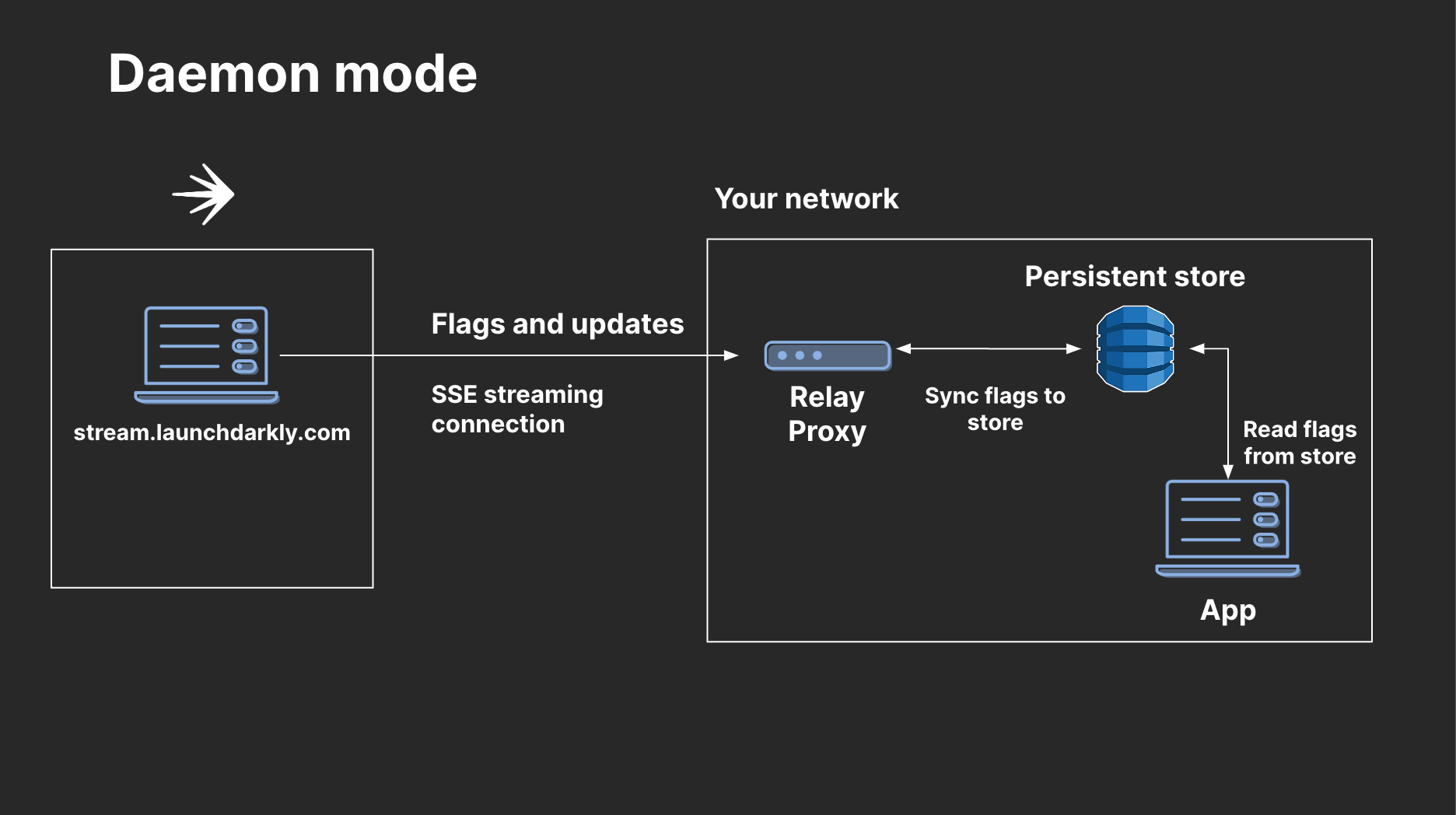
SDKs configured to use the Relay Proxy while in daemon mode.
- Configure your SDK to use a persistent data store. The SDK and the Relay Proxy must use the same data store.
- Configure your SDK to use daemon mode.
Configure your SDK: Storing data, Using daemon mode
If you have set your SDK to daemon mode and wish to restore it to proxy mode, you can do that by removing the configuration that enabled daemon mode. By default, LaunchDarkly SDKs run in proxy mode, so removing the additional configuration returns the SDK to proxy mode. To learn more about customizing SDK configuration, read the documentation for your SDK.
Using a persistent store
If you configure your SDKs for daemon mode, or if you are using synced segments or larger list-based segments with server-side SDKs, then you must use a persistent store with the Relay Proxy:- If you are using daemon mode, then you can use DynamoDB, Redis, or Consul as a persistent store.
- If you are using synced segments or larger list-based segments, then you can only use DynamoDB or Redis. To learn more, read Configuring the Relay Proxy for segments.
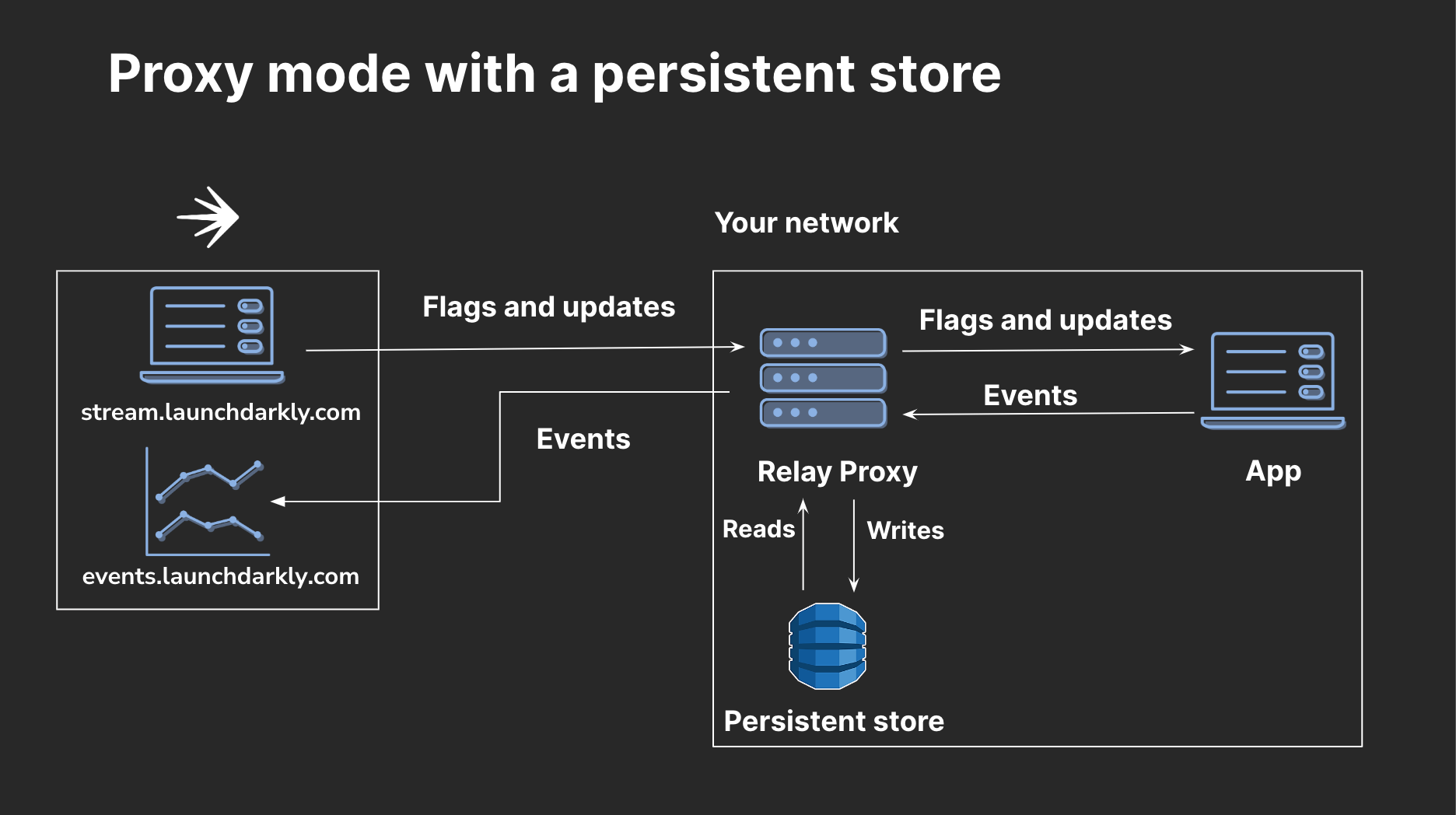
SDKs configured to use a persistent store and the Relay Proxy.
Expand Using DynamoDB with the Relay Proxy
Expand Using DynamoDB with the Relay Proxy
Using Dynamo
DB with the Relay ProxyWe generally recommend using DynamoDB for persistent storage with the Relay Proxy, because the Relay Proxy doesn’t support Redis in cluster mode or other sharding. However, using DynamoDB can incur higher costs. The Relay Proxy and LaunchDarkly SDKs will continually write updates to DynamoDB while in proxy mode. To mitigate this, consider running multiple Relays in AWS without a persistent store.Expand Using Redis with the Relay Proxy
Expand Using Redis with the Relay Proxy
Using Redis with the Relay Proxy
If you use Redis with the Relay Proxy, each of your Redis hosts will need enough RAM to load the full set of segments and flag configurations, because the Relay Proxy doesn’t support Redis in cluster mode or other sharding.Redis has a few different persistence modes, including snapshotting, write ahead log (WAL), and no persistence. Redis’ default configuration uses snapshotting, which means that if there is a Redis outage, it will be restored with a potentially stale copy of segment and flag configuration data. The Relay Proxy will refresh this.We recommend using either snapshotting or WAL when you are using Redis with the Relay Proxy. We discourage using no persistence, because it means that whenever Redis reboots, its store will be empty. The Relay Proxy will not realize that Redis is empty if it became empty after the Relay Proxy fully initialized.Configuring the Relay Proxy for segments
If you want to use synced segments or larger list-based segments with server-side SDKs, you must use a persistent store. You can either use the Relay Proxy with a persistent store, or a persistent store integration. You do not need to use both. To learn more, read SDK and integration configuration for segments.
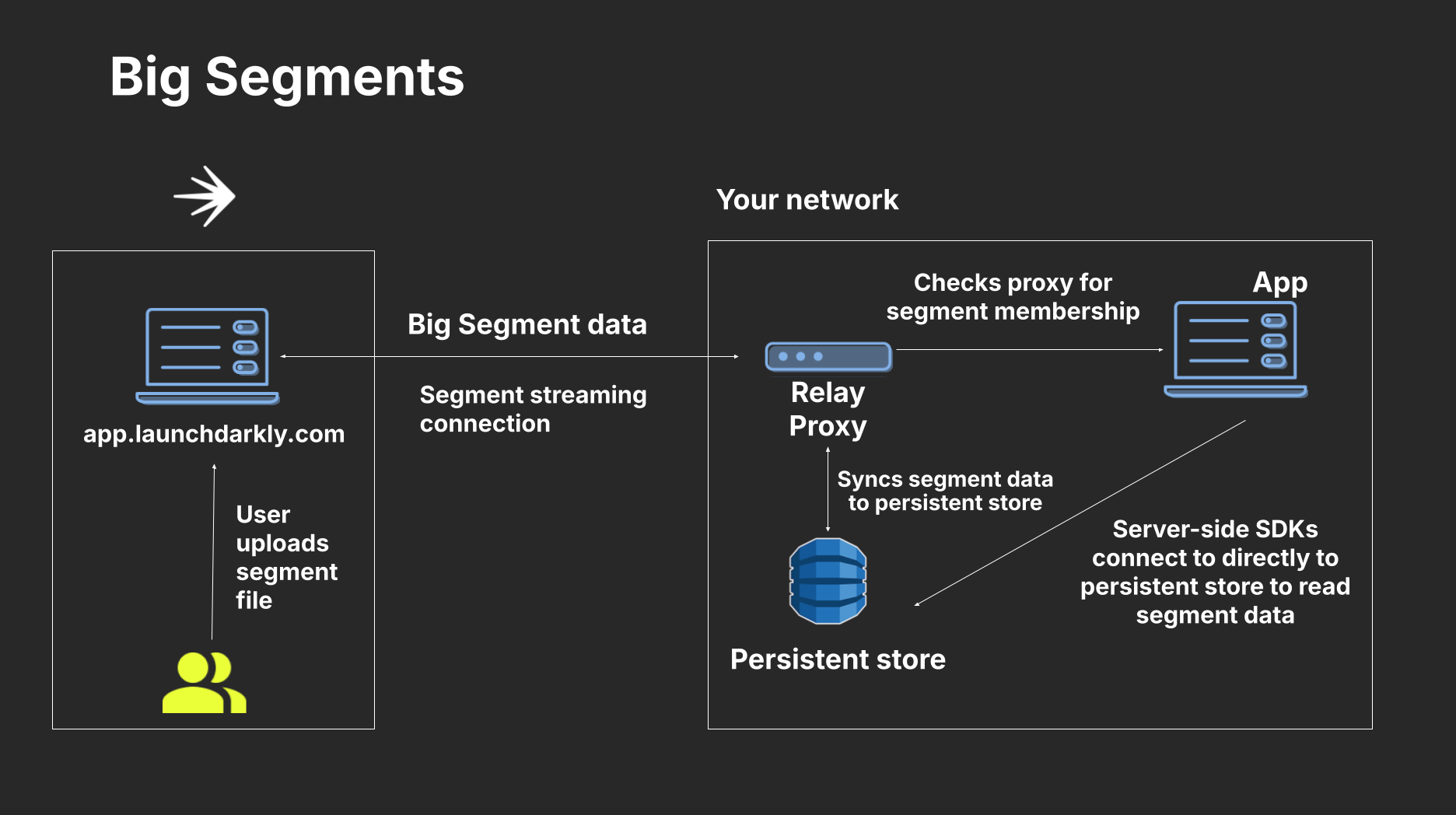
SDKs configured to use big segments and the Relay Proxy.
- If you use a client-side SDK, there’s no additional setup required. However, if you use the Relay Proxy with a client-side SDK, the Relay Proxy must be configured to use persistent storage with Redis or DynamoDB.
- If you use a server-side SDK, you must use the Relay Proxy and configure your server-side SDKs to use the same persistent storage as the Relay Proxy for segments.
- The persistent store and feature store configurations for your SDK are separate. If you are using a feature store for your SDK, you can use either the same or a different persistent store for your segments. For example, if you configure your SDK to use Redis for a feature store, you can still configure it to use DynamoDB for the persistent store for segments.
Configure your SDK: Big segments
Server-side flag evaluation using segments and the Relay Proxy
In unusual cases, server-side SDKs may return incorrect evaluations if the required segments data is unavailable. If an SDK tries to evaluate a flag rule that depends on a big segment but the segment data is unavailable, it continues evaluating the rest of the rules and records this problem in theEvaluationReason. In this case, the evaluation will return the result based on the remaining flag rules instead of the fallback value. To understand when and if this is happening, you can add code that examines the EvaluationReason.
Try it in your SDK: Evaluation reasons
Securing connections to and from the Relay Proxy
You can secure traffic into the Relay Proxy with TLS connections, and also set an environment variable to convey Relay Proxy traffic through another proxy.Securing inbound connections to the Relay Proxy
As a best practice, we recommend enabling TLS on all inbound connections to the Relay Proxy. This ensures that inbound traffic to the Relay Proxy is secure. To enable TLS on inbound connections, position the Relay Proxy behind a secure load balancer.Passing Relay Proxy traffic through a proxy
In some cases, you may want to pass relay traffic through a proxy when it communicates with LaunchDarkly’s services. Go’s standard HTTP library provides a built-in HTTPS proxy. If you include theHTTPS_PROXY environment variable in your configuration, the SDK will proxy all network requests through the URL you provide. Configuration instructions for Mac, Linux, and Windows systems appear below.
To set the HTTPS_PROXY environment variable: