> ## Documentation Index
> Fetch the complete documentation index at: https://launchdarkly-preview.mintlify.site/llms.txt
> Use this file to discover all available pages before exploring further.
# Find Code References in Pull Request
> This topic explains how to use the Find Code References in Pull Request (PR) GitHub Actions integration. The integration lets you determine if you modified any feature flags in a PR as a step in your GitHub workflow jobs.
> For the complete documentation index, see [llms.txt](/llms.txt). For the full documentation snapshot, see [llms-full.txt](/llms-full.txt).
## Overview
This topic explains how to use the Find Code References in Pull Request (PR) GitHub Actions integration. The integration lets you determine if you modified any feature flags in a PR as a step in your [GitHub workflow jobs](https://docs.github.com/en/actions/learn-github-actions/understanding-github-actions#jobs) and use those values in later steps.
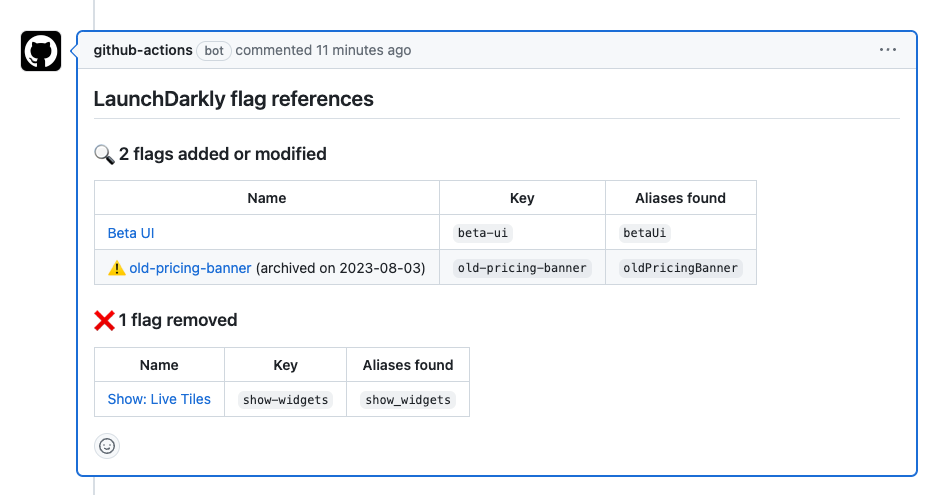
The action will post a comment to the PR that lists the flags found in the diff:
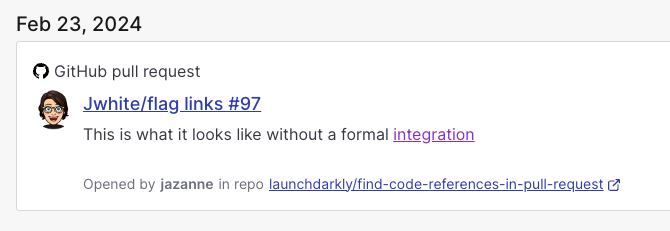
The action will optionally create a GitHub pull request flag link for any modified flags. To learn more, read [Flag links](/home/flags/links).
## Prerequisites
To complete this procedure, you must have the following prerequisites:
This action requires a [LaunchDarkly access token](/home/account/api) with:
* Read access for the designated `project-key`
* (Optional) the `createFlagLink` action, if you have set the `create-flag-links` input to `true`
## Set up Find Code References in Pull Request
To set up the Find Code References in Pull Request GitHub Action:
1. Navigate to your GitHub repo.
2. Navigate to **Settings**, then **Secrets**.
3. Click **Add a new secret**.
4. Enter your access token into the field.
5. Click **Save secret**.
6. Return to your GitHub repository to create a new Actions workflow.
If you already have a workflow file that runs on `pull_request` you can add the new find flags job to that file.
If you don't already have a workflow file, create a new file titled `pull_request.yml` in the `.github/workflows` directory of your repository. Paste the `find-flags` job declaration below into the **Edit file** section.
```yaml title="Sample workflow: find flags job declaration" theme={null}
on: pull_request
jobs:
find-flags:
runs-on: ubuntu-latest
name: Find LaunchDarkly feature flags in diff
steps:
- name: Checkout
uses: actions/checkout@v4
- name: Find flags
uses: launchdarkly/find-code-references-in-pull-request@v2
id: find-flags
with:
project-key: default
environment-key: production
access-token: ${{ secrets.LD_ACCESS_TOKEN }}
repo-token: ${{ secrets.GITHUB_TOKEN }}
```
We strongly recommend that you update the `uses` attribute value to reference the most recent tag in the [launchdarkly/find-code-references-in-pull-request](https://github.com/launchdarkly/find-code-references-in-pull-request) repository. This pins your workflow to a particular version of the `launchdarkly/find-code-references-in-pull-request` action.
7. Commit this file to the default branch of your repository.
## Use output in subsequent steps
In addition to posting a comment on the PR, the action will output details about how many and which flags were identified in the diff. GitHub Actions cast all value types to string in the output.
Read more about [Find Code References in Pull Request outputs](https://github.com/launchdarkly/find-code-references-in-pull-request#outputs).
```yaml title="Sample workflow: using find-flags output" theme={null}
on: pull_request
jobs:
find-feature-flags:
runs-on: ubuntu-latest
name: Find LaunchDarkly feature flags in diff
steps:
- name: Checkout
uses: actions/checkout@v4
- name: Find flags
uses: launchdarkly/find-code-references-in-pull-request@v2
id: find-flags
with:
project-key: default
environment-key: production
access-token: ${{ secrets.LD_ACCESS_TOKEN }}
repo-token: ${{ secrets.GITHUB_TOKEN }}
# Add or remove labels on PRs if any flags have changed
- name: Add label
if: steps.find-flags.outputs.any-changed == 'true'
run: gh pr edit $PR_NUMBER --add-label ld-flags
env:
GITHUB_TOKEN: ${{ secrets.GITHUB_TOKEN }}
PR_NUMBER: ${{ github.event.pull_request.number }}
- name: Remove label
if: steps.find-flags.outputs.any-changed == 'false'
run: gh pr edit $PR_NUMBER --remove-label ld-flags
env:
GITHUB_TOKEN: ${{ secrets.GITHUB_TOKEN }}
PR_NUMBER: ${{ github.event.pull_request.number }}
```
## Troubleshooting
After you create the workflow, you can confirm that it's working correctly by pushing an empty commit and verifying that the newly created action succeeds.
If the action fails, there may be a problem with your configuration. To investigate, review the action's logs to view any error messages.