> ## Documentation Index
> Fetch the complete documentation index at: https://launchdarkly-preview.mintlify.site/llms.txt
> Use this file to discover all available pages before exploring further.
# Set up Node.js (server-side) SDK
> Install and initialize the LaunchDarkly Node.js (server-side) SDK
> For the complete documentation index, see [llms.txt](/llms.txt). For the full documentation snapshot, see [llms-full.txt](/llms-full.txt).
### Install the package
```shell title={"yarn"} theme={null}
yarn add @launchdarkly/node-server-sdk
```
```shell title={"npm"} theme={null}
npm i @launchdarkly/node-server-sdk
```
```shell title={"pnpm"} theme={null}
pnpm i @launchdarkly/node-server-sdk
```
### Initialize the SDK
```tsx title={"Node.js (server-side) SDK initialization"} theme={null}
import * as LaunchDarkly from '@launchdarkly/node-server-sdk';
// Set your LaunchDarkly SDK key.
// This is inlined as example only for onboarding.
// Never hardcode your SDK key in production.
const client = LaunchDarkly.init('YOUR_SDK_KEY');
client.once('ready', function () {
// For onboarding purposes only we flush events as soon as
// possible so we quickly detect your connection.
// You don't have to do this in practice because events are automatically flushed.
client.flush();
console.log('SDK successfully initialized!');
});
```
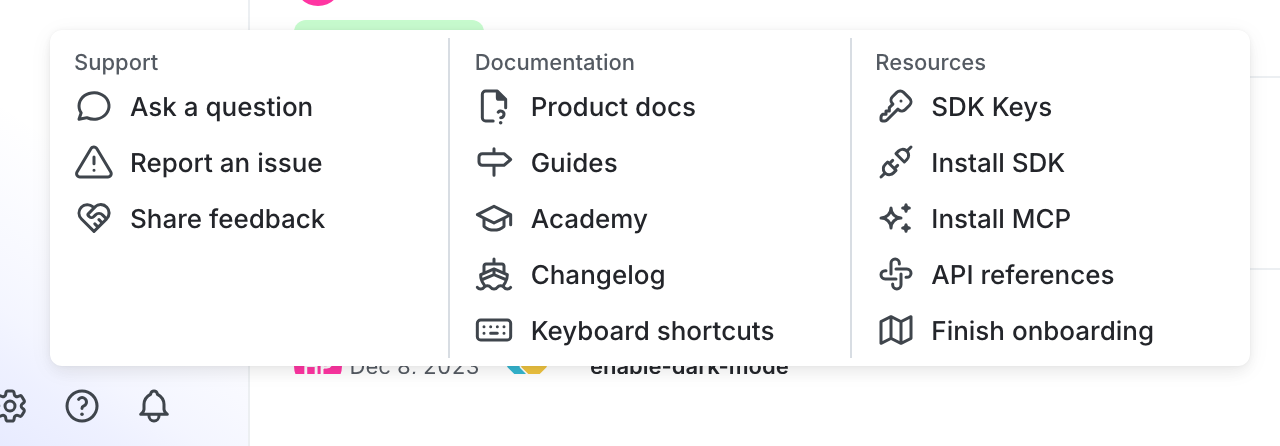
You can find your server-side SDK key, client-side ID, and mobile key in the "Resources" section of the help menu. Click the **help icon** at the bottom left corner of the LaunchDarkly UI, then choose **SDK keys**:
To learn more, read [Initialize the client](/sdk/server-side/node-js#initialize-the-client) in the Node.js (server-side) SDK reference guide.