> ## Documentation Index
> Fetch the complete documentation index at: https://launchdarkly-preview.mintlify.site/llms.txt
> Use this file to discover all available pages before exploring further.
# Set up iOS SDK
> Install and initialize the LaunchDarkly iOS SDK
> For the complete documentation index, see [llms.txt](/llms.txt). For the full documentation snapshot, see [llms-full.txt](/llms-full.txt).
### Install the package
```swift title={"Swift"} theme={null}
//...
dependencies: [
.package(url: "https://github.com/launchdarkly/ios-client-sdk.git", .upToNextMajor("9.15.0")),
],
targets: [
.target(
name: "YOUR_TARGET",
dependencies: ["LaunchDarkly"]
)
],
//...
```
```ruby title={"Podfile"} theme={null}
use_frameworks!
target 'YourTargetName' do
pod 'LaunchDarkly', '~> 9.15'
end
```
```swift title={"Cartfile"} theme={null}
github "launchdarkly/ios-client-sdk" ~> 9.15
```
### Initialize the SDK
```swift title={"iOS SDK initialization"} theme={null}
import LaunchDarkly
let config = LDConfig(mobileKey: "YOUR_MOBILE_KEY", autoEnvAttributes: .enabled)
// A "context" is a data object representing users, devices, organizations, and other entities.
let contextBuilder = LDContextBuilder(key: "EXAMPLE_CONTEXT_KEY")
guard case .success(let context) = contextBuilder.build()
else { return }
LDClient.start(config: config, context: context, startWaitSeconds: 5) { timedOut in
if timedOut {
print("SDK didn't initialize in 5 seconds. SDK is still running and trying to get latest flags.")
} else {
print("SDK successfully initialized with the latest flags")
}
}
print("SDK started.")
```
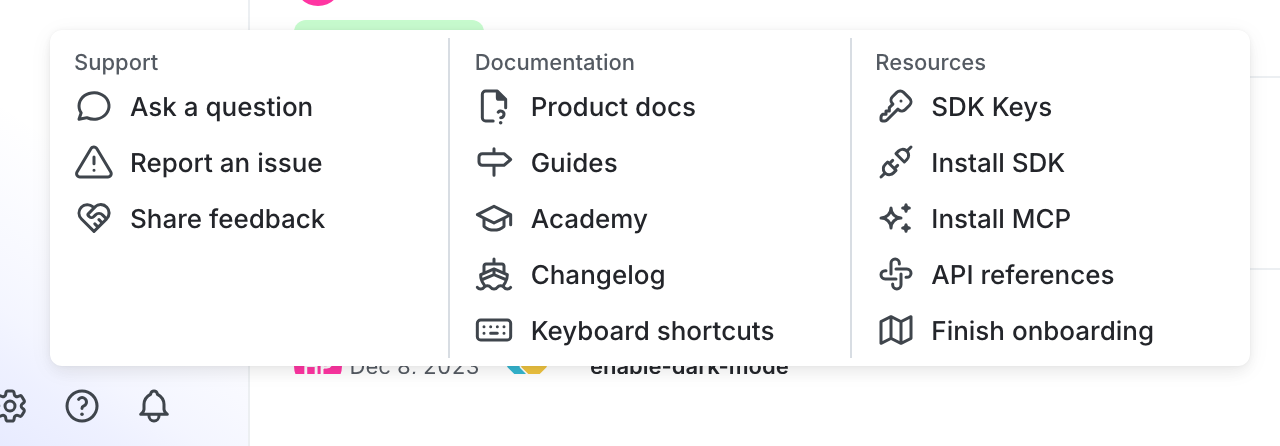
You can find your server-side SDK key, client-side ID, and mobile key in the "Resources" section of the help menu. Click the **help icon** at the bottom left corner of the LaunchDarkly UI, then choose **SDK keys**:
To learn more, read [Initialize the client](/sdk/client-side/ios#initialize-the-client) in the iOS SDK reference guide.