> ## Documentation Index
> Fetch the complete documentation index at: https://launchdarkly-preview.mintlify.site/llms.txt
> Use this file to discover all available pages before exploring further.
# Set up Go SDK
> Install and initialize the LaunchDarkly Go SDK
> For the complete documentation index, see [llms.txt](/llms.txt). For the full documentation snapshot, see [llms-full.txt](/llms-full.txt).
### Install the package
- If you are using the standard `Go` modules system, import the SDK packages in your code and `go build` will automatically download them. The SDK and its dependencies are modules.
- Alternatively, you can run the following command:
```shell title={"Shell"} theme={null}
go get github.com/launchdarkly/go-server-sdk/v7
```
### Initialize the SDK
```go title={"Go SDK initialization"} theme={null}
package main
import (
"fmt"
"os"
"time"
"github.com/launchdarkly/go-sdk-common/v3/ldcontext"
ld "github.com/launchdarkly/go-server-sdk/v7"
)
func main() {
ldClient, _ := ld.MakeClient("YOUR_SDK_KEY", 5*time.Second)
if ldClient.Initialized() {
fmt.Printf("SDK successfully initialized!")
} else {
fmt.Printf("SDK failed to initialize")
os.Exit(1)
}
// For onboarding purposes only we flush events as soon as
// possible so we quickly detect your connection.
// You don't have to do this in practice because events are automatically flushed.
ldClient.Flush()
}
```
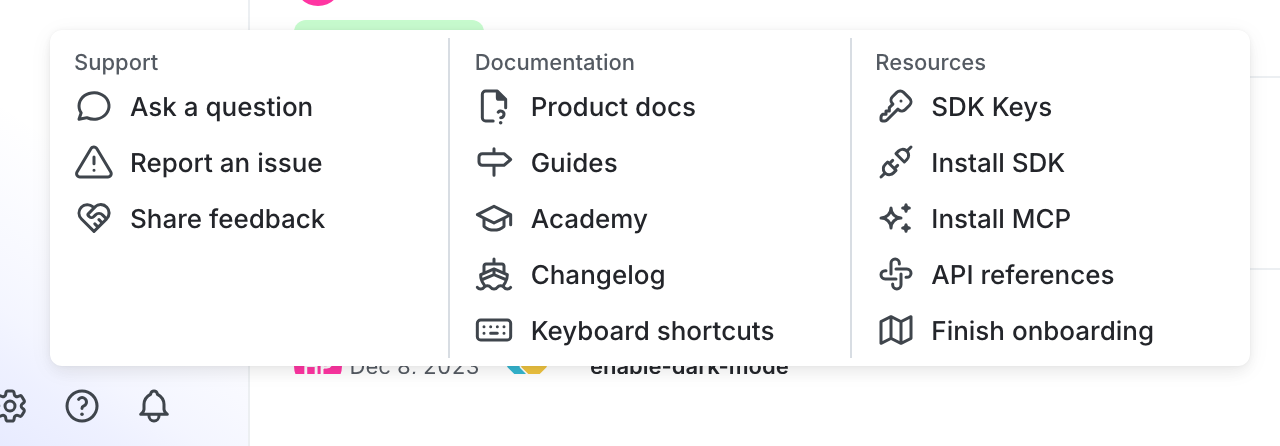
You can find your server-side SDK key, client-side ID, and mobile key in the "Resources" section of the help menu. Click the **help icon** at the bottom left corner of the LaunchDarkly UI, then choose **SDK keys**:
To learn more, read [Initialize the client](/sdk/server-side/go#initialize-the-client) in the Go SDK reference guide.