> ## Documentation Index
> Fetch the complete documentation index at: https://launchdarkly-preview.mintlify.site/llms.txt
> Use this file to discover all available pages before exploring further.
# Metric impact
> This topic explains how to use the metric Impact tab.
> For the complete documentation index, see [llms.txt](/llms.txt). For the full documentation snapshot, see [llms-full.txt](/llms-full.txt).
## Overview
This topic explains how to use the metric **Impact** tab.
## The metric Impact tab
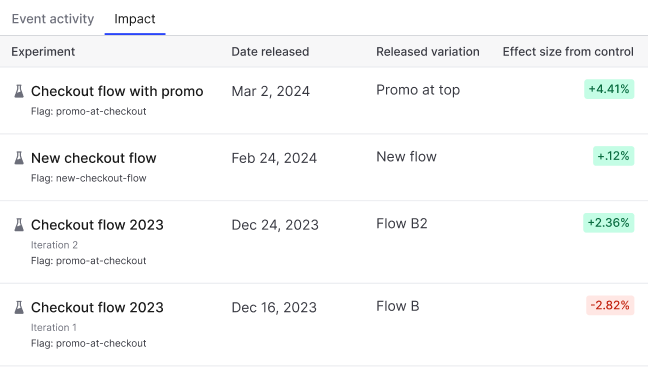
The metric **Impact** tab displays a list of complete experiment iterations that used the metric. Any experiment iterations that are currently running do not display on this list. This helps you understand how different flag variations have impacted the metric as part of your Experimentation program.
This list includes:
* The name of the experiment or flag the metric was attached to.
* The date the experiment iteration or guarded rollout ended.
* The variation rolled out to all contexts at the end of the experiment iteration or guarded rollout.
* The effect size from control, which is the difference in performance for the variation being tested against the control variation.
You can also use the REST API: [Get metric](/api-reference/metrics/get-metric)
To refine your analysis, you can [apply metric event filters](/home/metrics/event-filters) to a metric to limit which events are included in impact calculations. This is helpful when you want to measure the effect of a flag variation for events with specific context attributes, such as users where `country` = `CA` or `plan` = `enterprise`.