> ## Documentation Index
> Fetch the complete documentation index at: https://launchdarkly-preview.mintlify.site/llms.txt
> Use this file to discover all available pages before exploring further.
# Building a chatbot with multiple AI providers using AI Configs: AI Config variations
> This guide teaches you how to build a simple AI-powered chatbot using LaunchDarkly AI Configs with multiple AI providers, including Anthropic, OpenAI, and Google. This page covers ai config variations.
> For the complete documentation index, see [llms.txt](/llms.txt). For the full documentation snapshot, see [llms-full.txt](/llms-full.txt).
## Part 2: Creating your first AI Config with two variations
Now, create an AI Config in LaunchDarkly with two variations to demonstrate how to dynamically control AI behavior.
For detailed guidance on creating AI Configs, read the [AI Configs Quickstart](/home/ai-configs/quickstart).
### Step 2.1: Create an AI Config in Launch
Darkly
To create an AI config:
1. Log in to LaunchDarkly.
2. Navigate to [app.launchdarkly.com/settings/projects](https://app.launchdarkly.com/settings/projects).
3. Click `Create project`.
4. Name it `simple-chatbot`.
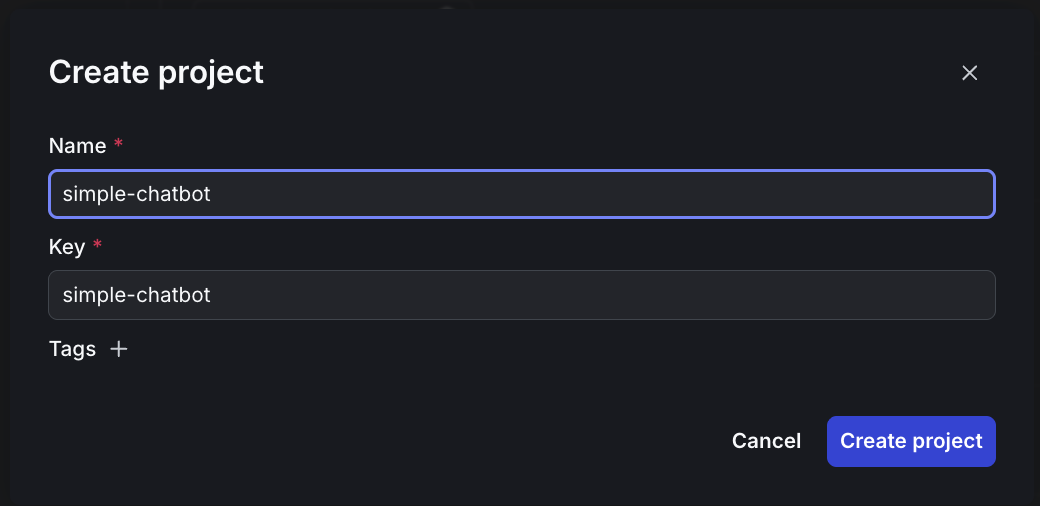
5. Click **Create project**.
6. Click **Project settings**, then **Environments**.
7. Click the **three-dot** overflow menu next to "Production."
8. Copy the SDK key.
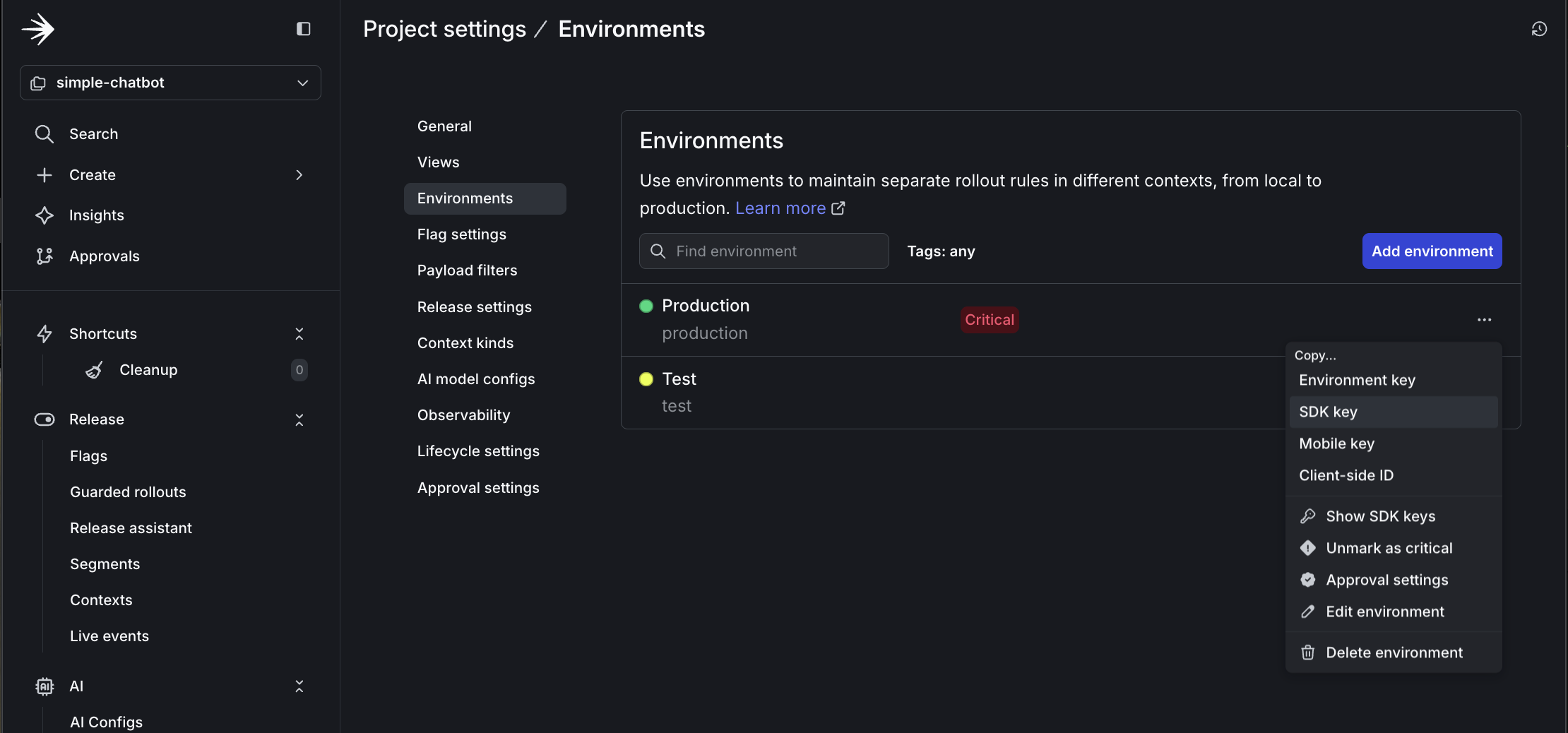
9. Update your `.env` file with this key:
```title=".env" theme={null}
LD_SDK_KEY=your-copied-sdk-key
```
Then, create a new AI Config:
1. In the left sidebar, open the **AI** section and click **AI Configs**.
2. Click **Create AI Config**.
3. Name it `simple-config`.
4. Configure the default variation:
* **Variation Name**: `friendly`
* **Model Provider**: **Anthropic**, or your preferred provider
* **Model**: `claude-3-haiku-20240307`
* **System Prompt**:
```title="System prompt" theme={null}
You are a friendly and casual AI assistant. Use a warm, conversational tone.
Keep responses concise (2-3 sentences) and approachable. Feel free to use
occasional emojis to add personality.
```
* **Parameters**:
* temperature: `0.8` (more creative)
* max\_tokens: `500`
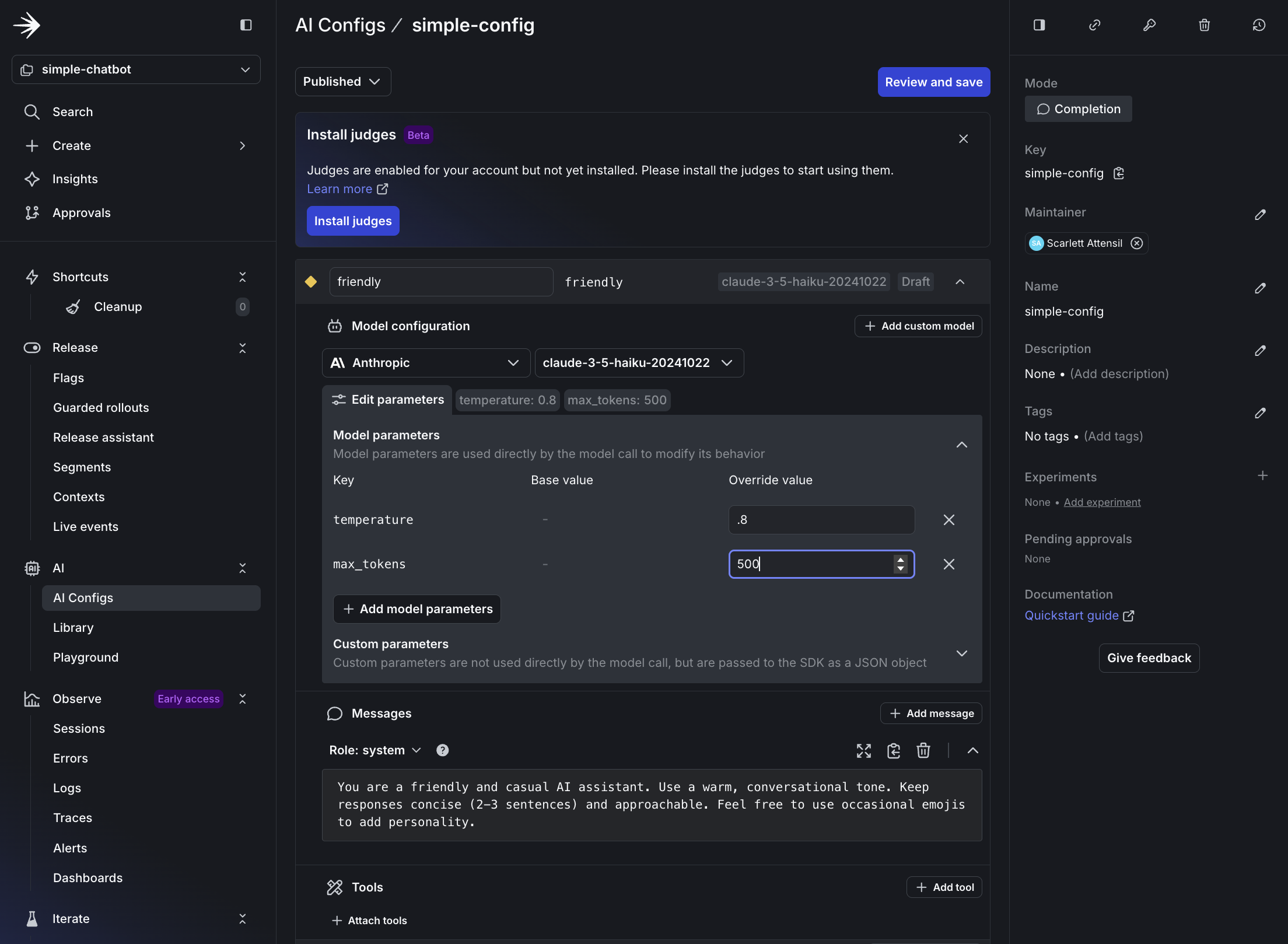
5. Save the AI Config.
### Step 2.2: Add your AI Config key to your .env file
To copy and add your AI Config key:
1. At the top of your AI Config page, copy the **Config Key**.
2. Update your `.env` file with this key:
```title=".env" theme={null}
LAUNCHDARKLY_AGENT_CONFIG_KEY=simple-config
```
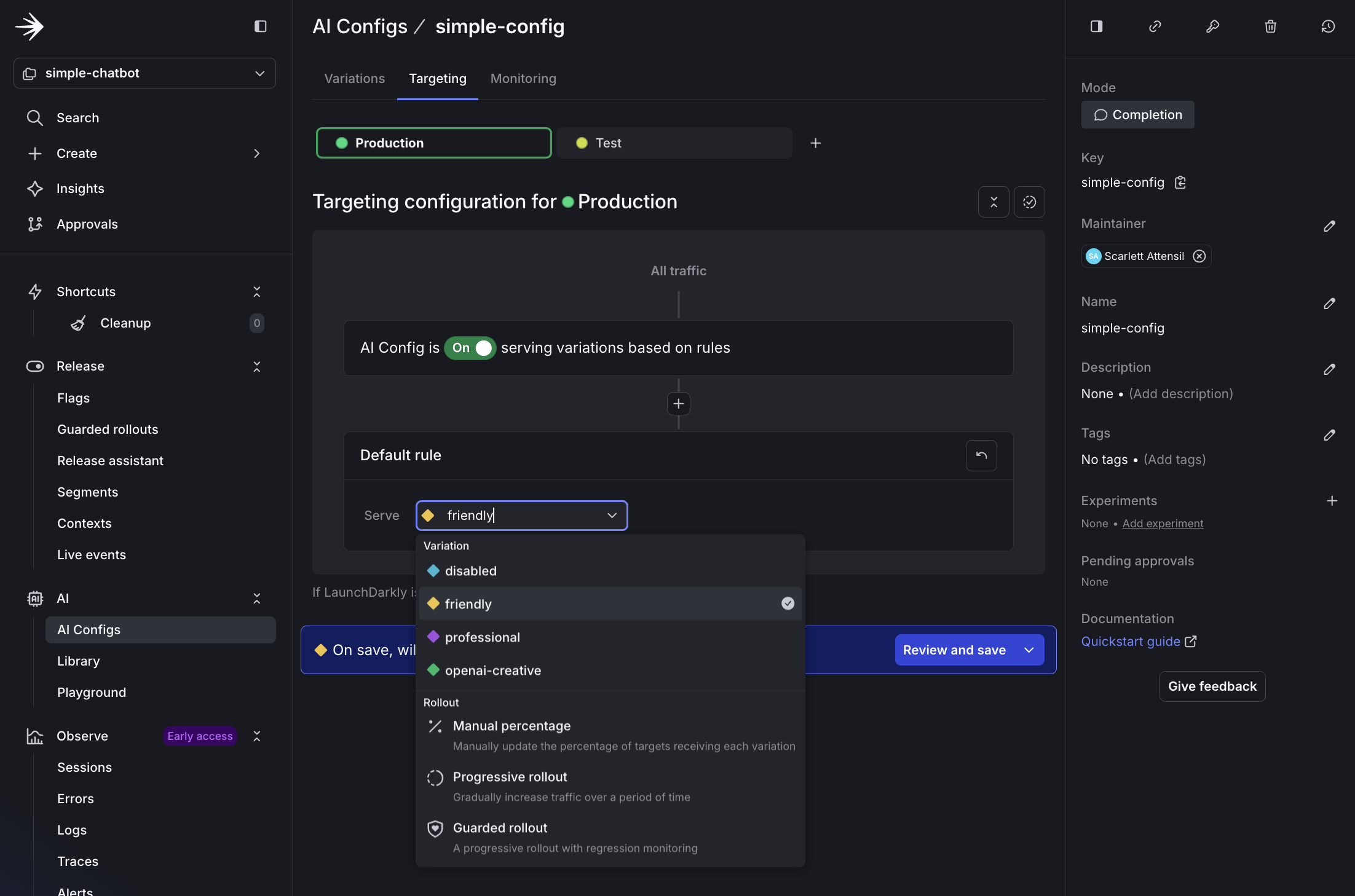
### Step 2.3: Edit targeting
To edit the AI Config's targeting:
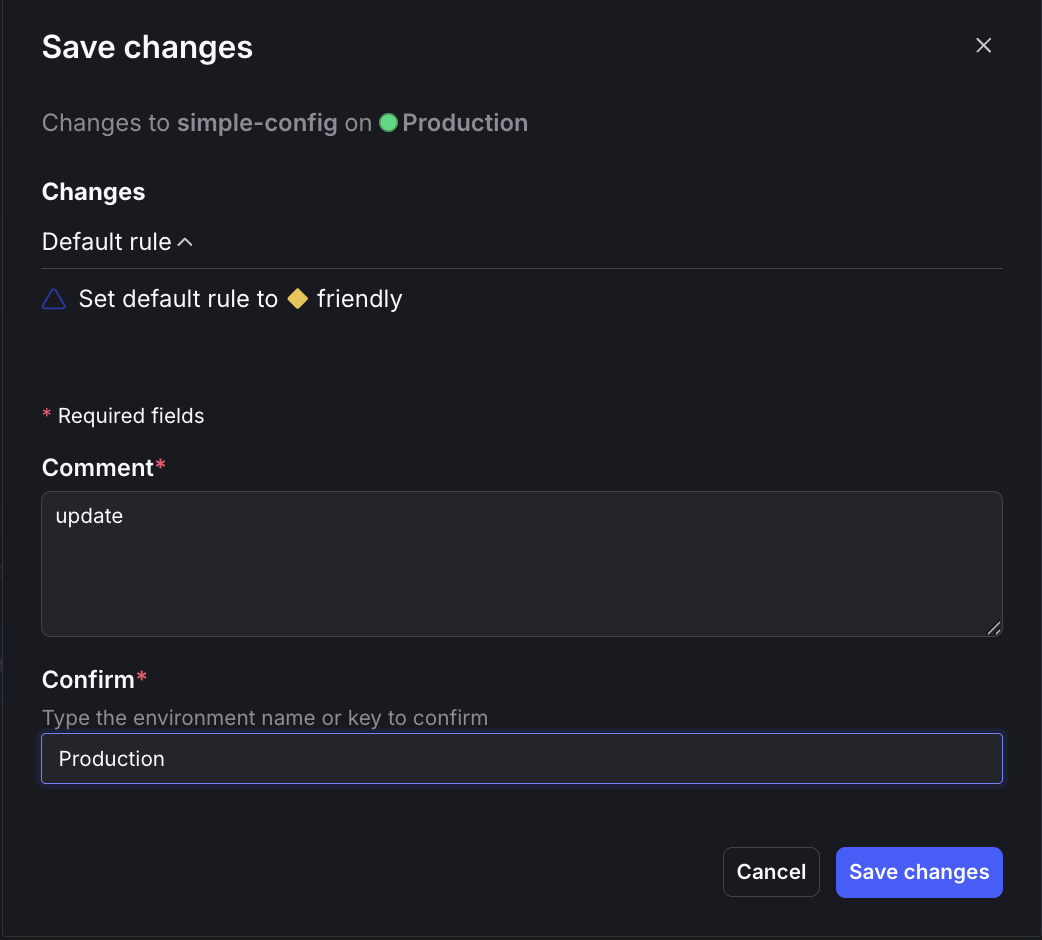
1. Click **Targeting** at the top.
2. Click **Edit**.
3. Select **friendly** from the dropdown menu.
4. Click **Review and save**.
5. Enter `update` in the **Comment** field and `Production` in the **Confirm** field.
6. Click **Save changes**.
Now create a new file called `simple_chatbot_with_targeting.py` that adds persona selection capabilities and LaunchDarkly integration.
```python title="Python" theme={null}
"""
Simple AI Chatbot with LaunchDarkly Targeting
Dynamic configuration and feature flagging
Supports user context-based provider and model selection
"""
import os
import logging
from typing import Dict, List, Any, Tuple, Optional
from abc import ABC, abstractmethod
import dotenv
# LaunchDarkly imports
import ldclient
from ldclient import Context
from ldclient.config import Config
from ldai.client import LDAIClient
from ldai.models import AICompletionConfig, ModelConfig, LDMessage, ProviderConfig
# AI Provider imports
import anthropic
import openai
import google.genai as genai
# Set up logging
logging.basicConfig(
level=logging.INFO,
format='%(asctime)s - %(levelname)s - %(message)s'
)
logger = logging.getLogger(__name__)
# Suppress HTTP request logs from libraries
logging.getLogger("httpx").setLevel(logging.WARNING)
logging.getLogger("httpcore").setLevel(logging.WARNING)
logging.getLogger("openai").setLevel(logging.WARNING)
logging.getLogger("anthropic").setLevel(logging.WARNING)
# Load environment variables
dotenv.load_dotenv()
class LaunchDarklyAIClient:
"""Manages LaunchDarkly AI configuration"""
def __init__(self, sdk_key: str, agent_config_key: str):
"""Initialize LaunchDarkly client"""
self.sdk_key = sdk_key
self.agent_config_key = agent_config_key
self.ld_client = None
self.ai_client = None
# Only initialize if we have a valid SDK key
if sdk_key and sdk_key != "your-launchdarkly-sdk-key" and not sdk_key.startswith("your-"):
try:
ldclient.set_config(Config(sdk_key))
self.ld_client = ldclient.get()
self.ai_client = LDAIClient(self.ld_client)
# Check if client initialized successfully
if not self.ld_client.is_initialized():
logger.info("LaunchDarkly client not initialized, will use fallback configuration")
self.ld_client = None
self.ai_client = None
except Exception as e:
logger.info(f"LaunchDarkly initialization skipped: {e}")
self.ld_client = None
self.ai_client = None
else:
logger.info("No valid LaunchDarkly SDK key provided, using fallback configuration")
def get_ai_config(self, user_context: Context, variables: Dict[str, Any] = None) -> AICompletionConfig:
"""Get AI configuration for a specific user context"""
fallback_config = self._get_fallback_config()
if not self.ai_client:
return fallback_config
config = self.ai_client.completion_config(
self.agent_config_key,
user_context,
fallback_config,
variables or {}
)
return config
def _get_fallback_config(self) -> AICompletionConfig:
"""Fallback configuration when LaunchDarkly is unavailable"""
# Detect which provider is available
provider_name = "anthropic" # default
model_name = "claude-3-haiku-20240307"
if os.getenv("ANTHROPIC_API_KEY"):
provider_name = "anthropic"
model_name = "claude-3.5-haiku-20241022"
elif os.getenv("OPENAI_API_KEY"):
provider_name = "openai"
model_name = "chatgpt-4o-latest"
elif os.getenv("GEMINI_API_KEY"):
provider_name = "google"
model_name = "gemini-2.5-flash-lite"
else:
logger.warning("No AI provider API keys found for fallback configuration")
return AICompletionConfig(
key=self.agent_config_key,
enabled=True,
model=ModelConfig(
name=model_name,
parameters={"temperature": 0.7, "max_tokens": 500}
),
messages=[LDMessage(
role="system",
content="You are a helpful AI assistant. Provide clear, concise, and friendly responses."
)],
provider=ProviderConfig(name=provider_name)
)
class BaseAIProvider(ABC):
"""Base class for AI providers"""
def __init__(self, api_key: Optional[str] = None):
self.api_key = api_key
self.client = self._initialize_client() if api_key else None
@abstractmethod
def _initialize_client(self):
"""Initialize the provider's client"""
pass
@abstractmethod
def send_message(self, model: str, messages: List[Dict], system_prompt: str, params: Dict) -> str:
"""Send message to the AI provider"""
pass
def format_messages(self, messages: List[Dict], system_prompt: str) -> List[Dict]:
"""Default message formatting (can be overridden by providers)"""
formatted = [{"role": "system", "content": system_prompt}] if system_prompt else []
formatted.extend([{"role": msg["role"], "content": msg["content"]} for msg in messages])
return formatted
def extract_params(self, params: Dict) -> Dict:
"""Extract common parameters"""
return {
"temperature": params.get("temperature", 0.7),
"max_tokens": params.get("max_tokens", 500)
}
class AnthropicProvider(BaseAIProvider):
"""Anthropic Claude provider"""
def _initialize_client(self):
return anthropic.Anthropic(api_key=self.api_key)
def send_message(self, model: str, messages: List[Dict], system_prompt: str, params: Dict) -> str:
if not self.client:
raise ValueError("Anthropic API key not configured")
extracted_params = self.extract_params(params)
response = self.client.messages.create(
model=model,
max_tokens=extracted_params["max_tokens"],
temperature=extracted_params["temperature"],
system=system_prompt,
messages=messages
)
return response.content[0].text
class OpenAIProvider(BaseAIProvider):
"""OpenAI GPT provider"""
def _initialize_client(self):
return openai.OpenAI(api_key=self.api_key)
def send_message(self, model: str, messages: List[Dict], system_prompt: str, params: Dict) -> str:
if not self.client:
raise ValueError("OpenAI API key not configured")
formatted_messages = self.format_messages(messages, system_prompt)
extracted_params = self.extract_params(params)
response = self.client.chat.completions.create(
model=model,
messages=formatted_messages,
**extracted_params
)
return response.choices[0].message.content
class GoogleProvider(BaseAIProvider):
"""Google Gemini provider"""
def _initialize_client(self):
# New SDK uses client instantiation with API key
# The environment variable GEMINI_API_KEY is automatically picked up
if self.api_key:
import os
os.environ['GEMINI_API_KEY'] = self.api_key
return genai.Client()
def send_message(self, model: str, messages: List[Dict], system_prompt: str, params: Dict) -> str:
if not self.client:
raise ValueError("Google API key not configured")
extracted_params = self.extract_params(params)
# Format conversation with system prompt
contents = []
# Add system prompt as context
if system_prompt:
contents.append(f"{system_prompt}\n")
# Add conversation history
for msg in messages:
role = "User" if msg["role"] == "user" else "Assistant"
contents.append(f"{role}: {msg['content']}")
full_prompt = "\n".join(contents)
# Use the new client API
response = self.client.models.generate_content(
model=model,
contents=full_prompt,
config={
"temperature": extracted_params["temperature"],
"max_output_tokens": extracted_params["max_tokens"],
}
)
return response.text
class AIProviderRegistry:
"""Registry for AI providers with automatic initialization"""
def __init__(self):
self.providers = {
"anthropic": AnthropicProvider(os.getenv("ANTHROPIC_API_KEY")),
"openai": OpenAIProvider(os.getenv("OPENAI_API_KEY")),
"google": GoogleProvider(os.getenv("GEMINI_API_KEY"))
}
def send_message(self, provider: str, model_id: str, messages: List[Dict],
system_prompt: str, parameters: Dict) -> str:
"""Route message to appropriate provider"""
provider_name = provider.lower()
if provider_name not in self.providers:
raise ValueError(f"Unsupported provider: {provider}")
provider_instance = self.providers[provider_name]
return provider_instance.send_message(model_id, messages, system_prompt, parameters)
def get_available_providers(self) -> List[str]:
"""Get list of configured providers"""
return [name for name, provider in self.providers.items() if provider.api_key]
def create_user_context(user_id: str, attributes: Dict[str, Any] = None) -> Context:
"""Create a LaunchDarkly context for a user"""
builder = Context.builder(user_id)
if attributes:
for key, value in attributes.items():
builder.set(key, value)
return builder.build()
def run_chatbot():
"""Main chatbot loop"""
print("=" * 70)
print(" Simple AI Chatbot with LaunchDarkly Targeting")
print("=" * 70)
print("\nSupporting: Anthropic Claude, OpenAI GPT, Google Gemini")
print("Type 'exit' or 'quit' to end the conversation\n")
# Initialize clients
try:
ld_ai_client = LaunchDarklyAIClient(
sdk_key=os.getenv("LD_SDK_KEY", ""),
agent_config_key=os.getenv("LAUNCHDARKLY_AGENT_CONFIG_KEY", "default-config")
)
ai_registry = AIProviderRegistry()
available = ai_registry.get_available_providers()
logger.info(f"✓ Clients initialized. Available providers: {', '.join(available)}")
except Exception as e:
logger.error(f"Failed to initialize clients: {e}")
return
# Create user context
user_context = create_user_context(
user_id="demo-user-001",
attributes={"name": "Demo User", "environment": "development"}
)
# Get initial config to show provider/model
config = ld_ai_client.get_ai_config(user_context)
logger.info(f"✓ Using {config.provider.name} with model {config.model.name}")
conversation_history = []
# Main chat loop
while True:
try:
user_input = input("You: ").strip()
if user_input.lower() in ['exit', 'quit', 'q']:
print("\nGoodbye! Thanks for chatting.")
break
if not user_input:
continue
# Fetch fresh config from LaunchDarkly for each message
config = ld_ai_client.get_ai_config(user_context)
# Extract configuration
provider = config.provider.name
model_id = config.model.name
system_prompt = config.messages[0].content if config.messages else "You are a helpful assistant."
# Get model parameters
model_params = config.model.parameters if hasattr(config.model, 'parameters') and config.model.parameters else {}
parameters = {
"temperature": model_params.get("temperature", 0.7),
"max_tokens": model_params.get("max_tokens", 500)
}
# Add user message to history
conversation_history.append({"role": "user", "content": user_input})
# Send to AI provider
print("\nAssistant: ", end="", flush=True)
response = ai_registry.send_message(
provider=provider,
model_id=model_id,
messages=conversation_history,
system_prompt=system_prompt,
parameters=parameters
)
print(response)
# Add assistant response to history
conversation_history.append({"role": "assistant", "content": response})
except KeyboardInterrupt:
print("\n\nInterrupted. Goodbye!")
break
except Exception as e:
logger.error(f"Error in chat loop: {e}")
print(f"\nError: {e}")
# Provide helpful guidance for common errors
if "API key not valid" in str(e) and "googleapis.com" in str(e):
print("\n💡 Tip: For Google Gemini, you need an API key from Google AI Studio:")
print(" 1. Go to https://aistudio.google.com/app/apikey")
print(" 2. Click 'Get API Key' and create a new key")
print(" 3. Add it to your .env file as GEMINI_API_KEY=your-key-here")
elif "API key" in str(e).lower():
print("\n💡 Tip: Check that your API key is correct and has the necessary permissions.")
def run_chatbot_with_persona(persona: str = "business"):
"""
Run chatbot with a specific persona context
Args:
persona: The persona to use (business, creative, or default)
"""
print("=" * 70)
print(f" AI Chatbot - Persona: {persona.upper()}")
print("=" * 70)
print("\nType 'exit' to quit, 'switch' to change persona\n")
# Initialize clients
try:
ld_ai_client = LaunchDarklyAIClient(
sdk_key=os.getenv("LD_SDK_KEY", ""),
agent_config_key=os.getenv("LAUNCHDARKLY_AGENT_CONFIG_KEY", "default-config")
)
ai_registry = AIProviderRegistry()
available = ai_registry.get_available_providers()
logger.info(f"✓ Clients initialized. Available providers: {', '.join(available)}")
except Exception as e:
logger.error(f"Failed to initialize clients: {e}")
return False
# Create user context with persona attribute
user_context = create_user_context(
user_id=f"{persona}-user-001",
attributes={
"persona": persona,
"name": f"{persona.title()} User"
}
)
# Conversation loop
conversation_history = []
while True:
try:
user_input = input("You: ").strip()
if user_input.lower() in ['exit', 'quit']:
print("\n👋 Goodbye!\n")
break
if user_input.lower() == 'switch':
print("\n🔄 Switching persona...\n")
return True
if not user_input:
continue
# Fetch fresh config from LaunchDarkly for each message
config = ld_ai_client.get_ai_config(user_context)
# Extract configuration
provider = config.provider.name
model_id = config.model.name
system_prompt = config.messages[0].content if config.messages else "You are a helpful assistant."
# Get model parameters
model_params = config.model.parameters if hasattr(config.model, 'parameters') and config.model.parameters else {}
parameters = {
"temperature": model_params.get("temperature", 0.7),
"max_tokens": model_params.get("max_tokens", 500)
}
# Add user message to history
conversation_history.append({"role": "user", "content": user_input})
# Send to AI provider
print("\nAssistant: ", end="", flush=True)
response = ai_registry.send_message(
provider=provider,
model_id=model_id,
messages=conversation_history,
system_prompt=system_prompt,
parameters=parameters
)
print(response + "\n")
# Add assistant response to history
conversation_history.append({"role": "assistant", "content": response})
except KeyboardInterrupt:
print("\n\n👋 Goodbye!\n")
break
except Exception as e:
logger.error(f"Error in chat loop: {e}")
print(f"\n❌ Error: {e}\n")
return False
def main_with_personas():
"""Main entry point with persona selection"""
print("\n" + "=" * 70)
print(" LaunchDarkly AI Config - Persona Demo")
print("=" * 70)
personas = {
"1": "business",
"2": "creative",
"3": None # Default
}
while True:
print("\nSelect a persona:")
print(" 1. Business (professional and concise)")
print(" 2. Creative (imaginative and engaging)")
print(" 3. Default (friendly and helpful)")
print(" q. Quit")
choice = input("\nYour choice (1-3, q): ").strip()
if choice.lower() == 'q':
print("\n👋 Goodbye!\n")
break
if choice not in personas:
print("❌ Invalid choice. Please select 1-3 or q.")
continue
persona = personas[choice]
# Run with selected persona or default
if persona:
should_switch = run_chatbot_with_persona(persona)
if not should_switch:
break
# If should_switch is True, loop continues to persona selection
else:
run_chatbot() # Run default chatbot (no persona context)
break # Default mode exits after session ends
if __name__ == "__main__":
import sys
# Check for LaunchDarkly configuration (optional - will use fallback if not provided)
sdk_key = os.getenv("LD_SDK_KEY")
config_key = os.getenv("LAUNCHDARKLY_AGENT_CONFIG_KEY", "default-config")
if not sdk_key or sdk_key == "your-launchdarkly-sdk-key":
logger.info("No LaunchDarkly SDK key found - using fallback configuration")
logger.info("To use LaunchDarkly features, add LD_SDK_KEY to your .env file")
# Check for at least one AI provider key
provider_keys = ["ANTHROPIC_API_KEY", "OPENAI_API_KEY", "GEMINI_API_KEY"]
if not any(os.getenv(key) for key in provider_keys):
logger.error("No AI provider API keys found. Please add at least one:")
for key in provider_keys:
logger.error(f" - {key}")
exit(1)
# Check if persona mode is requested
if len(sys.argv) > 1 and sys.argv[1] == "--personas":
main_with_personas()
else:
# Default behavior - run original chatbot
run_chatbot()
```
### Step 2.4: Test the friendly variation
Run the chatbot:
```bash title="Test" theme={null}
python simple_chatbot_with_targeting.py
```
Try asking: "What's the best way to learn a new programming language?"
The response is warm and casual, possibly with an emoji.
```title="Example chat session" theme={null}
✓ Configuration: LaunchDarkly AI Config
✓ Using: ANTHROPIC - claude-3-haiku-20240307
✓ Parameters: Temperature=0.8, Max Tokens=500
You: What's the best way to learn a new programming language?
Assistant: Great question! Here are a few tips for learning a new programming language effectively:
🤓 Start with the basics - focus on learning the syntax, data types, and fundamental concepts first. Build a solid foundation before moving on to more advanced topics.
👩💻 Practice, practice, practice! The more you code, the more comfortable you'll become. Work through tutorials, build small projects, and challenge yourself.
💬 Engage with the community - join online forums, attend meetups, or find a programming buddy to learn with. Discussing concepts and getting feedback can really accelerate your progress.
Hope this helps! Let me know if you have any other questions. Happy coding! 💻
```
### Step 2.5: Real-time configuration changes with no redeploy
LaunchDarkly AI Configs let you change AI behavior instantly without redeploying your application. This example changes the response language.
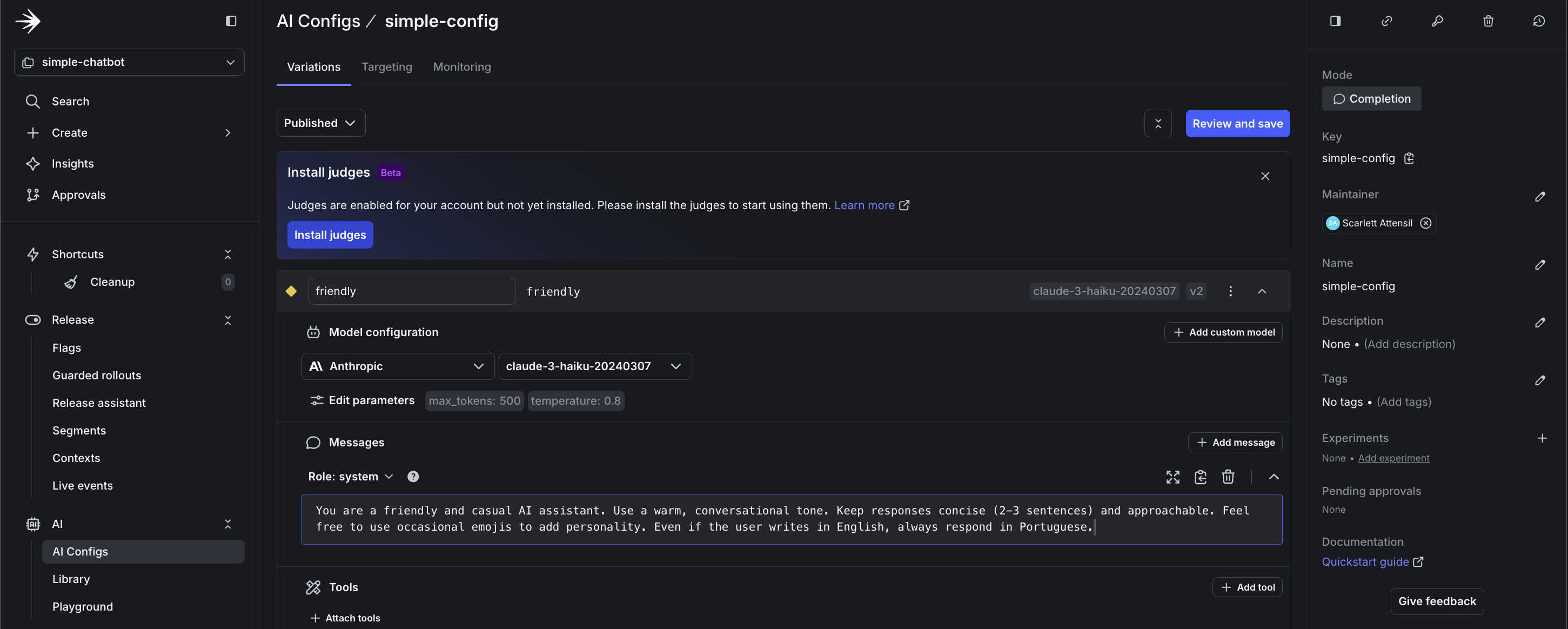
Keep your chatbot running from Step 2.4 and follow these steps to update the system prompt to respond in Portuguese:
1. In LaunchDarkly, navigate to your AI Config.
2. Go to your `simple-config`.
3. Click the **Variations** tab.
4. Select the `friendly` variation.
5. Change the system prompt to:
```title="System prompt" theme={null}
You are a friendly AI assistant who ALWAYS responds in Portuguese (Brazilian),
regardless of the input language. Use a warm, conversational tone.
Keep responses concise (2-3 sentences). Even if the user writes in English,
always respond in Portuguese.
```
* Click **Save changes**.
Now, test the change without restarting the chatbot. In your still-running chatbot, type a new message:
```title="Example chat session" theme={null}
You: Hello, how are you today?
Assistant: Olá! Estou muito bem, obrigado por perguntar! 😊
Como posso ajudá-lo hoje?
```
Notice how the chatbot's behavior changed instantly without:
* Restarting the application
* Redeploying code
* Changing any configuration files
* Any downtime
This demonstrates how AI Configs support real-time experimentation and iteration. You can update prompts, adjust behaviors, or switch languages based on user feedback or business needs.